PowerEdge: Intel 100G 2P E810-2C Adapter Reversed Port Mapping
Summary: Intel 100G 2P E810-2C adapter port numbers may be mapped reversely in BIOS and iDRAC on PowerEdge platforms.
This article applies to
This article does not apply to
This article is not tied to any specific product.
Not all product versions are identified in this article.
Symptoms
Intel 100G 2P E810-2C adapter port numbers may be mapped reversely in BIOS and iDRAC on PowerEdge platforms. The physical Port A is mapped to Port 2, and Port B is mapped to Port 1.
Take the Dell PowerEdge XR8620t as an example.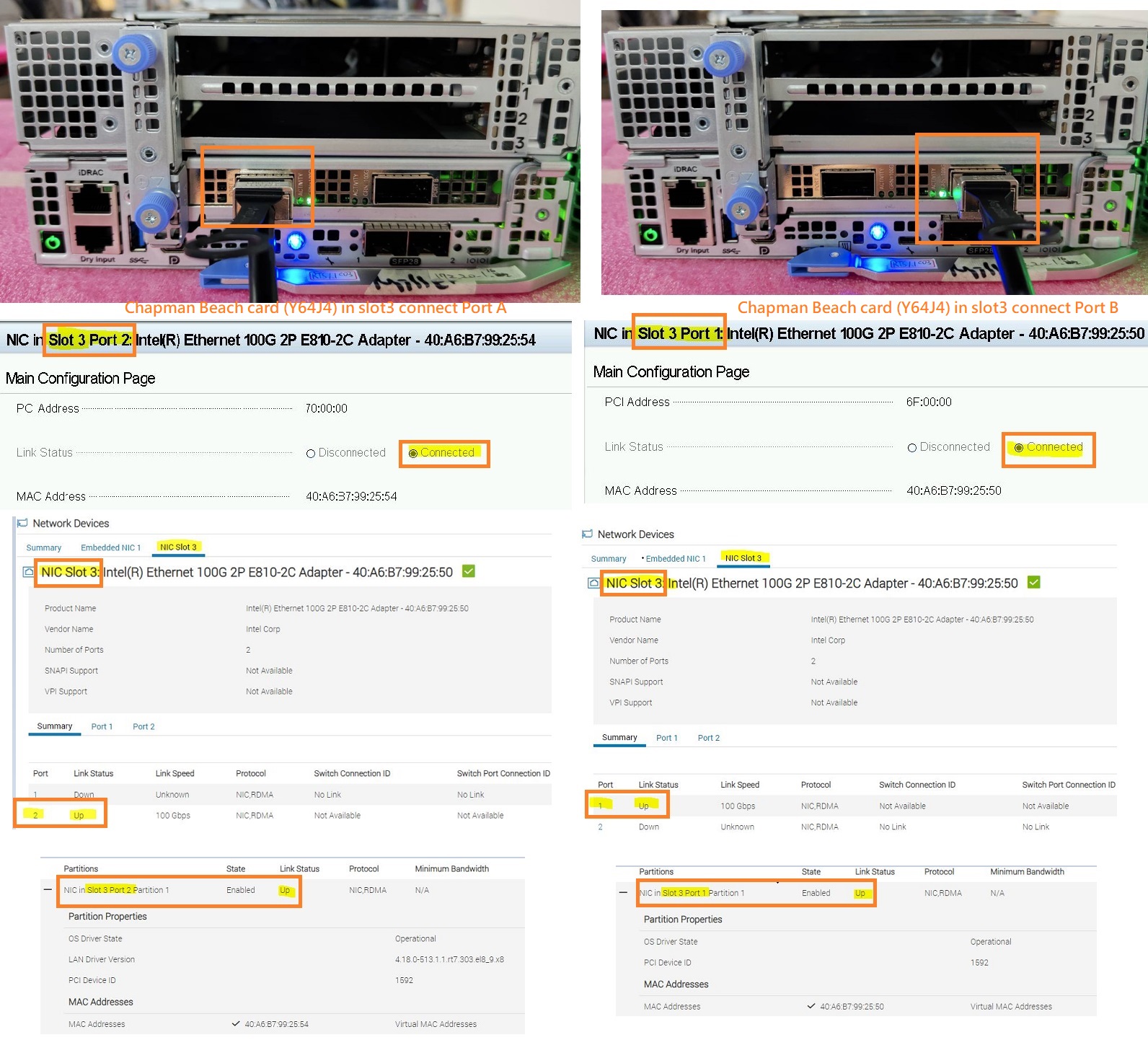 This port mapping behavior may vary depending on the server platform and the PCIE slot the card is installed in.
Take the Dell PowerEdge XR8620t and XR8610t as an example.
Platform |
PCIE Slot the card is installed |
Physical Port Number on the Card |
BIOS/iDRAC Port Mapping |
||
XR8620t |
PCIE Slot 1 |
Port A |
Port B |
Port A -> Port 2 |
Port B -> Port 1 |
XR8620t |
PCIE Slot 2 |
Port A |
Port B |
Port A -> Port 1 |
Port B -> Port 2 |
XR8620t |
PCIE Slot 3 |
Port A |
Port B |
Port A -> Port 2 |
Port B -> Port 1 |
XR8610t |
PCIE Slot 1 |
Port A |
Port B |
Port A -> Port 2 |
Port B -> Port 1 |
Note: Depending on the different platform configurations, Dell may only ship and support this Intel 100G 2P E810-2C adapter on certain PCIE slots as default.
Cause
This behavior is due to Intel card circuit design. Port A connects to PCIE LANE 8:15 and Port B connects to PCIE LANE 0:7.
Depending on the different platform designs, some PCIE slots support the Reversed LANE, but some do not.
Resolution
This is an expected behavior.
Affected Products
PowerEdge XR7620, PowerEdge XR8000r, PowerEdge XR8610t, PowerEdge XR8620tArticle Properties
Article Number: 000222339
Article Type: Solution
Last Modified: 23 Oct 2025
Version: 4
Find answers to your questions from other Dell users
Support Services
Check if your device is covered by Support Services.