NetWorker SNMPV3 Yapılandırması
Summary: NetWorker SNMPV3 Yapılandırması
This article applies to
This article does not apply to
This article is not tied to any specific product.
Not all product versions are identified in this article.
Instructions
SNMPV3 tuzaklarının yapılandırması için NetWorker Administration Guide da talimatlar verilmiştir. Bu, KB ile birlikte ilk yapılandırma için kullanılmalıdır: SNMP
kullanımı için NetWorker'ı yapılandırma.Aşağıdaki makale, Linux işletim sistemindeki yapılandırma dosyaları için çalışan bir örnek sağlar.
Aşağıda, çalışmayan bir SNMPV3 tuzak ortamının başarılı bir şekilde çalışmasına olanak tanıyan örnek bir yapılandırma müşteriye verilmiştir.
/etc/snmp/snmpd.conf
/etc/snmp/snmptrapd.conf
için -D anahtarı ekleyin NetWorker Sunucusundan ikinci bir putty oturumu başlatın ve şunu çalıştırın:
kullanımı için NetWorker'ı yapılandırma.Aşağıdaki makale, Linux işletim sistemindeki yapılandırma dosyaları için çalışan bir örnek sağlar.
Aşağıda, çalışmayan bir SNMPV3 tuzak ortamının başarılı bir şekilde çalışmasına olanak tanıyan örnek bir yapılandırma müşteriye verilmiştir.
/etc/snmp/snmpd.conf
# Please see /usr/share/doc/packages/net-snmp/EXAMPLE.conf for a
# more complete example and snmpd.conf(5).
#
# Writing is disabled by default for security reasons.  If you'd like
# to enable it uncomment the rwcommunity line and change the community
# name to something nominally secure (keeping in mind that this is
# transmitted in clear text).

# don't use ' < > in strings for syslocation or syscontact
# Note that if you define the following here you won't be able to change
# them with snmpset
# syslocation Server Room
# syscontact Sysadmin (root@localhost)

# These really aren't meant for production use.  They include all MIBS
# and can use considerable resources.  See snmpd.conf(5) for information
# on setting up groups and limiting MIBS.
rocommunity public 127.0.0.1

# sec.name source community
traptest snmpv3_user 192.168.xxx.xxx/24 public

# sec.model sec.name
group incremental usm snmpv3_user
rouser traptest
/etc/snmp/snmptrapd.conf
###########################################################################
#
# snmptrapd.conf
#
#- created by the snmpconf configuration program
#
###########################################################################
# SECTION: Authentication options
#
#   Authentication options
# ignoreauthfailure: Ignore authentication failure traps
#   arguments: (1|yes|true|0|no|false)
#authCommunity log,net,execute public
#disableAuthorization yes
#snmpTrapdAddr udp:162
createUser -e 3136353137373138 traptest MD5 password123 DES password123
authUser log traptest
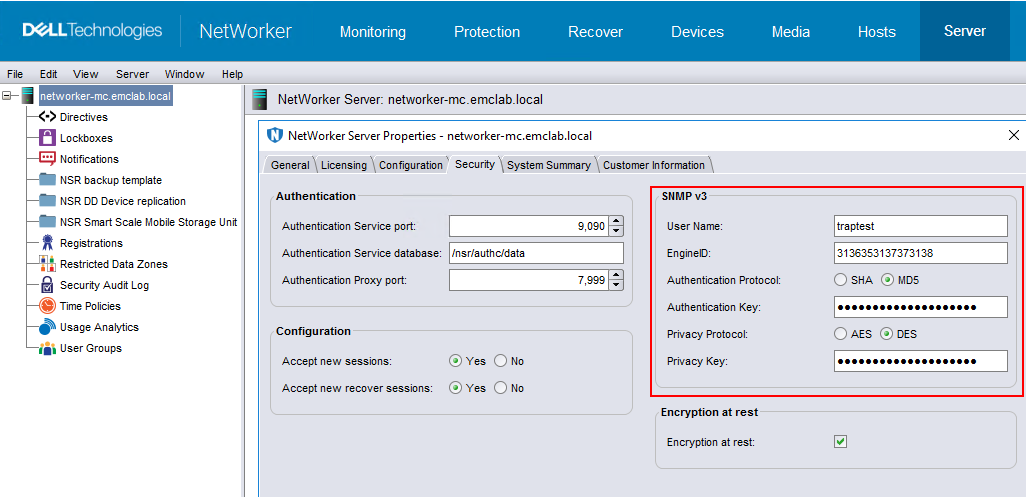
Vurgulanan değerler NSR sunucu özelliklerinden elde edilir ve ayarlanır:
NOT: Yapılandırma dosyalarında yapılan tüm değişiklikler snmpd ve snmptrapd'nin yeniden başlatılmasını gerektirir.
Test
Tuzak alıcı ana bilgisayarında (bu aynı zamanda NetWorker Sunucusu da olabilir) bir putty oturumu başlatın ve şunu çalıştırın:snmptrapd -f -C -c /etc/snmp/snmptrapd.conf -Le -M /usr/share/snmp/mibs -m NETWORKER-MIB *Not: Hata ayıklama çıktısı
için -D anahtarı ekleyin NetWorker Sunucusundan ikinci bir putty oturumu başlatın ve şunu çalıştırın:
nsrtrap -i 3 -v trapreceiver_hostname
This is a V3 Test
ctrl <D>
Başarılı olursa, ilk putty oturumunuz için günlükte şunu görmelisiniz;
2024-03-01 13:10:45 nwserv1 [UDP: [192.168.xxx.xxx]:33276->[192.168.xx.xxx]:162]:
SNMPv2-SMI::mib-2.1.3.0 = Timeticks: (7254049) 20:09:00.49      SNMPv2-SMI::snmpModules.1.1.4.1.0 = OID: NETWORKER-MIB::nwServerNotification    SNMPv2-SMI::mib-2.1.1.0 = STRING: "This is a V3 Test"
Yedekleme Bildirimlerini yapılandırma:
SNMP tuzak sunucusunda aşağıdaki komutu çalıştırın:
snmptrapd -f -C -c /etc/snmp/snmptrapd.conf -Le -M /usr/share/snmp/mibs -m NETWORKER-MIB &
Not;
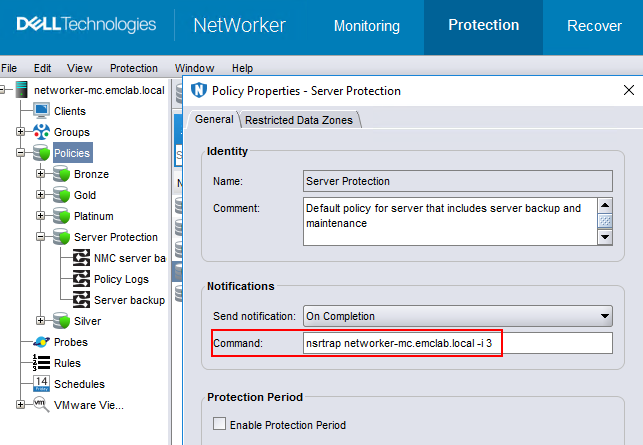
- Eylem düzeyinde yedekleme yapılandırması yalnızca SNMPv2'yi destekler
- Politika düzeyindeki yedekleme yapılandırması hem SNMPv2'yi hem de v3'ü destekler
/usr/sbin/nsrtrap trapreceiver_hostname -i 3
/var/log/snmptrap.log şunları içerir:
root@networker-mc:~# tail -n 71 /var/log/snmptrap.log
SNMPv2-SMI::mib-2.1.3.0 = Timeticks: (301392549) 34 days, 21:12:05.49   SNMPv2-SMI::snmpModules.1.1.4.1.0 = OID: NETWORKER-MIB::nwServerNotification    SNMPv2-SMI::mib-2.1.1.0 = STRING: "--- Server Backup Action Report ---
Policy name:Server Protection
Workflow name:Server backup
Action name:Server db backup
Action status:succeeded
Action start time:03/05/24 13:23:22
Action duration:0 hours 0 minutes 25 seconds
--- Successful Server Backup Save Sets ---
        3102171936/1709663008 networker-mc.emclab.local: index:networker-mc.emclab.local level=1, 53 MB, 62 files
        ...(removed for brevity)...
        2917622576/1709663024 networker-mc.emclab.local: bootstrap level=full, 9692 KB, 294 files
--- Bootstrap backup report ---
      date     time       ssid        volume            device                      access info
  02/05/2024 10:00:24 AM  3485530120  ddveBootstrap.002 ddve.emclab.local_Bootstrap ddve.emclab.local:/networker-mc/Bootstrap
  ...(removed for brevity)...
  03/05/2024 01:23:44 PM  2917622576  ddveBootstrap.002 ddve.emclab.local_Bootstrap ddve.emclab.local:/networker-mc/Bootstrap
--- Failed Server Backup Save Sets ---
        none"
2024-03-05 13:23:49 networker-mc.emclab.local [UDP: [192.168.25.10]:54540->[192.168.25.10]:162]:
SNMPv2-SMI::mib-2.1.3.0 = Timeticks: (301392681) 34 days, 21:12:06.81   SNMPv2-SMI::snmpModules.1.1.4.1.0 = OID: NETWORKER-MIB::nwServerNotification    SNMPv2-SMI::mib-2.1.1.0 = STRING: "---Summary notification report---
Policy name:Server Protection
        Workflow name:Server backup, Workflow status:succeeded, Workflow start time:03/05/24 13:23:22, Duration:0 hours 0 minutes 26 seconds
                Action name:Server db backup, Action status:succeeded, Action start time:03/05/24 13:23:22, Duration:0 hours 0 minutes 25 seconds
                Action name:Expiration, Action status:succeeded, Action start time:03/05/24 13:23:47, Duration:0 hours 0 minutes 1 seconds"
Additional Information
SNMP tuzakları ile ilgili ek bilgiler NetWorker Yönetim Rehberi'nde bulunabilir: https://www.dell.com/support/home/product-support/product/networker/docs
Affected Products
NetWorker FamilyArticle Properties
Article Number: 000222671
Article Type: How To
Last Modified: 05 Mar 2024
Version: 1
Find answers to your questions from other Dell users
Support Services
Check if your device is covered by Support Services.