PowerProtect:Cyber Recovery 数据避风港重置了 Index Engines UI“admin”密码
Summary: 本知识库文章讨论了重置 Index Engines“admin”密码的两种方法。
This article applies to
This article does not apply to
This article is not tied to any specific product.
Not all product versions are identified in this article.
Instructions
第一种方法 — 如果用户可以登录到 Index Engines UI,则可以按照以下步骤重置管理员密码。
1.登录到 Index Engines UI

2。转至管理系统>>用户。它会提示输入当前密码和新密码。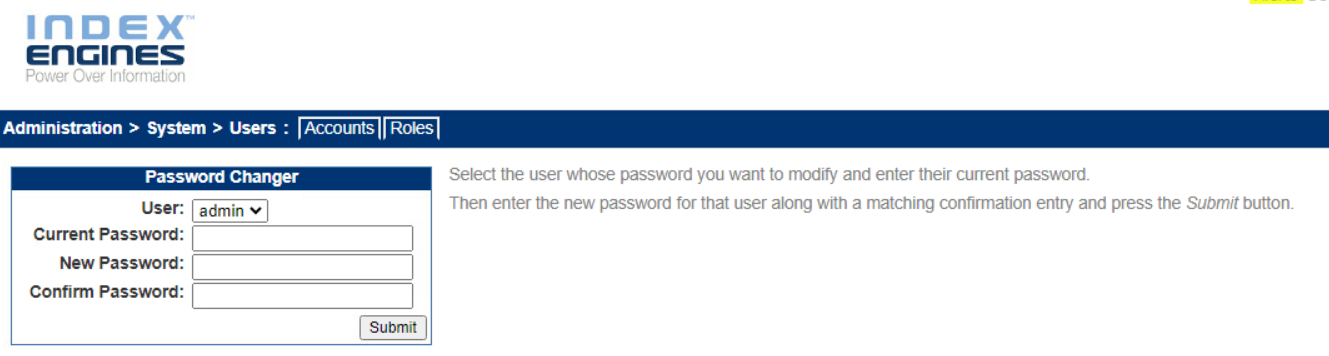
3.使用新密码登录 Index Engines UI。
第二种方法。
如果用户无法登录到 Index Engines UI,他们仍然可以按照以下步骤更改 管理员 密码。
1.使用 SSH 以 根用户 身份登录到 Index Engines 服务器。
2.在命令行中,运行 iepasswd admin
新密码必须满足以下要求:
- 长度至少为 15 个字符
- 至少包含一个大写字母
- 至少包含一个小写字母
- 至少包含一个数字
- 至少包含一个特殊字符(!、@、#、$、% 等)
其他要求包括:
- 更改密码时,新密码必须至少包含八个字符或与先前密码不同的字符数的 50%。
- 密码在 60 天后过期
- 上次更改后的 24 小时(1 天)内无法更改密码
- 新密码不能与之前五个密码中的任何一个相同
Affected Products
CyberSenseArticle Properties
Article Number: 000222977
Article Type: How To
Last Modified: 11 Jul 2024
Version: 1
Find answers to your questions from other Dell users
Support Services
Check if your device is covered by Support Services.