如何手動將商務電腦專用的 SupportAssist 更新至最新版本
Summary: 本文提供如何在自動更新失敗時,手動將商務電腦專用的 SupportAssist 更新至最新版本的詳細資料。
This article applies to
This article does not apply to
This article is not tied to any specific product.
Not all product versions are identified in this article.
Instructions
受影響的產品:
- 商務用電腦的 SupportAssist
受影響的版本:
- 3.2.x 版
- 3.3.x 版
受影響的作業系統:
- Windows 11
- Windows 10
更新步驟:
注意:
- 此檔案可在已安裝 v3.3.x 及更舊版本的電腦上運作。
- 該檔應以 管理員身份運行。
- 檔案以 無訊息模式執行。
- 該文件檢查計算機上的 .net 6.0 。如果沒有,它會下載並安裝 .net v6.0.28,然後繼續下載並安裝 SupportAssist v3.6 .msi。
- 如果手動升級失敗,檔案會解除安裝電腦上任何現有版本的商務電腦專用的 SupportAssist 應用程式,然後安裝 v3.6 .msi。
- 以系統管理員模式開啟命令提示字元。
- 前往儲存檔案的位置 (以下範例為 c:\SupportAssist)。
- 輸入 SupportAssistUpgradeTool.exe 以執行命令,然後按下 Enter 鍵。
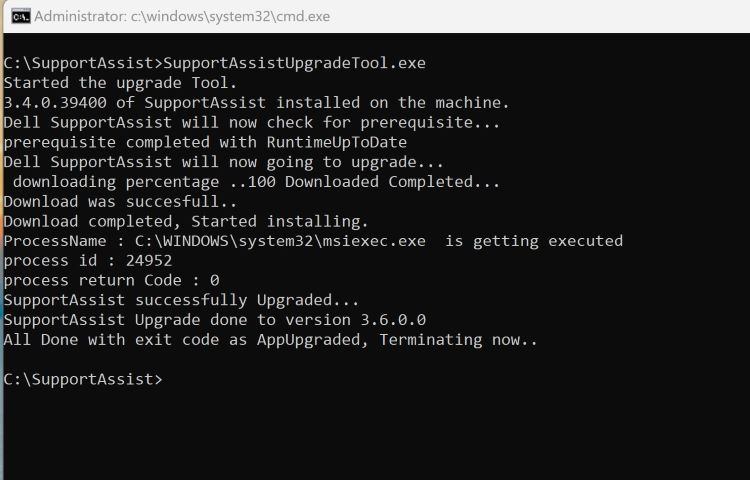
圖 1:(僅英文)在命令提示字元中輸入 SupportAssistUpgradeTool.exe
注意:您可以在 C:\Windows\temp\SupportAssist 找到記錄。
- 執行命令後,檢查電腦是否已更新至 TechDirect 清查頁面上的 v3.6。
Affected Products
SupportAssist for Business PCsArticle Properties
Article Number: 000225269
Article Type: How To
Last Modified: 21 May 2024
Version: 1
Find answers to your questions from other Dell users
Support Services
Check if your device is covered by Support Services.