PowerProtect: Файлова система диспетчера даних Встановлення агента Ubuntu для помилки збою PPDM: Вихід з процесу реєстрації з кодом виходу 7
Summary: Агент файлової системи Ubuntu для PowerProtect Data Manager продовжує аварійно завершувати роботу після встановлення Помилка: Проблема може бути пов'язана з FQDN або IP-адресою диспетчера даних PowerProtect. Вихід з процесу реєстрації з кодом виходу 7 ...
This article applies to
This article does not apply to
This article is not tied to any specific product.
Not all product versions are identified in this article.
Symptoms
PowerProtect: Диспетчер даних Файлова система Встановлення агента Ubuntu для PowerProtect Диспетчер даних продовжує аварійно завершувати роботу після встановлення Помилка: Проблема може бути пов'язана з FQDN або IP-адресою диспетчера даних PowerProtect. Вихід з процесу реєстрації з кодом виходу 7
Service Error:

admin@ubuntu:~/fsagent$ systemctl status agentsvc.service
× agentsvc.service - Dell PowerProtect Agent Service Daemon
     Loaded: loaded (/etc/systemd/system/agentsvc.service; enabled; vendor preset: enabled)
     Active: failed (Result: exit-code) since Wed 2024-04-17 20:22:04 UTC; 1min 31s ago
    Process: 3492 ExecStartPre=/bin/mkdir -p /opt/dpsapps/agentsvc/tmp (code=exited, status=0/SUCCESS)
    Process: 3493 ExecStart=/opt/dpsapps/agentsvc/agentService config=/opt/dpsapps/agentsvc/config.yml (code=exited, status=1/FAILURE)
   Main PID: 3493 (code=exited, status=1/FAILURE)
        CPU: 6.348s

Process AgentService Not Found:

admin@ubuntu:~/fsagent$ ps -ef | grep -i AgentService
la-pia-+    3631    1299  0 20:23 pts/0    00:00:00 grep --color=auto -i AgentService

Port # 7000 Not Found:

admin@ubuntu:~/fsagent$ sudo netstat -nlp | more
Active Internet connections (only servers)
Proto Recv-Q Send-Q Local Address           Foreign Address         State       PID/Program name
tcp        0      0 127.0.0.53:53           0.0.0.0:*               LISTEN      867/systemd-resolve
tcp        0      0 127.0.0.1:7011          0.0.0.0:*               LISTEN      3667/agentService
tcp        0      0 127.0.0.1:7010          0.0.0.0:*               LISTEN      3667/agentService
tcp        0      0 0.0.0.0:22              0.0.0.0:*               LISTEN      1022/sshd: /usr/sbi
tcp6       0      0 :::28002                :::*                    LISTEN      1097/avagent.bin
tcp6       0      0 127.0.0.1:44385         :::*                    LISTEN      1097/avagent.bin
tcp6       0      0 :::22                   :::*                    LISTEN      1022/sshd: /usr/sbi
udp        0      0 127.0.0.53:53           0.0.0.0:*                           867/systemd-resolve
raw6       0      0 :::58                   :::*                    7           865/systemd-network
Cause
Було проведено мінімальну інсталяцію Ubuntu з відсутністю деяких файлів та функцій ОС, а також були відсутні деякі залежності, через що порт 7000 не зміг придбати агент файлової системи Ubuntu для PowerProtect Data Manager agentsvc.service.
Агент файлової системи Ubuntu для PowerProtect Data Manager продовжує аварійно завершувати роботу після встановлення Помилка: Проблема може бути пов'язана з FQDN або IP-адресою диспетчера даних PowerProtect. Вихід з процесу реєстрації з кодом виходу 7
Агент файлової системи Ubuntu для PowerProtect Data Manager продовжує аварійно завершувати роботу після встановлення Помилка: Проблема може бути пов'язана з FQDN або IP-адресою диспетчера даних PowerProtect. Вихід з процесу реєстрації з кодом виходу 7
Resolution
Адміністратор PowerProtect Data Manager повністю встановив Ubuntu, а потім FSAgent почав працювати добре, як і очікувалося.
Ви можете перевірити /var/log/installer/telemetry, показавши true.
"Мінімалізм": правда
Що означає неправильну та обмежену установку Ubuntu.
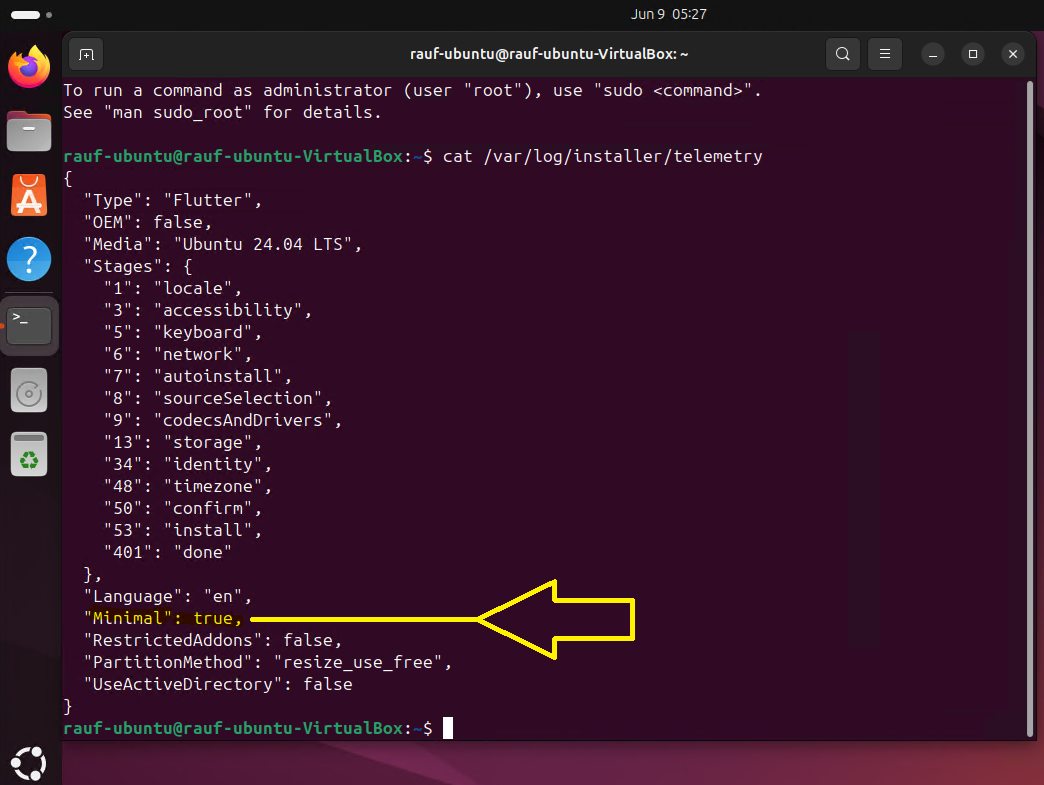
Ви можете перевірити /var/log/installer/telemetry, показавши true.
"Мінімалізм": правда
Що означає неправильну та обмежену установку Ubuntu.
Установки:
Installation Command after Complete Ubuntu OS Installation was done:

admin@ubuntu:~/fsagent$ sudo ./install.sh --debug --skip-driver
2024/04/17 20:19:07 debian based system
2024/04/17 20:19:07 Linux
2024/04/17 20:19:07 The adm-agent was not installed.
2024/04/17 20:19:07 19.15.0.78.78
dpkg-query: no packages found matching powerprotect-agentsvc
2024/04/17 20:19:07 The powerprotect-agentsvc was not installed.
2024/04/17 20:19:07 19.15.0.78
2024/04/17 20:19:07 The ppdm-fsagent was not installed.
2024/04/17 20:19:08 The ppdm-fsagent installation was successful.
2024/04/17 20:19:09 To configure firewall rules run /opt/dpsapps/agentsvc/configfw.sh
2024/04/17 20:19:09 The powerprotect-agentsvc installation was successful.
2024/04/17 20:19:09 Skipping the block based backup driver installation.
Do you wish to register with PowerProtect Data Manager? [y/n] y
2024/04/17 20:19:15 The powerprotect-agentsvc registration was initiated.
Enter PowerProtect Data Manager hostname or IP: myPPDM_Name
2024/04/17 20:19:35 /opt/dpsapps/agentsvc/register.sh --PowerProtectServer=myPPDM_Name
The PowerProtect Data Manager server FQDN or IP address that is used by the application agent host is myPPDM_Name.
To use the Fully Qualified Domain Name (FQDN) as the preferred address for the agent host, in the PowerProtect Data Manager UI, go to Infrastructure > Application Agents and select Configure DNS Name Resolution.
Enter the preferred FQDN or IP address of the application host: 10.##.##.##
Preferred Address of the application host is 10.##.##.##
Enter the port number from the supported ranges 7000 to 7009 and 7012 to 7020. ports 7010 and 7011 are used by the agent service process
Enter the port number for the agent service (7000 by default): 7000
Do you want to add the firewall rule for the port 7000 (yes/no)? yes
Running the firewall script /opt/dpsapps/agentsvc/configfw.sh for setting the firewall rule.
ufw service is running
configuring ufw firewall rules
Skipping adding existing rule
Skipping adding existing rule (v6)
Firewall reloaded
The port number used by the application agent host is 7000.
TMPDIR set to value /opt/dpsapps/agentsvc/tmp
Agent service (pid 3493) started successfully.
Checking for PowerProtect Data Manager server Accessibility.
PowerProtect Data Manager server is Accessible.
The PowerProtect Data Manager File system agent installation was successful, and the request for agent registration has been sent to the PowerProtect Data Manager Server. Go to Infrastructure >Application Agents in the PowerProtect Data Manager UI to confirm that the registration completed successfully.
Article Properties
Article Number: 000226123
Article Type: Solution
Last Modified: 18 Oct 2024
Version: 2
Find answers to your questions from other Dell users
Support Services
Check if your device is covered by Support Services.