Avamar: Steps to Validate Garbage Collection Failures on Avamar
Summary: Below are the steps to validate Garbage Collection (GC) Failures on Avamar.
This article applies to
This article does not apply to
This article is not tied to any specific product.
Not all product versions are identified in this article.
Symptoms
What is a Garbage Collection?
Garbage collection (GC) is the process of deleting unused chunks from backups that have expired. This frees up capacity on the Avamar server.
By default, Garbage collection runs once daily starting at the beginning of the Maintenance window.
Common Failure symptoms:
These are the most common symptoms indicating an issue with GC:
MSG_ERR_DDR_ERRORMSG_ERR_DISKFULLMSG_ERR_MISCMSG_ERR_TRYAGAINLATERMSG_ERR_BADTIMESYNC
Cause
Common Causes of GC failures:
MSG_ERR_DDR_ERROR
- There are many underlying issues that can cause GC to fail with
MSG_ERR_DDR_ERROR. Some of these reasons include:- Network or Connectivity Errors
- Issues with the Data Domain file system
- The Data Domain appliance becomes full
- An expired or incorrect DD Boost user password
- There are too many checkpoints (Avamar), or snapshots (Data Domain). This is usually coupled with
hfscheckfailures not allowing old checkpoints and snapshots to be "rolled off."
MSG_ERR_MISC or MSG_ERR_TRYAGAINLATER
- From Avamar v.7, backups can run simultaneously with garbage collection.
- On occasion, a process called "Index Stripe Splitting" occurs as new data is added from backups.
- As this "Index Stripe Splitting" process cannot run while garbage collection is running, one of the above errors reports.
- Index stripes on a grid tend to split around the same time period as each other on the various nodes.
- Sometimes this may take a few days to complete.
- Avamar is working as designed. The workaround is to not run backups during GC.
MSG_ERR_BADTIMESYNC
- This is a rare issue, and only seen on multinode grids. The error occurs when the time is not synchronized between one or more Avamar data nodes and the utility node.
- It is likely that all maintenance tasks (GC, checkpoint, and
hfscheck)are reporting the same error.
Resolution
Determining the most recent Garbage Collection Status:
Information about the most recent garbage collection can be viewed by using the CLI, AUI, or Management Console Server (MCS) UI.
From the CLI:

- Open an SSH session (For example putty) to Avamar Server and log in as 'admin'. Run the following commands:
status.dpn
avmaint gcstatus
- The following examples show a successful Garbage Collection:
Last GC: finished Tue Jul  9 00:00:23 2024 after 00m 03s >> recovered 199.88 KB (OK)
Last GC: finished Wed Jun  5 09:20:46 2024 after 00m 12s >> recovered 0.00 KB (OK)
- If the status shows anything but (OK), there is a potential issue with garbage collection:
Last GC: finished Mon Jun 17 09:02:41 2024 after 01m 51s >> recovered 14.98 MB (MSG_ERR_DDR_ERROR)
Last GC: finished Thu Jun 13 07:06:54 2024 after 03m 41s >> recovered 0.00 KB (MSG_ERR_DISKFULL)
Last GC: finished Mon Jun 10 19:04:58 2024 after 01m 01s >> recovered 0 KB (MSG_ERR_MISC)
Last GC: finished Thu Jun  16:21:12 2024 after 00m 25s >> recovered 0 KB (MSG_ERR_BADTIMESYNC)
From the AUI:

- Review the "Last Garbage collection status." If the status shows anything but (OK), there is a potential issue with garbage collection.
From the MCS UI:

- If the "Last Garbage collection" has a red "x" as shown above, there is a potential issue with garbage collection and further analysis is required.
If garbage collection continues to fail due to a genuine issue (as validated using the steps above), select the appropriate options in the Alert Response Form to transfer the service request to a support agent.
Additional Information
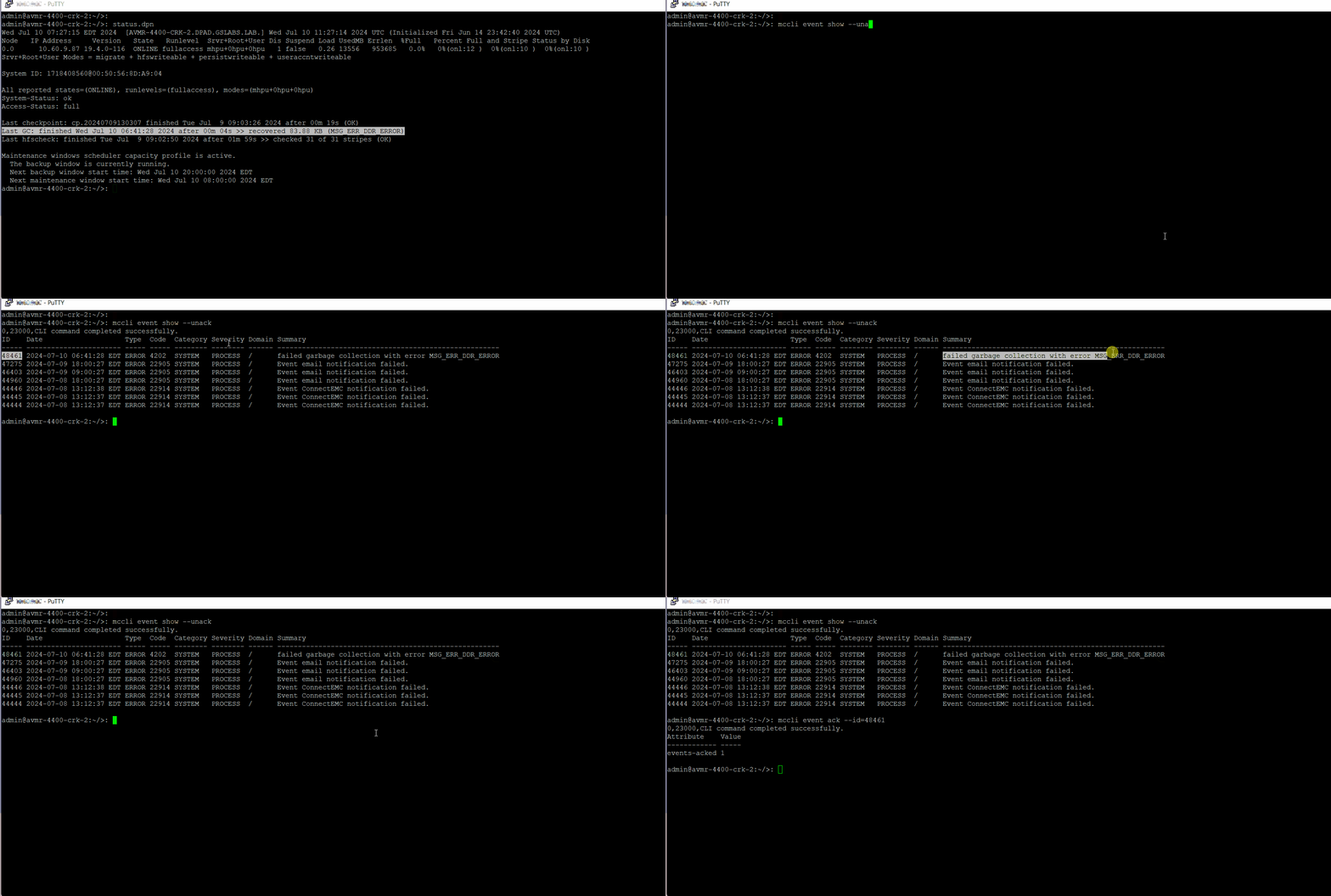
Acknowledging Errors once the issue has been resolved:
From the CLI:
- Find the Unacknowledged events by running:
mccli event show --unack
- Acknowledge either the single code by entering the unique ID, or all error codes:
mccli event show --id-
From the AUI:
- Log in to the AUI and view the dashboard:

- Click the Exclamation Mark, and the screen shows something similar to the following:

- Click the Unacknowledged events, and the screen shows something similar to the following:

- Select the event (as shown above), and click Acknowledge.
Determining how long the GC has been failing:
The easiest way to determine how long GC has been failing is to use the CLI (although this information is also available in both the AUI and MCS UI)
The following command shows all garbage collection failures from the past 30 days:
dumpmaintlogs --types=gc --days=30 |grep "failed garbage collection"
2024/05/27-16:32:18.55893 {0.0} <4202> failed garbage collection with error MSG_ERR_DDR_ERROR
2024/05/28-16:32:37.92920 {0.0} <4202> failed garbage collection with error MSG_ERR_DDR_ERROR
2024/05/29-16:31:51.62962 {0.0} <4202> failed garbage collection with error MSG_ERR_DDR_ERROR
2024/05/30-16:31:55.18969 {0.0} <4202> failed garbage collection with error MSG_ERR_DDR_ERROR
2024/06/20-01:19:09.97961 {0.0} <4202> failed garbage collection with error MSG_ERR_DDR_ERROR
Affected Products
Avamar ServerArticle Properties
Article Number: 000226150
Article Type: Solution
Last Modified: 28 Aug 2025
Version: 31
Find answers to your questions from other Dell users
Support Services
Check if your device is covered by Support Services.