NetWorker: BMR boot fails with same VM and Secure Boot Manager changes with CVE-2023-24932 applied
Summary: VM fails to boot into the WinPE environment when using the same VM and it has the Secure Boot Manager changes associated with CVE-2023-24932 applied.
This article applies to
This article does not apply to
This article is not tied to any specific product.
Not all product versions are identified in this article.
Symptoms
VM unable to boot from the disk drive it stays at the Boot Manager screen.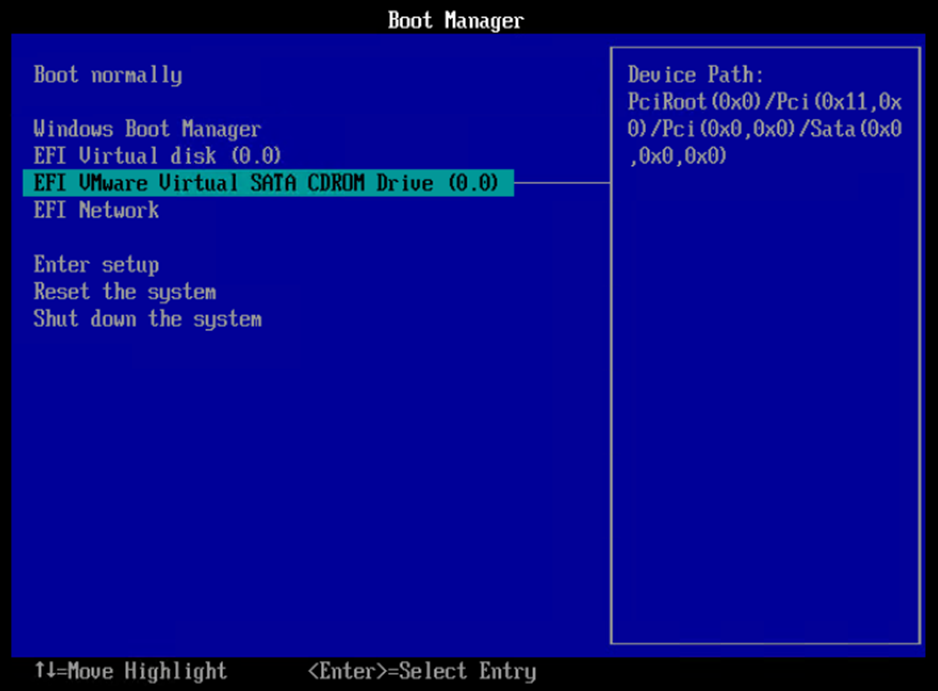
All ISOs fail to boot not just NetWorker ones.
Cause
The winPE image does not contain the required 'Windows UEFI CA 2023' certificate for VMs with the secure boot remediation applied for CVE-2023-24932
Resolution
Engineering is working on a new ISO that contains the certificate which is able to boot servers from the CD/DVD that use UEFI firmware that have not been remediated for CVE-2023-24932, UEFI Firmware that has been remediated and BIOS Firmware see NWREE-27533 Bug NETWORKER-111088
Workaround
The only known safe workaround is to boot from another VM.
Dell does not recommend or support the following but they are possibilities to get around this issue.
Disabling secure Boot in the VM options prior to booting allows the VM to boot correctly and secure boot can be enabled afterwards although it is unclear how this will affect in the future and should be used with caution.
With the correct ISO editing software and sufficient knowledge it is possible to download the Windows UEFI CA 2023 and add it to the ISOs boot.wim and create a new bootable image from that, although this ISO will only work for VMs that have been remediated for CVE-2023-24932
Affected Products
NetWorker, NetWorker SeriesArticle Properties
Article Number: 000226853
Article Type: Solution
Last Modified: 07 Aug 2025
Version: 2
Find answers to your questions from other Dell users
Support Services
Check if your device is covered by Support Services.