IDPA: PTAgent fails to connect to iDRAC due to incorrect setting in iDRAC local configuration settings
Summary: Integrated Data Protection Appliance (IDPA) PTAgent is not running and fails to start. pta_debug log shows invalid credentials. dpacli -agentinfo shows idracConnection Error.
This article applies to
This article does not apply to
This article is not tied to any specific product.
Not all product versions are identified in this article.
Symptoms
1. On ESXi host, pta_call get agent/info command and on ACM dpacli -agentinfo command both shows idracConnection, agent, idraccache Error:
# /opt/dell/DellPTAgent/tools/pta_call get agent/info
Request sent to DellPTAgent @ https://192.168.100.101:8086
{
    "libstorelibit.so": "07.05",
    "process_id": "2101904",
    "idrac_ethernet_ip": "x.x.x.x",
    "rest_endpoints": "https://127.0.0.1:8086,https://192.168.100.101:8086",
    "api_blocking_enabled": "false",
    "ptagentversion": "2.5.5-5",
    "name": "hostname",
    "host_epoch_time": "1720671327.376838 (secs.usecs)",
    "servicetag": "servicetag",
    "idrac_pass_thru_ip": "169.254.0.1",
    "domain": "host FQDN",
    "host_pass_thru_ip": "169.254.0.2",
    "status": {
        "idracConnection": "Error",
        "iSM": "N/A",
        "agent": "Error",
        "idraccache": "Error"
    },
    "MarvellLibraryVersion": "5.0.13.1109",
    "default_server_cert": "true",
    "libstorelibir-3.so": "15.03-0",
    "system_uuid": "6330c25e-942f-463a-797e-78ac449f4840",
    "ism_version": "4.1.0.0",
    "os_version": "6.7.0 build-15160138",
    "uptime": "3890 seconds ( 1 hour 4 minutes 50 seconds )",
    "mfr": "Dell Inc.",
    "os": "VMWare ESXi",
    "model": "DP4400",
    "libstorelib.so": "07.07",
    "TPM Present": "false"
}
2. On the ESXi host, /scratch/log/pta_debug.log shows the PTAdmin credentials problem:
 "message": "A general error has occurred. See ExtendedInfo for more information.",
        "@Message.ExtendedInfo": [
        {
            "@odata.type": "#Message.v1_1_0.Message",
            "MessageId": "Base.1.8.AccessDenied",
            "Message": "The authentication credentials included with this request are missing or invalid.",
            "MessageArgs": [],
            "MessageArgs@odata.count": 0,
            "RelatedProperties":[],
            "RelatedProperties@odata.count": 0,
            "Severity": "Critical",
            "Resolution": "Attempt to ensure that the URI is correct and that the service has the appropriate credentials."
        }
        ]
3. Follow KB PowerProtect DP Series Appliances IDPA: iDRAC Cache Failed Due to PTAgent Password Minimum Length Setting to re-create PTAdmin account, but iDRAC page does not show PTAdmin account in iDRAC Settings -> Users -> Local Users.
Cause
This issue is caused by incorrect setting on iDRAC.
iDRAC Setting -> Services -> Local Configuration
Disable iDRAC Local Configuration using Settings.
Disable iDRAC Local Configuration using RACADM. 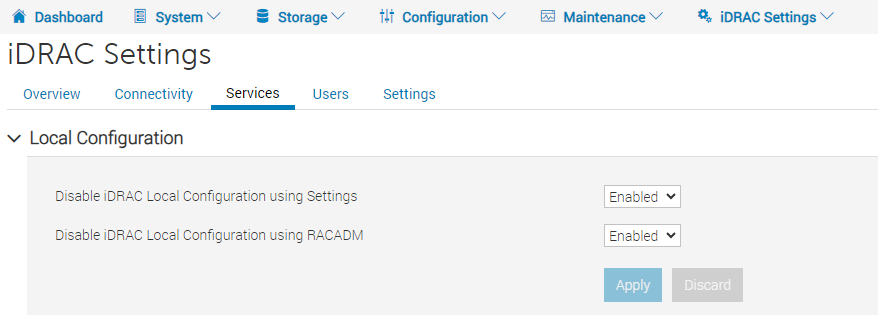
The default setting for the above configuration is Disabled. If any of above settings is Enabled, PTAgent may not work properly.
Resolution
1. Go to iDRAC page:
iDRAC Setting -> Services -> Local Configuration
Disable iDRAC Local Configuration using Settings.
Disable iDRAC Local Configuration using RACADM. 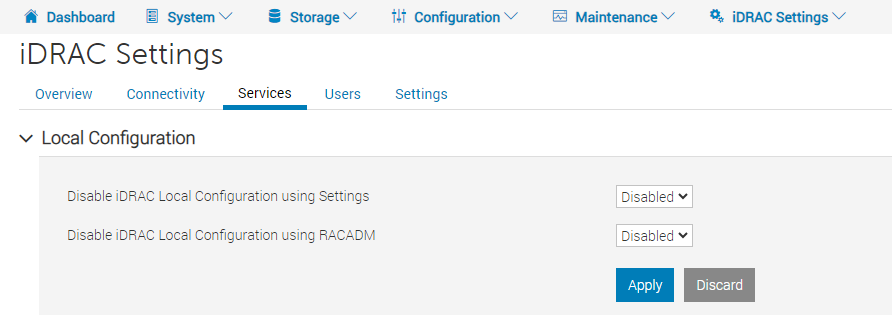
Change the above settings to Disabled and click the Apply button.
2. From ESXi, stop PTAgent.
/etc/init.d/DellPTAgent stop
3. From iDRAC WebGUI, iDRAC Settings -> Users -> Local Users, delete PTAdmin user.
4. From ESXi, re-create iDRAC PTAdmin user. Password is synced automatically.
/opt/dell/DellPTAgent/sbin/IDracUser
5. From ESXi, start PTAgent.
/etc/init.d/DellPTAgent start
6. Wait for 5 minutes for PTAgent to re-build idraccache.
7. From ESXi, test the PTAgent REST API call.
/opt/dell/DellPTAgent/tools/pta_call get agent/info

/opt/dell/DellPTAgent/tools/pta_call post system/idraccheck
Affected Products
Integrated Data Protection Appliance FamilyProducts
Integrated Data Protection Appliance SoftwareArticle Properties
Article Number: 000226934
Article Type: Solution
Last Modified: 16 Oct 2024
Version: 1
Find answers to your questions from other Dell users
Support Services
Check if your device is covered by Support Services.