VCF on VxRail: NSX is stuck when checking LDAP status
Summary: Active Directory over Lightweight Directory Access Protocol (LDAP) setting on NSX UI is correct. NSX is unable to finish checking the LDAP setting. The status causes it to be functionally unavailable. ...
This article applies to
This article does not apply to
This article is not tied to any specific product.
Not all product versions are identified in this article.
Symptoms
Active Directory over LDAP setting on NSX UI is correct. NSX is unable to finish checking the LDAP setting. The status causes it to be functionally unavailable.
The LDAP setting is correct but is unable to add new users.
There is an unhealthy mark, like connection down on the VMware Identity Manager tab of NSX UI.
Localhost access log: VMware Identity Manager (VIDM) status returns HTTP code 400.
nsx-mgr> tail -f /var/log/proxy/localhost_access_log
2024-08-06T02:27:46.690Z - "GET /policy/api/v1/aaa/roles HTTP/1.1" 200 343 13 13
2024-08-06T02:27:46.738Z - "GET /favicon.ico HTTP/1.1" 200 5686 2 1
2024-08-06T02:27:46.811Z - "POST /policy/api/v1/search/aggregate?page_size=250 HTTP/1.1" 200 2026 105 105
2024-08-06T02:27:46.812Z - "POST /policy/api/v1/search/aggregate?page_size=50&cursor=0&sort_by=display_name&sort_ascending=true HTTP/1.1" 200 1306 113 113
2024-08-06T02:27:48.461Z - "GET /api/v1/node/aaa/providers/vidm/status HTTP/1.1" 400 135 1761 1760
Cause
NSX scans all the identity contexts before fulfillment.
If VMware Identity Manager is integrated and the connection between NSX and VIDM is down, the identity scanning is stuck.
Resolution
Remediation steps:
1. Check for the detailed reasons of this error from the NSX manager:
curl -k -u 'admin:<nsx admin password>' -X GET https://localhost/api/v1/node/aaa/providers/vidm/status
The output may be similar to the following:
"error_message": "Invalid VMware Identity Manager thumbprint specified."
2. Check the current thumbprint for VIDM.

openssl s_client -connect <FQDN of vIDM host>:443 < /dev/null 2> /dev/null | openssl x509 -sha256 -fingerprint -noout -in /dev/stdin
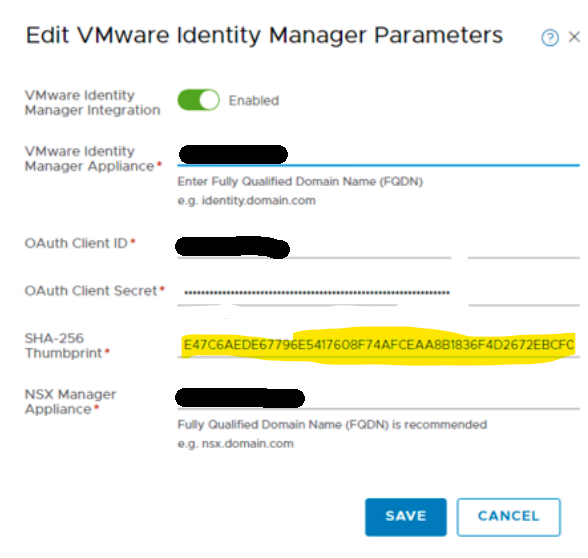
3. Replace with the correct thumbprint on NSX UI and save.
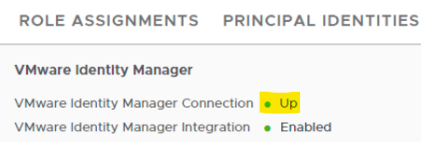
4. After the connection status recovers, it will show as "Up".
Affected Products
VxRail, VxRail Appliance Series, VxRail E560 VCF, VxRail E560F VCF, VxRail E560N VCF, VxRail G560 VCF, VxRail G560F VCF, VxRail P570 VCF, VxRail P570F VCF, VxRail P580N VCF, VxRail S570 VCF, VxRail V570 VCF, VxRail V570F VCFArticle Properties
Article Number: 000227655
Article Type: Solution
Last Modified: 08 Nov 2025
Version: 3
Find answers to your questions from other Dell users
Support Services
Check if your device is covered by Support Services.