Alienware Command Center v6.3.7.0 无法加载显示屏、键盘、鼠标或耳机
Summary: 了解在 Alienware Command Center 版本 6.3.7 中未显示显示屏、键盘或耳机设备时应采取的措施。
This article applies to
This article does not apply to
This article is not tied to any specific product.
Not all product versions are identified in this article.
Symptoms
按照安装 Alienware Command Center 版本 6.2.7.0 的工作流作,然后通过驱动程序流升级到版本 6.3.7.0 或手动运行安装程序后,连接的设备未按预期显示在 Alienware Command Center 用户界面中。
受影响的软件:
- Alienware Command Center
受影响的版本:
- 6.3.7.0 版
受影响的平台:
- Alienware Aurora R15
- Alienware Aurora R16
- Alienware m15 R7
- Alienware m16 R1
- Alienware m16 R2
- Alienware m17 R5 AMD
- Alienware m18 R1
- Alienware m18 R2
- Alienware x14
- Alienware x14 R2
- Alienware x15 R2
- Alienware x16 R1
- Alienware x16 R2
- Alienware x17 R2
- Dell G15 5530
- Dell G16 7630
受影响的外围设备:
- Alienware 25 游戏显示器 AW2521H
- Alienware 25 游戏显示器 AW2521HF
- Alienware 25 游戏显示器 AW2521HFA
- Alienware 25 游戏显示器 AW2521HFL
- Alienware 25 游戏显示器 AW2521HFLA
- Alienware 25 游戏显示器 AW2523HF
- Alienware 27 360 Hz QD OLED 游戏显示器 AW2725DF
- Alienware 27 游戏显示器 AW2720HF
- Alienware 27 游戏显示器 AW2720HFA
- Alienware 27 游戏显示器AW2721D
- Alienware 27 游戏显示器 AW2724DM
- Alienware 27 游戏显示器 AW2724HF
- Alienware 32 4K QD OLED 游戏显示器 AW3225QF
- Alienware 34 曲面 OLED 显示器 AW3423DW
- Alienware 34 曲面 QD OLED 游戏显示器 AW3423DWF
- Alienware 38 曲面游戏显示器 AW3821DW
- Alienware 500 Hz 游戏显示器AW2524H
- Alienware 55 OLED 显示器 AW5520QF
- Alienware AW3420DW
- Alienware 双模无线游戏耳机 AW720H
- Alienware RGB 矮轴机械游戏键盘 |AW510K
- Alienware 机械游戏键盘 |AW310K
- Alienware Pro 无线游戏键盘
- Alienware Pro 无线游戏鼠标
- Alienware RGB 游戏鼠标 AW510M
- Alienware RGB 机械游戏键盘 AW410K
- Alienware 87 键游戏键盘 AW420K
- Alienware 三模无线游戏耳机 AW920H
- Alienware 三模无线游戏键盘 AW920K
- Alienware 三模无线游戏鼠标 AW720M
- Alienware 有线游戏鼠标 AW320M
- Alienware 有线/无线游戏鼠标 AW610M
- Alienware 有线游戏耳机 AW520H
- Alienware 无线游戏鼠标 AW310M
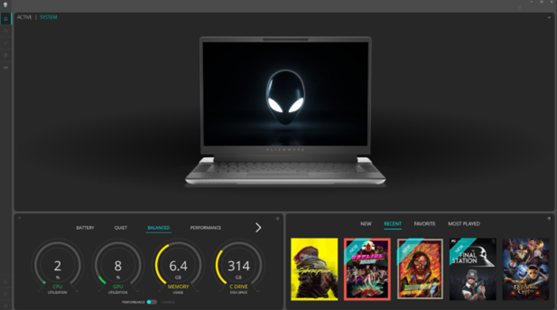
遇到此问题时,在 Alienware Command Center 仪表板上找不到设备。无法在 Alienware Command Center 的任何其他配置页面上看到它们。下面的示例图像显示 Alienware Command Center 未检测到设备。
Cause
而 AWCCSmartInstaller 导致发生这种情况。外围组件安装程序正在迁移到其组件的 InstallShield 框架。在尝试卸载任何以前的版本并安装较新版本时,复制或删除某些文件时发生错误。
Resolution
在计算机上更新到 Alienware Command Center 版本 6.4 或更高版本可解决此问题。要下载并安装 Alienware Command Center,请参阅 如何下载和安装戴尔驱动程序。
Affected Products
Alienware Aurora R15, Alienware Aurora R16, Alienware Command Center, Alienware Mechanical Gaming Keyboard | AW310K, Alienware RGB Mechanical Gaming Keyboard AW410K, Alienware Tenkeyless Gaming Keyboard AW420K
, Alienware Low-Profile RGB Mechanical Gaming Keyboard | AW510K, Alienware m15 R7, Alienware m16 R1, Alienware m16 R2, Alienware m17 R5 AMD, Alienware m18 R1, Alienware m18 R2, Alienware Wireless Gaming Mouse AW310M, Alienware RGB Gaming Mouse AW510M, Alienware Wired/Wireless Gaming Mouse AW610M, Alienware Tri-Mode Wireless Gaming Mouse AW720M, Alienware x14, Alienware x14 R2, Alienware x15 R2, Alienware x16 R1, Alienware x16 R2, Alienware x17 R2, Alienware Tri-Mode Wireless Gaming Headset AW920H, Alienware Wired Gaming Mouse AW320M, Alienware Pro Wireless Gaming Keyboard, Alienware Pro Wireless Gaming Mouse, Alienware Tri-Mode Wireless Gaming Keyboard AW920K, Alienware Wired Gaming Headset AW520H, Alienware Dual Mode Wireless Gaming Headset AW720H, Alienware 25 Gaming Monitor AW2523HF, Alienware 500Hz Gaming Monitor AW2524H, Alienware 27 Gaming Monitor AW2724DM, Alienware 27 Gaming Monitor AW2724HF, Alienware 27 360Hz QD OLED Gaming Monitor AW2725DF, Alienware 32 4K QD OLED Gaming Monitor AW3225QF, Alienware 34 Curved OLED Monitor AW3423DW, Alienware 34 Curved QD OLED Gaming Monitor AW3423DWF, Alienware 25 Gaming Monitor AW2521H, Alienware 25 Gaming Monitor AW2521HF, Alienware 25 Gaming Monitor AW2521HFA, Alienware 25 Gaming Monitor AW2521HFL, Alienware 25 Gaming Monitor AW2521HFLA, Alienware 27 Gaming Monitor AW2720HF, Alienware 27 Gaming Monitor AW2720HFA, Alienware 27 Gaming Monitor AW2721D, Alienware AW3420DW, Alienware 38 Curved Gaming Monitor AW3821DW, Alienware 55 OLED Monitor AW5520QF, Dell G15 5530, Dell G16 7630
...
Article Properties
Article Number: 000228419
Article Type: Solution
Last Modified: 25 Sep 2025
Version: 3
Find answers to your questions from other Dell users
Support Services
Check if your device is covered by Support Services.