How to Enter the Intel AMT Configuration Menu on MEBx-Enabled VPro Computers
Summary: Learn about how to enter the Intel AMT Configuration menu on MEBx-Enabled VPro Latitude, OptiPlex, Precision, and XPS computers.
This article applies to
This article does not apply to
This article is not tied to any specific product.
Not all product versions are identified in this article.
Instructions
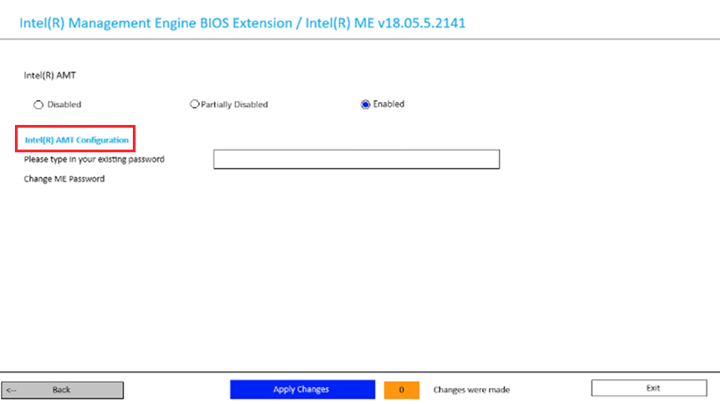
Upon entering the main AMT menu page of the BIOS, it may not be immediately clear that the Intel AMT Configuration text in the menu page is a hyperlink to enter the AMT Configuration Menu.
Once an admin password has been set in the BIOS, the AMT Configuration menu is an accessible option. For more information, reference Unable to Access the MEBx VPro Menu Using the F12 Boot Menu.
Affected Platforms:
- Latitude 5350
- Latitude 5430
- Latitude 5431
- Latitude 5450
- Latitude 5530
- Latitude 5550
- Latitude 9430
- OptiPlex 5000 Micro
- OptiPlex 5400 All-In-One
- OptiPlex 7000 Micro
- OptiPlex 7000 Tower
- OptiPlex 7400 All-In-One
- Precision 3460 Small Form Factor
- Precision 3571
- Precision 3660 Tower
- Precision 5570
- XPS 15 9520
- Use the F12 key to access the one-time boot menu.
- Select the Intel ME Configuration option and then press Enter.
- If the ME password is changed and the new password is entered, the example image below is displayed. Click the blue Intel(R) AMT Configuration hyperlink on the menu page to access the AMT configuration.
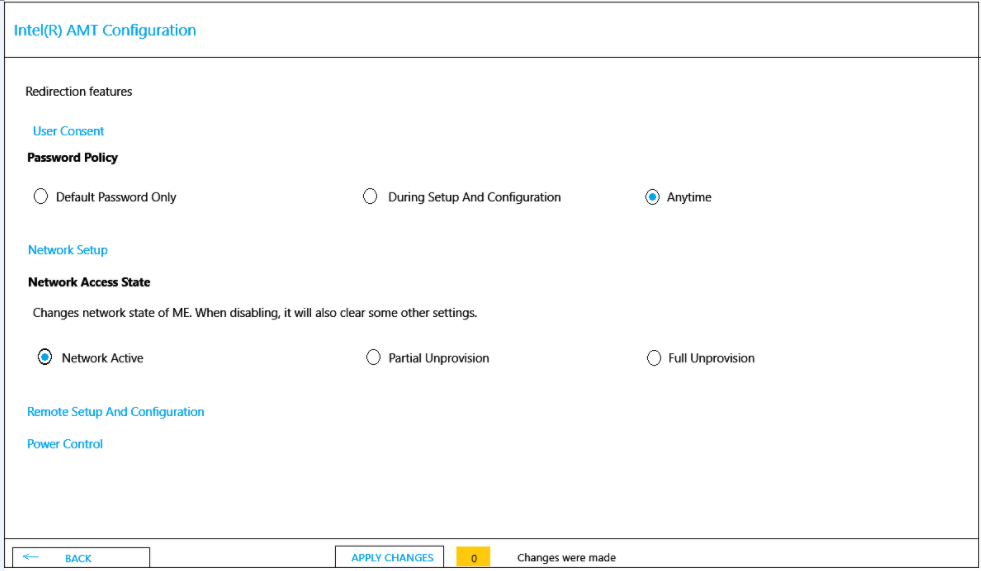
- The options in the Intel(R) AMT Configuration menu include:
- User Consent
- Network Setup
- Remote Setup And Configuration
- Power Control
Affected Products
Latitude 5350, Latitude 5431, Latitude 5450, Latitude 9430, Latitude 5530, Latitude 5550, Latitude 5430, OptiPlex 5000 Micro, OptiPlex 5400 All-In-One, OptiPlex 7000 Tower, OptiPlex 7000 Micro, OptiPlex 7400 All-In-One, Precision 3571, Precision 5570
, Precision 3460 Small Form Factor, Precision 3660 Tower, XPS 15 9520
...
Article Properties
Article Number: 000228454
Article Type: How To
Last Modified: 19 Nov 2025
Version: 4
Find answers to your questions from other Dell users
Support Services
Check if your device is covered by Support Services.