OS10 MTU 配置简介
Summary: MTU 配置简介 最大传输单位 (MTU) 定义接口可以在不分段的情况下传输的最大数据包大小。正确的 MTU 配置对于网络性能和稳定性至关重要。本文档提供了有关戴尔电源开关的 MTU 行为、默认设置和配置命令的详细信息。
This article applies to
This article does not apply to
This article is not tied to any specific product.
Not all product versions are identified in this article.
Instructions
涵盖的关键议题
默认 MTU 配置
- 从版本 10.5.4.4 开始,默认 MTU 值为 9216 字节。以前,它是 1532 字节。
- 用于配置和验证 MTU 值的命令:
default mtu <value>:为没有用户配置 MTU 的所有接口设置自定义 MTU 值no default mtu:将接口重置为系统默认 MTU 值show default mtu:显示系统级默认 MTUshow interface:显示特定接口的当前 MTU
MTU 配置示例
- 如何使用 CLI 命令显示和修改默认 MTU 的示例
- 虚拟 LAN (VLAN) 和虚拟网络的配置方案,重点强调在所有接口上保持一致的 MTU 设置以避免 L2 和 L3 VPN 抖动的重要性
注意事项和最佳实践
- 确保所有接口(包括边界网关协议 (BGP) 对等方之间的逻辑和物理接口)的 MTU 设置一致
- 除 S4200-ON 系列和 S5148-ON 平台等特定型号外,大多数戴尔电源交换机不支持碎片化
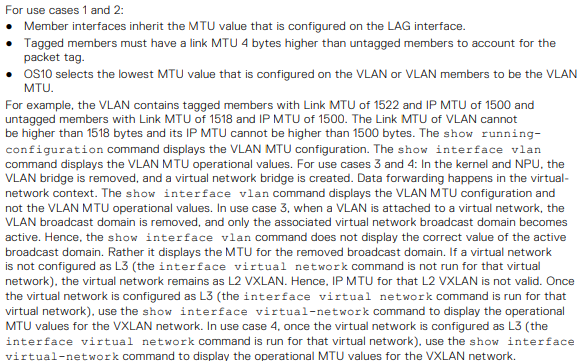
- OS10 选择在 VLAN 或 VLAN 成员上配置的最低 MTU 值作为 VLAN MTU
MTU
- 升级到 10.5.4.4 后,对于尚未配置用户配置 MTU 的所有 VLAN 和以太网接口,MTU 默认为 9216
MTU 配置不正确的潜在问题
数据包丢失
- 如果 MTU 设置得太低,则会丢弃较大的数据包,从而导致严重的数据丢失和网络性能下降
网络抖动
- 接口之间的 MTU 设置不一致可能会导致 L2 和 L3 VPN 抖动,从而破坏网络稳定性和连接性
延迟增加
- 不正确的 MTU 设置可能会导致碎片增加,从而导致更高的延迟和更低的吞吐量
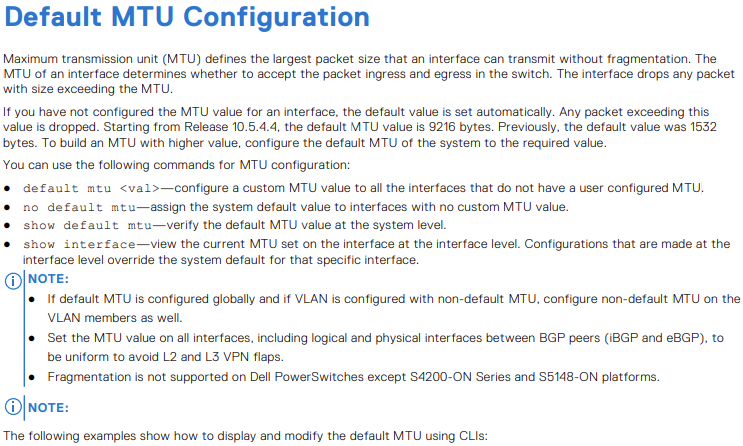
显示默认 MTU。
OS10# show default mtu
Default MTU 9216 bytes
无用户配置的系统默认值
OS10# show interface ethernet 1/1/1
Ethernet 1/1/1 is up, line protocol is down
Hardware is Eth, address is 90:b1:00:00:00:a0
 Current address is 90:b1:00:00:00:a0
Pluggable media present, QSFP+ type is QSFP+ 40GBASE-LR4
 Wavelength is 1311
 Receive power reading is no power
Interface index is 11
Internet address is not set
Mode of IPv4 Address Assignment: not set
Interface IPv6 oper status: Disabled
MTU 9216 bytes, IP MTU 1500 bytes
LineSpeed 0, Auto-Negotiation off
Flowcontrol rx off tx off
ARP type: ARPA, ARP Timeout: 60
Last clearing of "show interface" counters: 20:45:24
Queuing strategy: fifo
Input statistics:
 0 packets, 0 octets
 0 64-byte pkts, 0 over 64-byte pkts, 0 over 127-byte pkts
 0 over 255-byte pkts, 0 over 511-byte pkts, 0 over 1023-byte pkts
 0 Multicasts, 0 Broadcasts, 0 Unicasts
 0 runts, 0 giants, 0 throttles
 0 CRC, 0 overrun, 0 discarded
Output statistics:
 0 packets, 0 octets
 0 64-byte pkts, 0 over 64-byte pkts, 0 over 127-byte pkts
 0 over 255-byte pkts, 0 over 511-byte pkts, 0 over 1023-byte pkts
 0 Multicasts, 0 Broadcasts, 0 Unicasts
 0 throttles, 0 discarded, 0 Collisions, wred drops
Rate Info(interval 30 seconds):
 Input 0 Mbits/sec, 0 packets/sec, 0% of line rate
Output 0 Mbits/sec, 0 packets/sec, 0% of line rate
Time since last interface status change: 20:45:25
OS10# configure terminal
OS10(config)# default mtu 9000
OS10(config)#
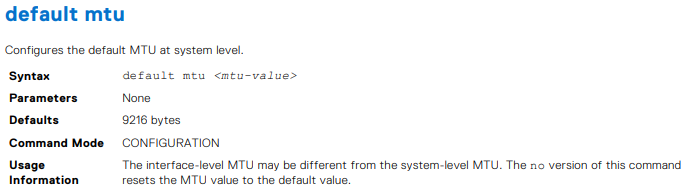
- 示例
OS10# default mtu 9216
OS10# no default mtu

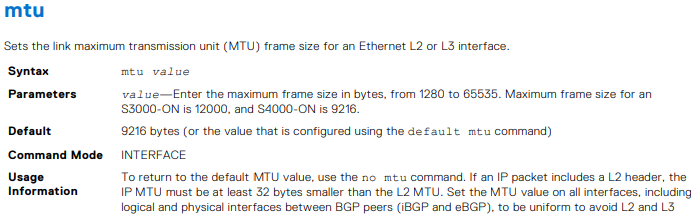

表 54.VLAN MTU 配置的用例。
| 配置 |
以太网接口 配置 |
show interface output |
|---|---|---|
interface vlan300 no shutdown ! |
interface ethernet1/1/6 no shutdown switchport mode trunk switchport trunk allowed vlan300 ! interface ethernet1/1/9 no shutdown switchport mode trunk switchport trunk allowed vlan300 |
OS10# show interface vlan300 Vlan300 is up, line protocol is up Address is 14:10:10:0d:00:e9, Current address is 14:10:10:0d:00:e9 Interface index is 84 Internet address is not set Mode of IPv4 Address Assignment: not set Interface IPv6 oper status: Enabled Link local IPv6 address: fe80::1010:10ff:fe0d:e9/10 MTU 1532 bytes, IP MTU 1500 bytes |
interface vlan300 no shutdown ! |
interface ethernet1/1/6 no shutdown switchport mode trunk switchport trunk allowed vlan300 ! interface ethernet1/1/9 no shutdown switchport mode trunk switchport trunk allowed vlan300 mtu 1312 |
OS10# show interface vlan300 Vlan300 is up, line protocol is up Address is 14:10:10:0d:00:e9, Current address is 14:10:10:0d:00:e9 Interface index is 84 Internet address is not set Mode of IPv4 Address Assignment: not set Interface IPv6 oper status: Enabled Link local IPv6 address: fe80::1010:10ff:fe0d:e9/10 MTU 1312 bytes, IP MTU 1280 bytes |
virtual-network 3333 ! interface vlan300 no shutdown virtual-network 3333 ! |
interface ethernet1/1/6 no shutdown switchport mode trunk switchport trunk allowed vlan300 ! interface ethernet1/1/9 no shutdown switchport mode trunk switchport trunk allowed vlan300 mtu 1312 |
OS10# # show interface vlan300 Vlan300 is up, line protocol is up Address is 14:18:77:0d:00:e9, Current address is 14:18:77:0d:00:e9 Interface index is 84 Internet address is not set Mode of IPv4 Address Assignment: not set Interface IPv6 oper status: Enabled Link local IPv6 address: fe80::1618:77ff:fe0d:e9/64 MTU 1532 bytes, IP MTU 1500 bytes |
virtual-network 3333 ! interface vlan300 no shutdown virtual-network 3333 ! interface virtual-network 3333 |
interface ethernet1/1/6 no shutdown switchport mode trunk switchport trunk allowed vlan300 ! interface ethernet1/1/9 no shutdown switchport mode trunk switchport trunk allowed vlan300 mtu 1312 |
show interface vlan300 Vlan300 is up, line protocol is up Address is 14:18:77:0d:00:e9, Current address is 14:18:77:0d:00:e9 Interface index is 84 Internet address is not set Mode of IPv4 Address Assignment: not set Interface IPv6 oper status: Enabled Link local IPv6 address: fe80::1618:77ff:fe0d:e9/64 MTU 1532 bytes, IP MTU 1500 bytes OS10# show interface virtual-network 3333 Virtual-network 3333 is up, line protocol is up Address is 14:18:77:0d:00:ea, Current address is 14:18:77:0d:00:ea Interface index is 87 Internet address is not set Mode of IPv4 Address Assignment: not set Interface IPv6 oper status: Enabled MTU 1312 bytes, IP MTU 1280 bytes |
- 示例
OS10(conf-if-eth1/1/7)# mtu 3000


- 示例
OS10# show default mtu
Default MTU 9216 bytes

Additional Information
OS10 用户指南在线文档 - 支持 SmartFabric OS10 软件 |文档 |戴尔美国
Affected Products
SmartFabric OS10 SoftwareArticle Properties
Article Number: 000228459
Article Type: How To
Last Modified: 07 Nov 2025
Version: 4
Find answers to your questions from other Dell users
Support Services
Check if your device is covered by Support Services.