Avamar: 19.10 Avamar Administrator Console Automatically Enables the Group When Edit a Disabled Group Policy
Summary: This article describes a behavior in Avamar 19.10 where the Avamar Administrator console automatically enables the group when to edit a disabled group policy.
This article applies to
This article does not apply to
This article is not tied to any specific product.
Not all product versions are identified in this article.
Symptoms
-
Launch Avamar Administrator and go to Policy window.
-
Select a disabled group policy, right-click and "Edit Group…"
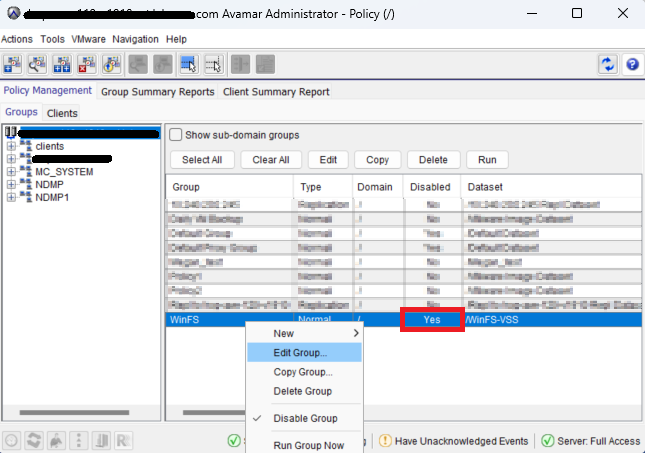
-
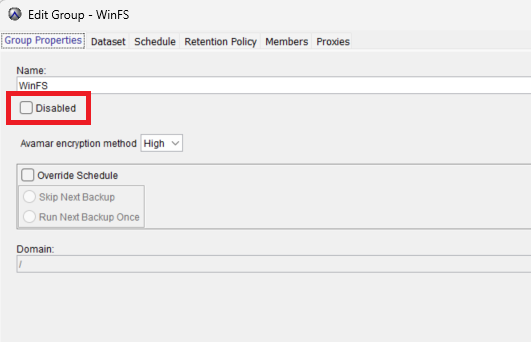
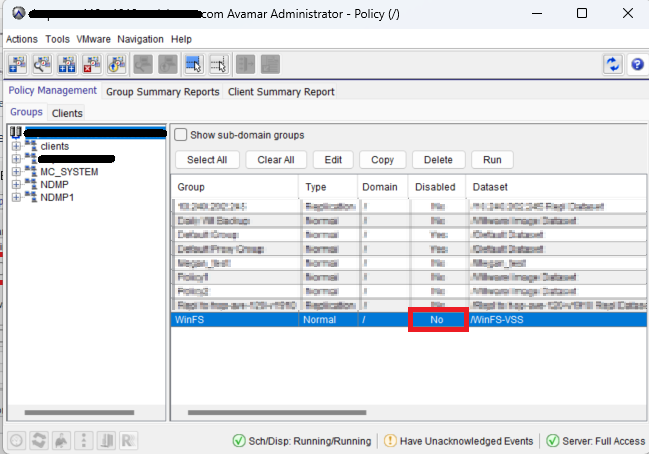
When the Edit Group window appears, the "Disabled" checkbox field is cleared and if it clicks OK, the group policy is enabled:
Cause
This issue appeared in the Avamar 19.10 version, and it is determined as a software defect.
Resolution
As a workaround, use Avamar User Interface (AUI), or always check the "Disabled" checkbox in the Avamar Administrator console before save (click OK) the group policy.
The defect is fixed in the Avamar 19.12 version release.
Affected Products
AvamarProducts
Avamar ServerArticle Properties
Article Number: 000228606
Article Type: Solution
Last Modified: 16 May 2025
Version: 4
Find answers to your questions from other Dell users
Support Services
Check if your device is covered by Support Services.