在 BIOS 中禁用 M.2 PCIe SSD2 后,Dell Precision 和 Latitude 笔记本电脑无法启动
Summary: 本文提供有关更改 M.2 PCIe BIOS 设置时 Precision 3571 和 Latitude 5531 无法启动的问题的信息。
This article applies to
This article does not apply to
This article is not tied to any specific product.
Not all product versions are identified in this article.
Symptoms
Dell Precision 3571 和 Latitude 5531 可能无法启动进入 Windows 或停留在戴尔徽标屏幕上。当 Windows 安装在 M.2 PCIe SSD1 上并且 M.2 PCIe SSD2 选项在 BIOS 存储设置中更改为“关闭”时,会发生这种情况。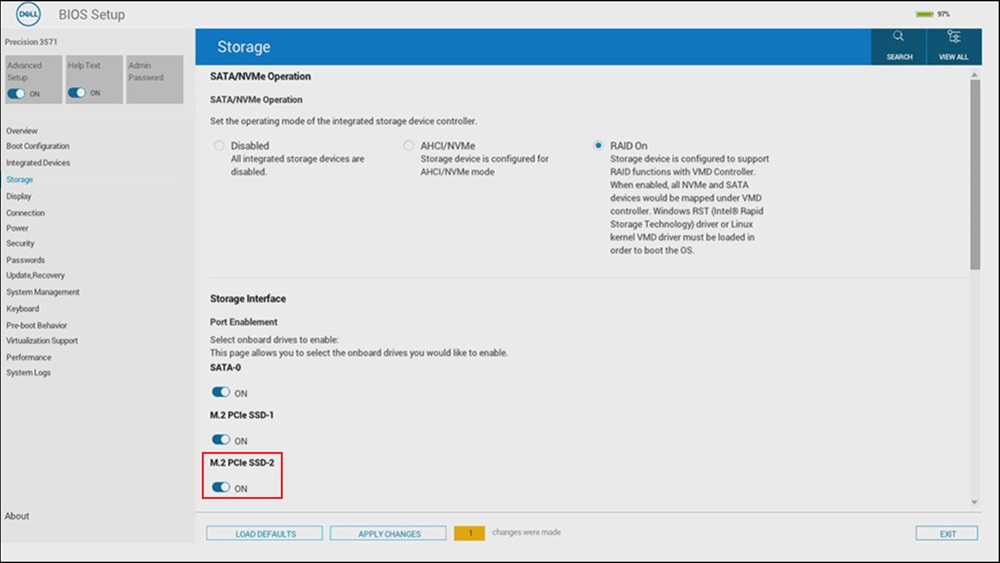
受影响系统:
- Precision 3571
- Latitude 5531
Cause
发生这种情况的原因是英特尔 Alder Lake 芯片组的限制。
Resolution
Affected Products
Latitude 5531, Precision 3571Article Properties
Article Number: 000229541
Article Type: Solution
Last Modified: 24 Apr 2025
Version: 3
Find answers to your questions from other Dell users
Support Services
Check if your device is covered by Support Services.