PowerFlex 4.X:如何從 Dial Home SIO03.02.0000005 的 PFMP 中清除裝置錯誤
Summary: 本文說明如何在觸發 Dial Home (DH) SIO03.02.0000005 時,從 PowerFlex Manager 平台 (PFMP) 清除裝置錯誤。
This article applies to
This article does not apply to
This article is not tied to any specific product.
Not all product versions are identified in this article.
Instructions
當裝置有許多來自作業系統的錯誤時,PowerFlex Manager 會產生警示,列出受影響磁碟的 SDS 和磁碟名稱。
- 從 PowerFlex Manager 警示頁面擷取 SDS 名稱和磁碟路徑:

在此範例中,磁碟路徑為 N/A0009,代表它是磁碟插槽 9。
當磁碟處於錯誤狀態時,路徑會變更為 N/A 0000 <,插槽 no> N/A000A 代表插槽 10,B 代表 11,依此類推,因為這是十六進位。
SDS 名稱是路徑旁邊的欄位,在此範例中,我們放置通用 <SDS 名稱 >。
- 如果磁碟路徑已正確列出 (/dev/sdf),則表示磁碟仍處於健全狀態。可以忽略此警示,但請留意此磁碟一段時間,確保其不會變成錯誤狀態 (依然會產生警示)。
- 如果磁碟是 NA000X,其中 X 是 dIsk 的插槽編號,則表示它處於錯誤狀態,需要執行錯誤動作。
- 若要清除磁碟錯誤,請前往:
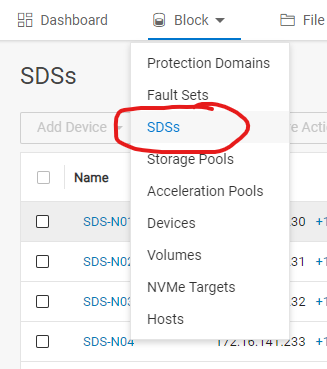
選取從警示中擷取的 SDS 名稱,並在右側窗格列出所有 SDS 裝置:

選取從警示 NA0009 擷取的裝置路徑。在我們的範例中,從更多動作中,按一下清除錯誤 (如果磁碟處於錯誤狀態,則應為作用中)。
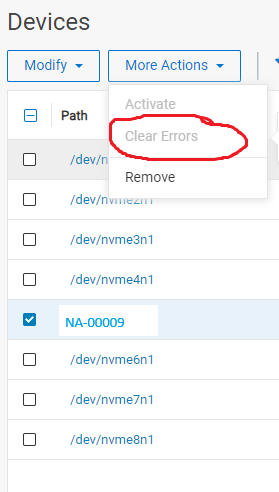
- 清除錯誤 48 小時後,監控磁碟狀態。如果返回到錯誤狀態,則需要更換磁碟。
Additional Information
若為 PowerFlex 3.6,請查看文章 PowerFlex 3.6 清除 PowerFlex 簡報伺服器中的磁碟錯誤。
Products
PowerFlex rack, VxFlex Ready Nodes, PowerFlex custom node, PowerFlex appliance R650, PowerFlex appliance R6525, PowerFlex appliance R660, PowerFlex appliance R6625, Powerflex appliance R750, PowerFlex appliance R760, PowerFlex appliance R7625
, PowerFlex custom node, PowerFlex custom node R650, PowerFlex custom node R6525, PowerFlex custom node R660, PowerFlex custom node R6625, PowerFlex custom node R750, PowerFlex custom node R760, PowerFlex custom node R7625, PowerFlex rack connectivity, PowerFlex rack HW, PowerFlex rack RCM Software, VxFlex Ready Node, VxFlex Ready Node R640, VxFlex Ready Node R740xd, PowerFlex appliance R640, PowerFlex appliance R740XD, PowerFlex appliance R7525, PowerFlex appliance R840, VxFlex Ready Node R840
...
Article Properties
Article Number: 000256801
Article Type: How To
Last Modified: 10 Jan 2025
Version: 3
Find answers to your questions from other Dell users
Support Services
Check if your device is covered by Support Services.