PowerFlex: LDAP Could not connect to LDAP service due to configuration problem
Summary: Attempts to log in to PowerFlex UI or CLI using LDAP authentication are unsuccessful. Logins using native 'admin' accounts are still successful.
This article applies to
This article does not apply to
This article is not tied to any specific product.
Not all product versions are identified in this article.
Symptoms
PowerFlex login attempts with an Active Directory user failed with the error "Could not connect to LDAP service due to configuration problem. Contact your system administrator" MDM trace logs report the error "The server requires binds to turn on integrity checking if SSL\TLS are not already active on the connection"
PowerFlex authentication is configured as non-secure LDAP (ldap://)
Login Failure:
[root@mdm01 ~]# scli --login --username ADuser@powerflexlab.local --ldap_authentication
Enter password:
Error: MDM failed command.  Status: Could not connect to LDAP service due to configuration problem. Please contact your system administrator.
MDM Trace Logs:
2024/11/19 18:20:36.154486 71d0003df927:mosLdap_InitConnection:00205: Connection was successfully established to LDAP://dc01.powerflexlab.local:389 ldap service
2024/11/19 18:20:36.155993 71d0003df927:mosLdap_Bind:00130: After ldap_sasl_bind - rc: 0, msg-id: 1
2024/11/19 18:20:36.157283 71d0003df927:mosLdap_ParseBindResult:00217: ldap_sasl_bind: Strong(er) authentication required (8)
*****
2024/11/19 18:20:36.157286 71d0003df927:mosLdap_ParseBindResult:00225: Additional information: 00002028: LdapErr: DSID-0C09032E, comment: The server requires binds to turn on integrity checking if SSL\TLS are not already active on the connection, data 0, v4f7c
*****
2024/11/19 18:20:36.157288 71d0003df927:mosLdap_Bind:00178: Failed to bind to ldap service with username CN=ADuser,CN=Users,DC=powerflexlab,DC=local
Verify Non-Secure LDAP Configuration:
[root@mdm01 ~]# scli --query_user_authentication_properties
------------------------------------------------------------
User authentication method: Native and LDAP
System has 1 configured LDAP services
------------------------------------------------------------
LDAP service ID: 7f28b9b000000000
LDAP service name: SRVLDAP
LDAP service URI: LDAP://dc01.powerflexlab.local:389
Users base DN: cn=Users,dc=powerflexlab,dc=local
FQDN: powerflexlab.local
User search filter: (&(objectClass=user)(sAMAccountName=[USER])(memberOf:1.2.840.113556.1.4.1941:=[GROUP]))
Username DN format: CN=[USER],CN=Users,DC=powerflexlab,DC=local
Authorizer DN: svc_powerflex
LDAP service has 1 configured groups.
        Role: Administrator
        Group DN: CN=pfadmins,CN=Users,DC=powerflexlab,DC=local
------------------------------------------------------------
Impact
Active Directory users are unable to log in to PowerFlex UI or CLI.
Cause
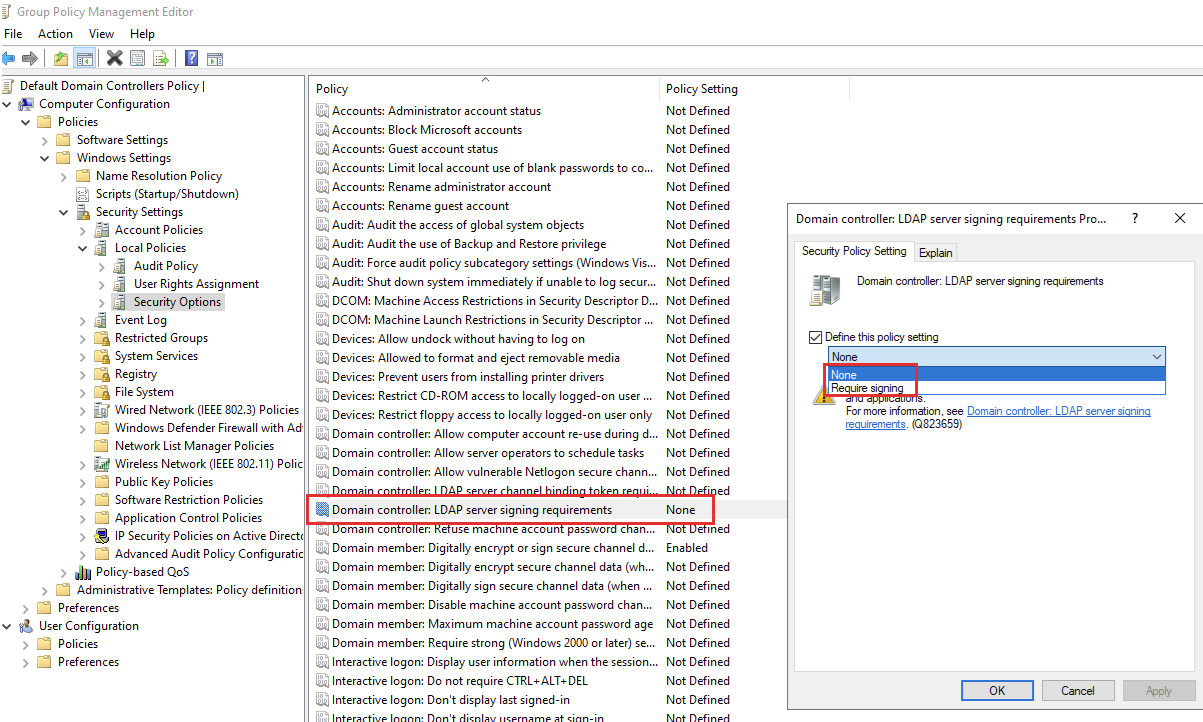
Domain controller's Group Policy settings are configured to enforce authentication to be secured with TLS/SSL, and reject insecure login attempts.
The specific Group Policy setting that rejects insecure LDAP binds is:
- Policy: Domain controller: LDAP server signing requirements
- Setting: Require Signing

Resolution
Reconfigure PowerFlex LDAP Authentication to use LDAPS instead of non-secure LDAP (Link).
Alternatively, setting the Group Policy "Domain controller: LDAP server signing requirements" to None allows non-secure LDAP authentication to succeed, but this is less secure and not recommended.
Impacted Version
PowerFlex 3.x and 4.x
Fixed In Version
Not a PowerFlex issue
Affected Products
ScaleIOProducts
PowerFlex SoftwareArticle Properties
Article Number: 000257275
Article Type: Solution
Last Modified: 03 Jan 2026
Version: 2
Find answers to your questions from other Dell users
Support Services
Check if your device is covered by Support Services.