Alienware Command Center Causes Systems to Run in High-Performance Mode Instead of Balanced Mode
Summary: Information about incorrect game mode performance in Alienware Command Center.
This article applies to
This article does not apply to
This article is not tied to any specific product.
Not all product versions are identified in this article.
Symptoms
Many games in the Alienware Command Center library are set to run in Performance mode (rather than Balanced) which can cause higher processor and graphics card temperatures than expected.
Cause
This behavior is caused by the Alienware Command Center application. For example, Alien Isolation (a game from 2014) is set for Performance mode (which is not necessary on most modern systems). This puts Windows into High-Performance mode while the game is running (which will cause higher processor speeds and thermal output than is necessary.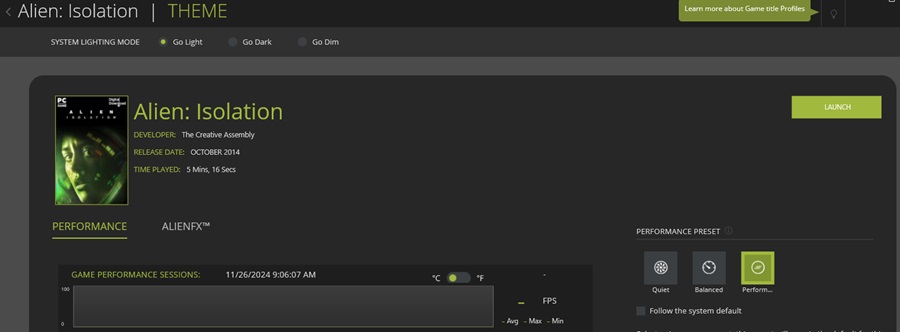
Resolution
Alienware Command Center
Change the Performance preset switch to System (rather than per game) and ensure that the Performance is in Balanced mode.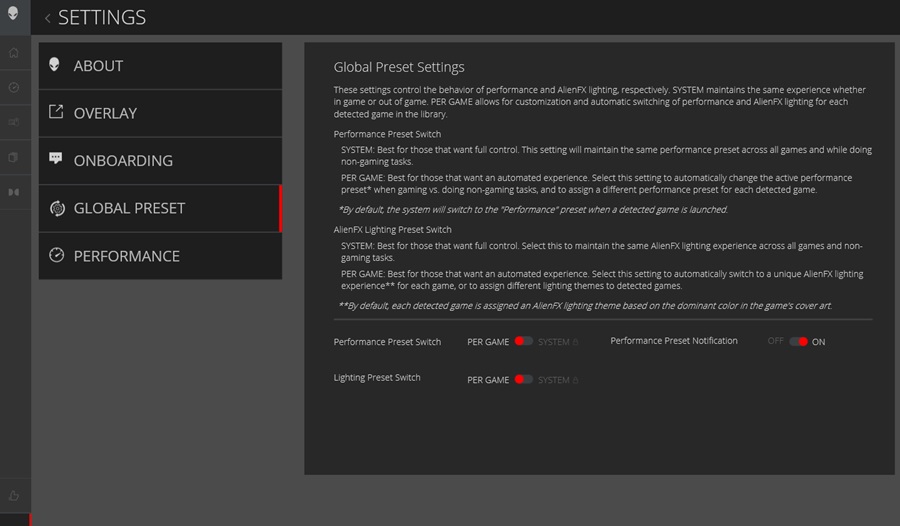

Note: To enhance individual controls for each game, clear the box and then select the preferred mode (Balanced being the optimal mode).
Affected Products
Alienware, AlienwareArticle Properties
Article Number: 000277861
Article Type: Solution
Last Modified: 04 Feb 2025
Version: 2
Find answers to your questions from other Dell users
Support Services
Check if your device is covered by Support Services.