VxRail: Cannot quiesce guest file system while doing a snapshot on a Windows SQL VM
Summary: This is a Windows 2022 Virtual Machine (VM) which is running a SQL server service. Cannot quiesce guest file system while doing a snapshot of the VM.
This article applies to
This article does not apply to
This article is not tied to any specific product.
Not all product versions are identified in this article.
Symptoms
SQL Server on a Windows 2022 VM, backups always fail.
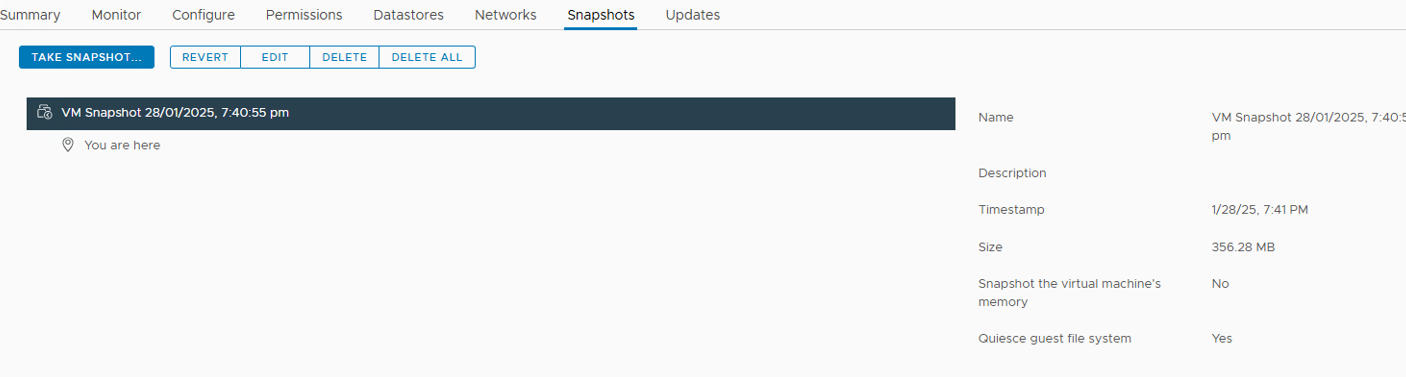
The customer's backup solution must quiesce the file system. When manually doing a snapshot with the checked option, it completes, but option "quiesce guest file system" is shown as NOT selected.
The VMware.log seems fine, and the quiesce option is set during snapshot.
Review of the Guest OS, and Windows events, no error events regarding volume shadow copy.
The VMware tool service is running.
Cause
The VMware tool service is running. But the VMware Snapshot provider service is missing.
The VMware Snapshot provider service is necessary to snapshot the Guest VM with the "Quiesce guest file system" option.
Resolution
To resolve this issue, follow the steps below:
- Uninstall VMware tools and reinstall it again. Ensure that the snapshot provider service is there.
- To uninstall VMware tools:
- RDP to Windows, open programs and features and uninstall VMware tools.
- To install VMware tools, follow the instructions in either Broadcom link: https://knowledge.broadcom.com/external/article?articleId=376237 [knowledge.broadcom.com]
https://docs.vmware.com/en/VMware-Tools/12.4.0/com.vmware.vsphere.vmwaretools.doc/GUID-391BE4BF-89A9-4DC3-85E7-3D45F5124BC7.html [docs.vmware.com]
- Once the tool is again installed, selecting the quiesce option should work.
Affected Products
VxRail 460 and 470 Nodes, VxRail D Series NodesProducts
VxRail G Series Nodes, VxRail E Series Nodes, VxRail P Series NodesArticle Properties
Article Number: 000278658
Article Type: Solution
Last Modified: 22 May 2026
Version: 2
Find answers to your questions from other Dell users
Support Services
Check if your device is covered by Support Services.