Data Domain: Unable to enable CloudIQ/APEX AIOps CyberSecurity feature from the DD GUI
Summary: When trying to enable CloudIQ/APEX AIOps CyberSecurity feature the "Accept" button remains greyed out Note: Plan for fix in future DDOS
This article applies to
This article does not apply to
This article is not tied to any specific product.
Not all product versions are identified in this article.
Symptoms
When trying to enable CloudIQ/APEX AIOps CyberSecurity feature the "Accept" button remains greyed out.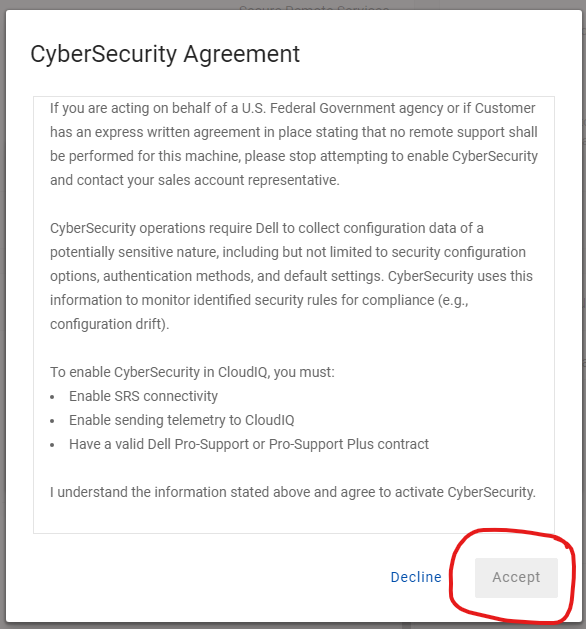
Cause
This behavior can be due to current resolution and zoom setting for the particular system.
Resolution
Try increasing the zoom on the screen so that a scroll bar appears inside the terms and agreement box. Please find the below snip, the screen is at 150% zoom, after scrolling to the bottom the Accept button will get enabled.
For further assistance, please call into Support.
Affected Products
Data Domain, APEXArticle Properties
Article Number: 000283891
Article Type: Solution
Last Modified: 11 Feb 2025
Version: 1
Find answers to your questions from other Dell users
Support Services
Check if your device is covered by Support Services.