PowerProtect Data Manager - PowerScale/isilon user's privileges to use with PPDM NAS
Summary: Correct privileges to setup PPDM NAS backups along with "System" Access and "Non-System" Access Zones
This article applies to
This article does not apply to
This article is not tied to any specific product.
Not all product versions are identified in this article.
Instructions
When setting up PowerProtect Data Manager to backup PowerScale, Isilon NAS backup, you must to setup the correct permissions and privileges from your PowerScale to your NAS user you want to use, as followed:
For "System" access zone:
Follow the guide at page 13, and create a new role in "Access, Membership and roles", and "Roles":

○ The PowerScale user must have these privileges to perform discovery, backup, and restore:
Privileges
ISI_PRIV_LOGIN_CONSOLE (Read only)
ISI_PRIV_LOGIN_PAPI (Read only)
ISI_PRIV_AUTH (Read only)
ISI_PRIV_AUTH_ZONES (Read only)
ISI_PRIV_NETWORK (Read only)
ISI_PRIV_NFS (Read write)
ISI_PRIV_SMB (Read write)
ISI_PRIV_SNAPSHOT (Read write)
ISI_PRIV_SYNCIQ (Read write)
In addition to these privileges, please add your PowerProtect Data Manager user used for the backups into the Role "BackupAdmins" that also has the Backup and restore privileges. This role contains:
ISI_PRIV_IFS_BACKUP (Read only)
ISI_PRIV_IFS_RESTORE (Read only)
Testing the user's privileges with "user mapping", it should return:
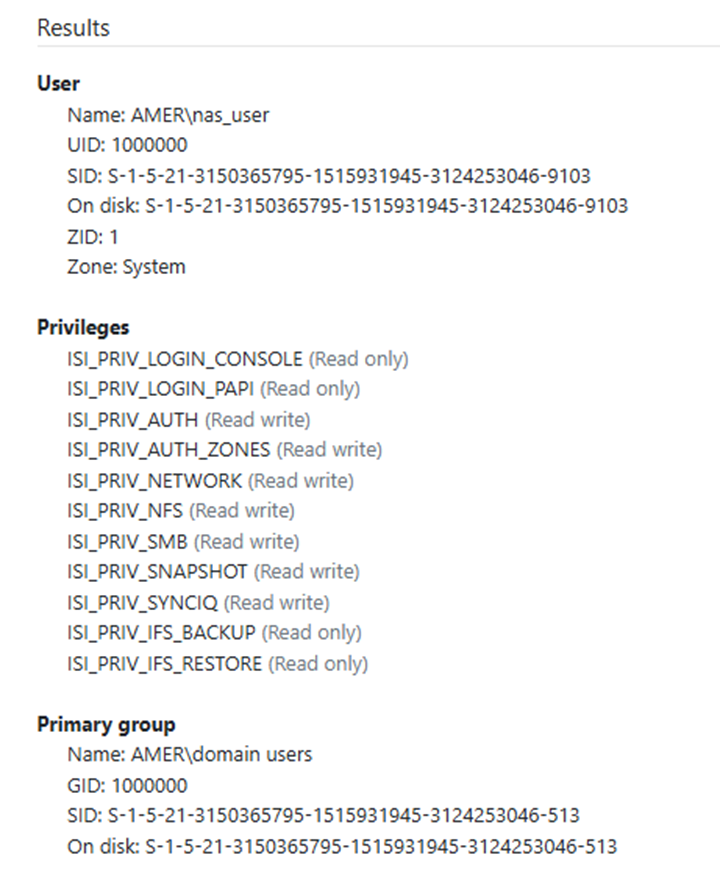
As part of 19.19 version onward and because of the addition of the "ChangeList" feature from PowerScale, these 2 new privileges need to be added:
ISI_PRIV_JOB_ENGINE (Read write)
ISI_PRIV_STATISTICS (Read only)
For "Non-System" Access zones:
For "Non-System" access zones, the same procedure is applied, however, few privileges cannot be applied to the PowerProtect Data Manager role due to not being a System access zone.
- Create your PowerProtect Data Manager role, as for a System zone.
- Add your user to it, and add the following permissions to it:
ISI_PRIV_LOGIN_PAPI (Read only)
ISI_PRIV_AUTH (Read only)
ISI_PRIV_NFS (Read write)
ISI_PRIV_SMB (Read write)
ISI_PRIV_IFS_BACKUP (Read only)
ISI_PRIV_IFS_RESTORE (Read only)
The "Test mapping" for that Access zone shall return:
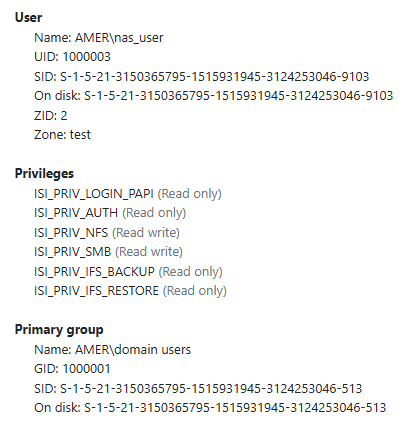
These privileges must be applied for ALL your "Non-System" access zones.
Affected Products
PowerProtect Data ManagerArticle Properties
Article Number: 000290981
Article Type: How To
Last Modified: 24 Jun 2025
Version: 2
Find answers to your questions from other Dell users
Support Services
Check if your device is covered by Support Services.