PowerFlex 4.x LDAP 그룹을 추가하거나 제거할 수 없음
Summary: PFxM에서 AD를 제거한 후 Keycloak에서 캐싱된 LDAP 그룹을 제거할 수 없습니다.
This article applies to
This article does not apply to
This article is not tied to any specific product.
Not all product versions are identified in this article.
Symptoms
시나리오
그룹을 추가하려고 처음 시도하면 다음 오류가 발생합니다.
Failed to add Remote group
Failed to find request group
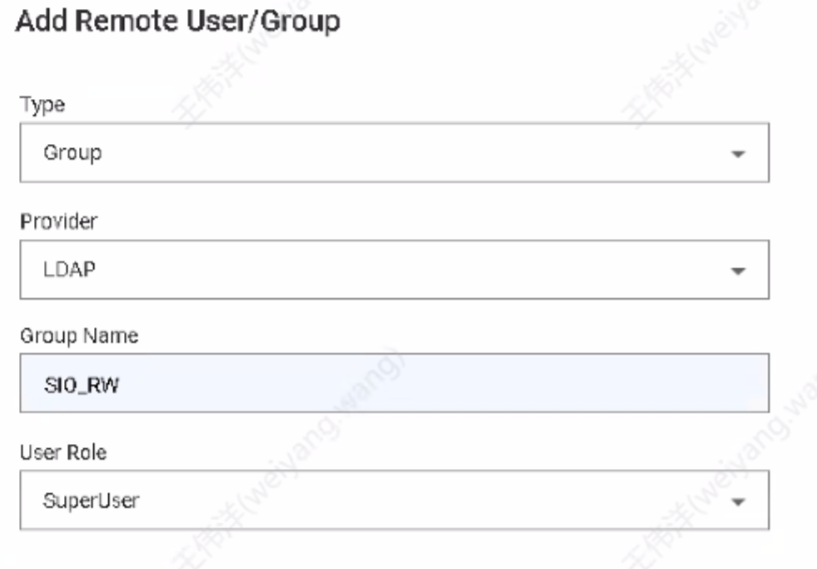
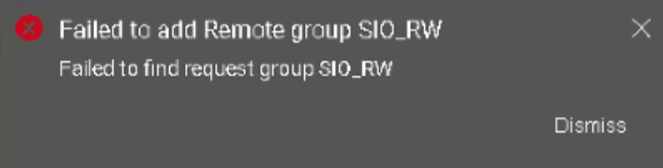
keycloak ldap 필터에 그룹을 채운 후 PowerFlex 4.X - PFxM Keycloak 관리 콘솔에서 LDAP 그룹 검색 필터를 적용하는 방법 | Dell US PFxM에서 LDAP 공급자로 동기화하면 sso.stdout.log에 그룹 동기화가 작동하지 않는 것으로 표시됩니다.
2024-09-25T07:10:31.684769872Z stdout F 2024-09-25T07:10:31.684Z  INFO 1 --- [io-8083-exec-10] c.d.s.c.DirectoryServicesController      : Received sync user request
2024-09-25T07:10:31.685080784Z stdout F 2024-09-25T07:10:31.684Z  INFO 1 --- [pool-9-thread-1] c.d.s.managers.DirectoryServiceManager   : starting sync process for ldap groups
2024-09-25T07:10:31.69678586Z stdout F 2024-09-25T07:10:31.696Z  INFO 1 --- [pool-9-thread-1] com.dell.sso.clients.KeycloakClient      : Ldap group sync started
2024-09-25T07:10:31.710659167Z stdout F 2024-09-25T07:10:31.710Z ERROR 1 --- [pool-9-thread-1] com.dell.sso.clients.KeycloakClient      : Failed to sync groups: HTTP 500 Internal Server Error

2024-09-25T07:10:31.710959458Z stderr F Exception in thread "pool-9-thread-1" java.lang.RuntimeException: com.dell.sso.exceptions.KeycloakException: Failed to sync groups or sync users
LDAP 공급자를 제거한 후에도 데이터베이스에 그룹이 표시됩니다(예: 아래 4개 그룹 표시).
delladmin@mvm1:/>kubectl exec -it -c database -n powerflex $(kubectl get pods -n powerflex -l='postgres-operator.crunchydata.com/role=master, postgres-operator.crunchydata.com/instance-set' | grep Running | cut -d' ' -f1) -- psql -U postgres -d keycloak -c "SELECT COUNT(*) FROM keycloak_group;"
 count
-------
     4
(1 row)
PFMP에서 LDAP로의 연결은 다음 명령을 사용하여 확인해야 합니다.
kubectl exec -it keycloak-0 -n powerflex -- curl --verbose ldap://
예:

영향
LDAP 그룹을 추가하거나 제거할 수 없습니다.
Cause
|
AD가 제거된 경우:
|
Resolution
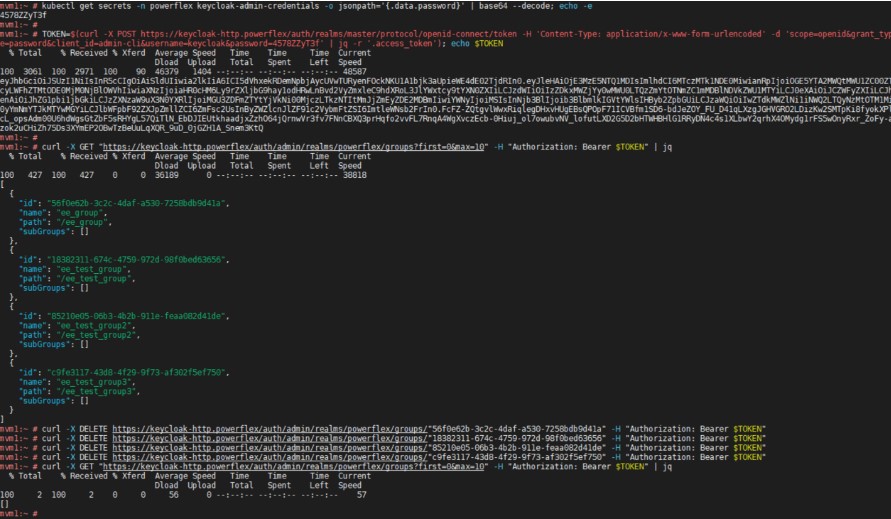
API를 사용하여 각 그룹을 한 번에 하나씩 삭제합니다.
1) keycloak 자격 증명을 검색합니다..
kubectl get secrets -n powerflex keycloak-admin-credentials -o jsonpath='{.data.username}' | base64 --decode; echo -e
kubectl get secrets -n powerflex keycloak-admin-credentials -o jsonpath='{.data.password}' | base64 --decode; echo -e
2) 액세스 토큰을 가져옵니다(참고: 4578ZZyT3f를 위 출력의 암호로 대체).
TOKEN=$(curl -X POST https://keycloak-http.powerflex/auth/realms/master/protocol/openid-connect/token -H 'Content-Type: application/x-www-form-urlencoded' -d 'scope=openid&grant_type=password&client_id=admin-cli&username=keycloak&password=4578ZZyT3f' | jq -r '.access_token'); echo $TOKEN
3) API를 사용하여 그룹 확인 (한 번에 10 개 그룹 나열)
curl -X GET "https://keycloak-http.powerflex/auth/admin/realms/powerflex/groups?first=0&max=10" -H "Authorization: Bearer $TOKEN" | jq
4) 그룹을 한 번에 하나씩 삭제합니다(위 3단계의 각 ID로 대체).
curl -X DELETE https://keycloak-http.powerflex/auth/admin/realms/powerflex/groups/"" -H "Authorization: Bearer $TOKEN"
또는 루프 스크립트를 사용하여 group_id 한 번에 하나씩 삭제하십시오.
for group_id in $(curl -X GET "https://keycloak-http.powerflex/auth/admin/realms/powerflex/groups" -H "Authorization: Bearer $TOKEN" | jq -r '.[].id'); do curl -X DELETE "https://keycloak-http.powerflex/auth/admin/realms/powerflex/groups/$group_id" -H "Authorization: Bearer $TOKEN"; done
예제
영향을 받는 버전
PFMP 4.x
수정된 버전
Keycloak의 향후 버전은 대량 그룹 삭제를 지원합니다.
Affected Products
PowerFlex rack, VxFlex Ready Nodes, PowerFlex custom node, PowerFlex appliance R650, PowerFlex appliance R6525, PowerFlex appliance R660, PowerFlex appliance R6625, Powerflex appliance R750, PowerFlex appliance R760, PowerFlex appliance R7625
, PowerFlex appliance R640, PowerFlex appliance R740XD, PowerFlex appliance R7525, PowerFlex appliance R840
...
Article Properties
Article Number: 000291045
Article Type: Solution
Last Modified: 04 Mar 2025
Version: 1
Find answers to your questions from other Dell users
Support Services
Check if your device is covered by Support Services.