Intel Unison End of Service Announcement
Summary: This article provides information about the discontinuation of the Intel Unison software and provides information about uninstalling the software.
This article applies to
This article does not apply to
This article is not tied to any specific product.
Not all product versions are identified in this article.
Instructions
Affected Platforms:
- Inspiron 14 5430
- Inspiron 16 5630
- Inspiron 16 7630 2-in-1
- Inspiron 14 Plus 7430
- Inspiron 16 Plus 7630
- Inspiron 13 5330
- Latitude 9440 2-in-1
- Latitude 7440
- Latitude 7340
- Precision 5480
- XPS 15 9530
- XPS 13 Plus 9320
- XPS 17 9730
The Intel Unison application is being discontinued and will no longer function correctly or be available for download after June 30, 2025.
| Country or region | Application unavailable for download | Application discontinued |
|---|---|---|
| All Countries | June 30, 2025 | June 30, 2025 |
Intel Unison software is available on eligible Dell Windows-based computers with 13th Gen Intel and newer CPUs. This software allows users to connect their smart phone or tablet to a computer for a focused unified work and communication experience.
Dell Technologies recommends uninstalling Intel Unison from your Dell computer before the end of service date. This frees up storage space and ensures optimum device experience.
To Uninstall the Application:
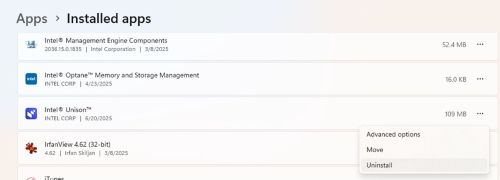
- Select Start, then select Settings > Apps > Installed Apps
- Select Intel Unison, then select Uninstall
Affected Products
Inspiron 13 5330, Inspiron 14 5430, Inspiron 14 Plus 7430, Inspiron 16 5630, Inspiron 16 7630 2-in-1, Inspiron 16 Plus 7630, Latitude 7340, Latitude 7440, Latitude 9440 2-in-1, Precision 5480, XPS 13 Plus 9320, XPS 15 9530, XPS 17 9730Article Properties
Article Number: 000337603
Article Type: How To
Last Modified: 26 Jun 2025
Version: 1
Find answers to your questions from other Dell users
Support Services
Check if your device is covered by Support Services.