NetWorker: external user fails to log in through VCUI "Invalid Username or Password"
Summary: External authority (AD/LDAP) user fails to log in to vCenter User (web) Interface (VCUI). An "Invalid Username or Password" message appears. The same external user can successfully log in to other NetWorker interfaces such as the NetWorker Management Console (NMC) or NetWorker Web User Interface (NWUI). ...
This article applies to
This article does not apply to
This article is not tied to any specific product.
Not all product versions are identified in this article.
Symptoms
- Active Directory (AD) or Lightweight Directory Access Protocol (LDAP) has been integrated with the NetWorker authentication service (authc).
- The External Authority Resource was configured using the "default" tenant:
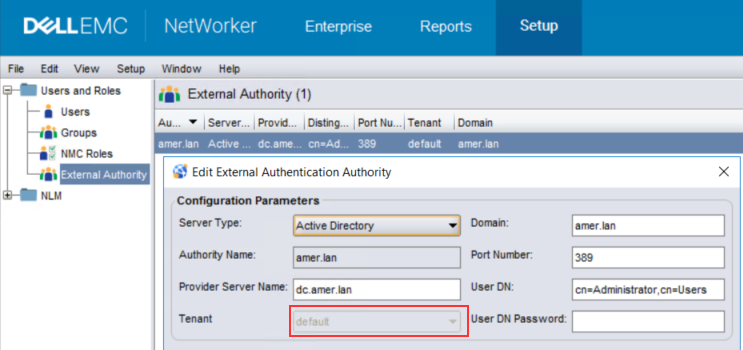
- External authority users can successfully log in to the NetWorker Management Console (NMC), NetWorker Web User Interface (NWUI), Data Protection Restore Web Interface (FLR/SQL restores).
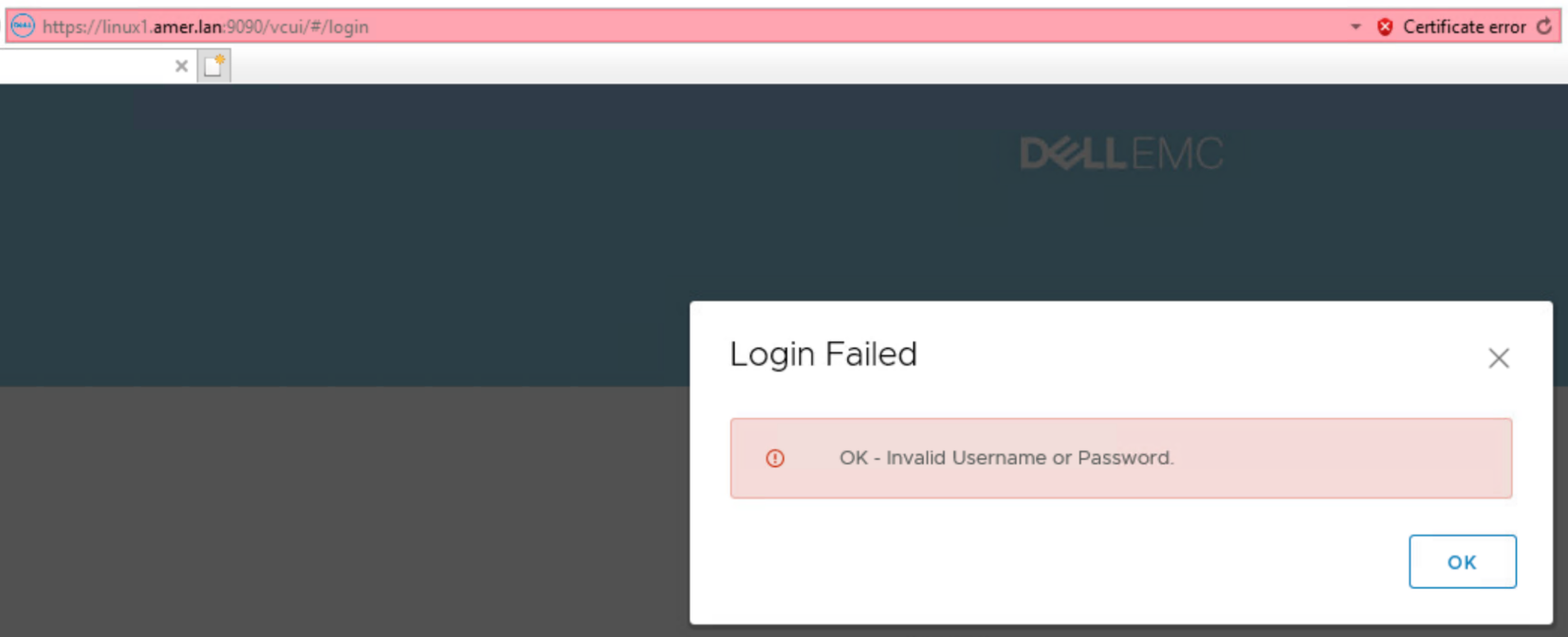
- When logging in to the vCenter User Interface: https://NetWorker-Server-Address:9090/vcui the following error appears:
Cause
The NetWorker server's localhost_access_log.date.txt reports:
Linux: /nsr/authc/logs/localhost_access_log.date.txt
Windows: ..\Program Files\EMC NetWorker\nsr\authc-server\tomcat\logs\localhost_access_log.date.txt
Windows: ..\Program Files\EMC NetWorker\nsr\authc-server\tomcat\logs\localhost_access_log.date.txt
NWSERVERIP   - - [DD/MMM/YYYY:HH:MM:SS -TZ] "GET /nwrestapi/v3/internal/users/domain%255Cusername HTTP/1.1" 404 478
VCUICLIENTIP - - [DD/MMM/YYYY:HH:MM:SS -TZ] "POST /vcui/api/login HTTP/1.1" 401 135
The NetWorker server's vcui.log reports:
Linux: /nsr/authc/logs/vcui.log
Windows: ..\Program Files\EMC NetWorker\nsr\authc-server\tomcat\logs\vcui.log
Windows: ..\Program Files\EMC NetWorker\nsr\authc-server\tomcat\logs\vcui.log
YYYY-MM-DD HH:MM:SS [https-jsse-nio-9090-exec-4] INFO  c.e.n.c.n.i.NwRestApiBase.buildWebResourceFromUri 171 - Call NW: [https://NetWorker-ServerAddress:9090/nwrestapi/v3/internal/users/domain%255Cusername]
YYYY-MM-DD HH:MM:SS [https-jsse-nio-9090-exec-4] INFO  c.e.n.c.n.impl.GlobalApi.validateAdminLogin 46 - Got response.
YYYY-MM-DD HH:MM:SS [https-jsse-nio-9090-exec-4] ERROR c.e.n.c.n.impl.GlobalApi.validateAdminLogin 118 - Get internal user information failed. Response Status Family = CLIENT_ERROR does not equal SUCCESSFUL
YYYY-MM-DD HH:MM:SS [https-jsse-nio-9090-exec-4] ERROR c.e.n.c.n.impl.GlobalApi.validateAdminLogin 122 - Admin status was not able to be determined for given user and group.
YYYY-MM-DD HH:MM:SS [https-jsse-nio-9090-exec-4] ERROR c.d.e.n.s.AuthenticationServiceImpl.assertValidNetWorkerLogin 82 - NetWorker login failed for administrator
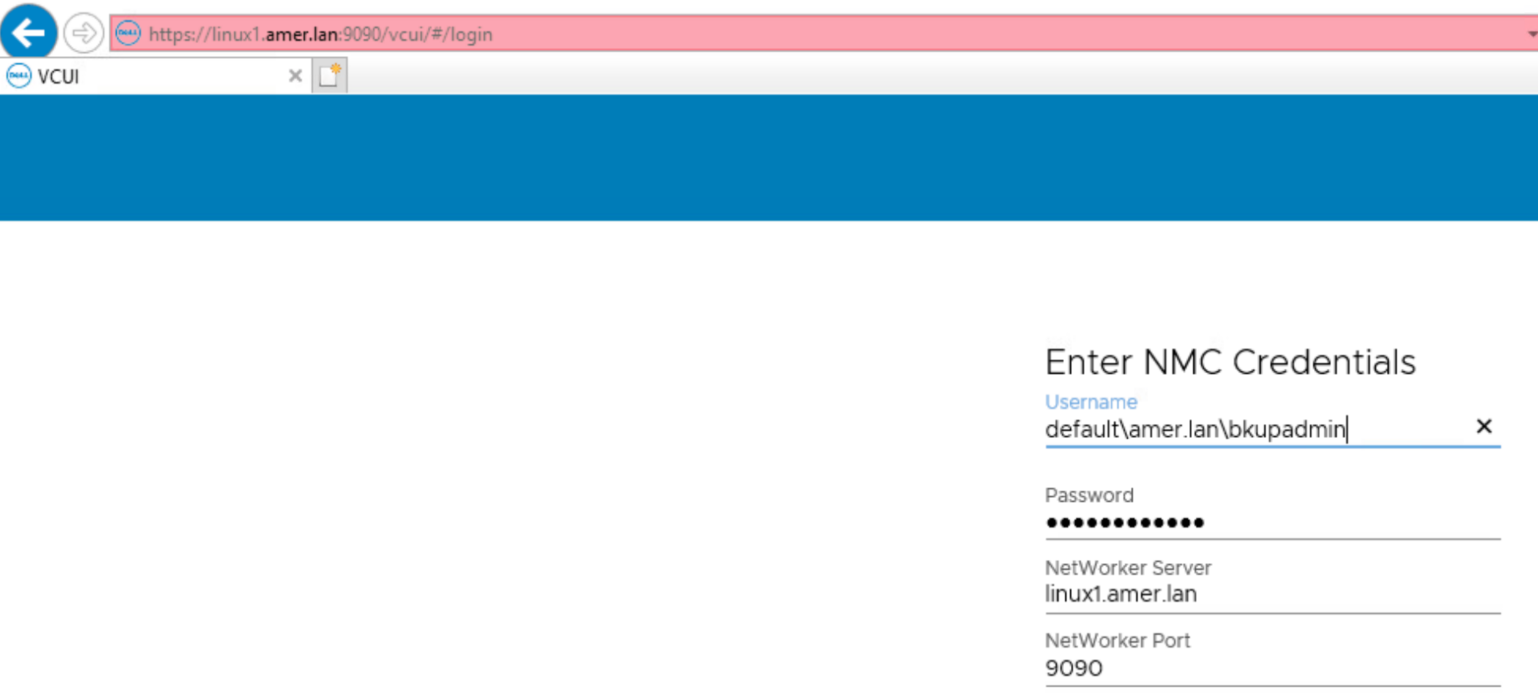
The external user login was specified using the format "domain\username." This method is used in the NMC, NWUI, and Data Protection Restore Client with the 'default' tenant. The VCUI requires the tenant to be specified: "tenant\domain\username."
For example, when the default tenant is used this would appear as "default\domain\username."
Resolution
When logging in to the vCenter User Interface (VCUI) as external authority (AD or LDAP) users, specify the tenant\domain\username.
The successful authentication request is logged in the vcui.log:
YYYY-MM-DD HH:MM:SS [https-jsse-nio-9090-exec-3] INFO  c.e.n.c.n.i.NwRestApiBase.buildWebResourceFromUri 171 - Call NW: [https://NetWorker-Server-Address:9090/nwrestapi/v3/internal/users/default%255Cdomain%255Cusername]
YYYY-MM-DD HH:MM:SS [https-jsse-nio-9090-exec-3] INFO  c.e.n.c.n.impl.GlobalApi.validateAdminLogin 46 - Got response.
Affected Products
NetWorkerProducts
NetWorker Family, NetWorker SeriesArticle Properties
Article Number: 000204190
Article Type: Solution
Last Modified: 21 Mar 2025
Version: 4
Find answers to your questions from other Dell users
Support Services
Check if your device is covered by Support Services.