Avamar VM image restore fails before showing any progress bytes
Resumen: Avamar VM image restore fails before showing any progress bytes as proxy fails to communicate with datadomain to reterive VM metadata
Este artículo se aplica a
Este artículo no se aplica a
Este artículo no está vinculado a ningún producto específico.
No se identifican todas las versiones del producto en este artículo.
Síntomas
N/A
- VM image restore fails before showing any progress bytes as we could see below error messages from the Activity logs :
 avvcbimage Info <12181>: Avtar metadata restore session initiated
 avvcbimage Info <10684>: Setting ctl message version to 3 (from 1)
 avvcbimage Info <16136>: Setting ctl max message size to 268435456
 avvcbimage Info <6688>: Process 8885 (/usr/local/avamarclient/bin/avtar) finished (code 158: cannot establish connection with server (possible network or DNS failure))
 avvcbimage Warning <6690>: CTL workorder "MOD-########99" non-zero exit status 'code 158: cannot establish connection with server (possible network or DNS failure)'
 avvcbimage Error <0000>: [IMG0011] restore metadata Avtar exited with 'code 158: cannot establish connection with server (possible network or DNS failure)'
 avvcbimage FATAL <17824>: GetDiskAttributed Failed
 avvcbimage Info <18664>: Login(https://<Vcenter_FQDN>:443/sdk) Datacenter: 'xxxxert'
 avvcbimage Info <19728>:      - connected to 'VirtualCenter' - version: '<vcenter_version>',  apiVersion:'6.7.3'
 avvcbimage Info <42146>: Login by loginWS test is OK.
 avvcbimage Info <42225>: (CURL) Logging into datacenter path of 'folder?dcPath=xxxxert', xxxxert => xxxxert
 avvcbimage Info <42226>: (Legacy) Logging into datacenter path of 'folder?dcPath=xxxxert', xxxxert => xxxxert
 avvcbimage Info <41153>: Using CURL Method
 avvcbimage Info <41154>: Re-using vCS Session Cookie
 avvcbimage Info <41153>: Using CURL Method
 avvcbimage Info <41154>: Re-using vCS Session Cookie
 avvcbimage Info <17770>: DataStore Storage Info:
  DataStore:'<Datastore_Name>': Pre Free Space(KB)=4340662272,
                                    Post Free Space(KB) range=##### to #####
    Disk '####': Disk Size(KB)=#####, restoreThisDisk=1, thin=0
    Disk '####': Disk Size(KB)=#####, restoreThisDisk=1, thin=0
    Disk '####': Disk Size(KB)=#####, restoreThisDisk=1, thin=0
    Disk '####': Disk Size(KB)=#####, restoreThisDisk=1, thin=0
 avvcbimage Info <17825>: A VM create has been requested.
 avvcbimage Info <18664>: Login(https://<Vcenter_FQDN>:443/sdk) Datacenter: 'xxxxert'
 avvcbimage Info <19728>:      - connected to 'VirtualCenter' - version: '<vcenter_version>',  apiVersion:'6.7.3'
 avvcbimage Info <42146>: Login by loginWS test is OK.
 avvcbimage Info <42213>: checking datastore type for special processing, checking for type vsan, actual type = VMFS
 avvcbimage Info <42213>: checking datastore type for special processing, checking for type VVOL, actual type = VMFS
 avvcbimage Error <17771>: Invalid request to create a VM.
 avvcbimage Error <0000>: [IMG2012] VM creation failed during restore.
- The errors mentioned above means that proxy tried to retrieve the VM metadata from Data Domain but it failed to communicate with it.
- This caused the the proxy request sent to vcenter to be invalid thuse VM creation step failed.
Causa
- While initiating the restore, encryption mode on Data Domain is kept on 'Default' value even the encryption strength is set to 'High' while backup taken on both Avamar and Data Domain.
Resolución
- To Fix this issue follow below steps while initiating restore:
1-Make Sure that encryption strength is set to 'High' on avamar as below:
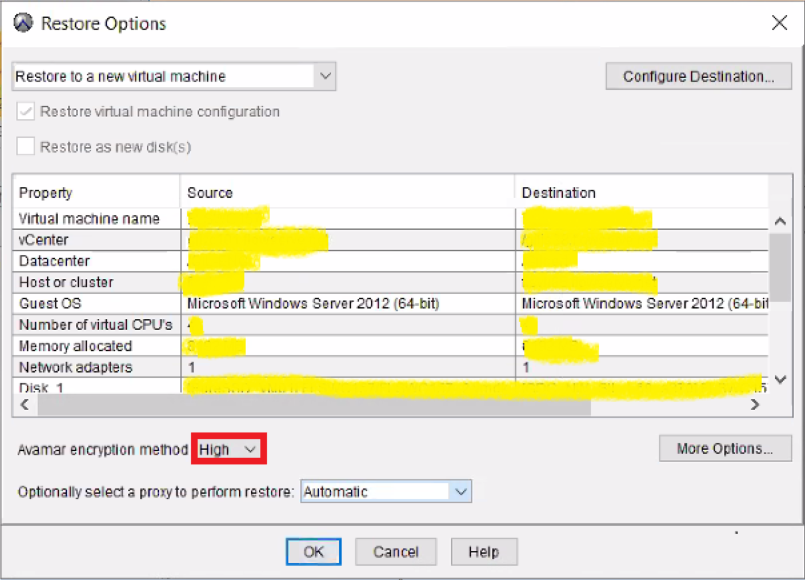
2-Then click on 'More Options' to set encryption to 'High' on Datadomian as below:
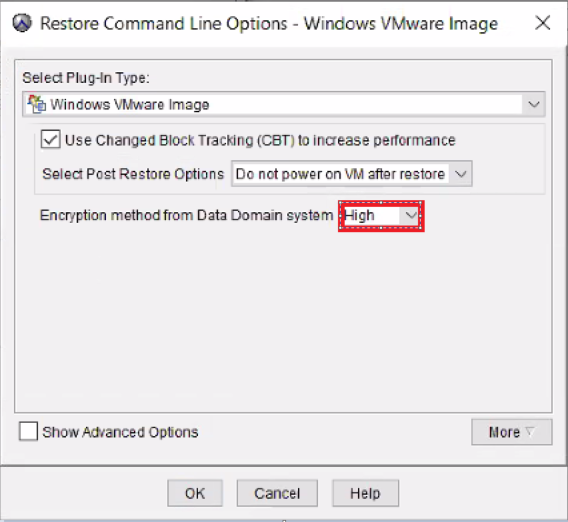
- Image restore shall work fine.
Productos afectados
AvamarProductos
Avamar, Avamar Client for VMwarePropiedades del artículo
Número del artículo: 000069283
Tipo de artículo: Solution
Última modificación: 06 nov 2025
Versión: 3
Encuentre respuestas a sus preguntas de otros usuarios de Dell
Servicios de soporte
Compruebe si el dispositivo está cubierto por los servicios de soporte.