진행 바이트를 표시하기 전에 Avamar VM 이미지 복원에 실패함
Resumen: 프록시가 Data Domain과 통신하여 VM 메타데이터를 검색하지 못하기 때문에 진행 바이트를 표시하기 전에 Avamar VM 이미지 복원에 실패함
Este artículo se aplica a
Este artículo no se aplica a
Este artículo no está vinculado a ningún producto específico.
No se identifican todas las versiones del producto en este artículo.
Síntomas
N/A
- 작업 로그에 아래와 같은 오류 메시지가 표시될 수 있으므로 진행 바이트를 표시하기 전에 VM 이미지 복원에 실패합니다.
avvcbimage Info <12181>: Avtar metadata restore session initiated avvcbimage Info <10684>: Setting ctl message version to 3 (from 1) avvcbimage Info <16136>: Setting ctl max message size to 268435456 avvcbimage Info <6688>: Process 8885 (/usr/local/avamarclient/bin/avtar) finished (code 158: cannot establish connection with server (possible network or DNS failure)) avvcbimage Warning <6690>: CTL workorder "MOD-########99" non-zero exit status 'code 158: cannot establish connection with server (possible network or DNS failure)' avvcbimage Error <0000>: [IMG0011] restore metadata Avtar exited with 'code 158: cannot establish connection with server (possible network or DNS failure)'avvcbimage FATAL <17824>: GetDiskAttributed Failed avvcbimage Info <18664>: Login(https://<Vcenter_FQDN>:443/sdk) Datacenter: 'xxxxert' avvcbimage Info <19728>: - connected to 'VirtualCenter' - version: '<vcenter_version>', apiVersion:'6.7.3' avvcbimage Info <42146>: Login by loginWS test is OK. avvcbimage Info <42225>: (CURL) Logging into datacenter path of 'folder?dcPath=xxxxert', xxxxert => xxxxert avvcbimage Info <42226>: (Legacy) Logging into datacenter path of 'folder?dcPath=xxxxert', xxxxert => xxxxert avvcbimage Info <41153>: Using CURL Method avvcbimage Info <41154>: Re-using vCS Session Cookie avvcbimage Info <41153>: Using CURL Method avvcbimage Info <41154>: Re-using vCS Session Cookie avvcbimage Info <17770>: DataStore Storage Info: DataStore:'<Datastore_Name>': Pre Free Space(KB)=4340662272, Post Free Space(KB) range=##### to ##### Disk '####': Disk Size(KB)=#####, restoreThisDisk=1, thin=0 Disk '####': Disk Size(KB)=#####, restoreThisDisk=1, thin=0 Disk '####': Disk Size(KB)=#####, restoreThisDisk=1, thin=0 Disk '####': Disk Size(KB)=#####, restoreThisDisk=1, thin=0 avvcbimage Info <17825>: A VM create has been requested. avvcbimage Info <18664>: Login(https://<Vcenter_FQDN>:443/sdk) Datacenter: 'xxxxert' avvcbimage Info <19728>: - connected to 'VirtualCenter' - version: '<vcenter_version>', apiVersion:'6.7.3' avvcbimage Info <42146>: Login by loginWS test is OK. avvcbimage Info <42213>: checking datastore type for special processing, checking for type vsan, actual type = VMFS avvcbimage Info <42213>: checking datastore type for special processing, checking for type VVOL, actual type = VMFS avvcbimage Error <17771>: Invalid request to create a VM. avvcbimage Error <0000>: [IMG2012] VM creation failed during restore.
- 위에서 언급한 오류는 프록시가 Data Domain에서 VM 메타데이터를 검색하려고 했지만 Data Domain과 통신하지 못했음을 의미합니다.
- 이로 인해 vCenter로 전송된 프록시 요청이 유효하지 않게 되어 VM 생성 단계가 실패했습니다.
Causa
- 복원을 시작하는 동안 Data Domain의 암호화 모드는 '기본값'으로 유지됩니다. Avamar와 Data Domain 모두에서 백업을 수행하는 동안 암호화 강도가 'High'로 설정되어 있어도 마찬가지입니다.
Resolución
- 이 문제를 해결하려면 복원을 시작하는 동안 아래 단계를 따릅니다.
1-다음과 같이 Avamar에서 암호화 강도가 'High'로 설정되어 있는지 확인합니다.

2-아래와 같이 Data Domain에서 'More Options'를 클릭하여 암호화를 'High'로 설정합니다.
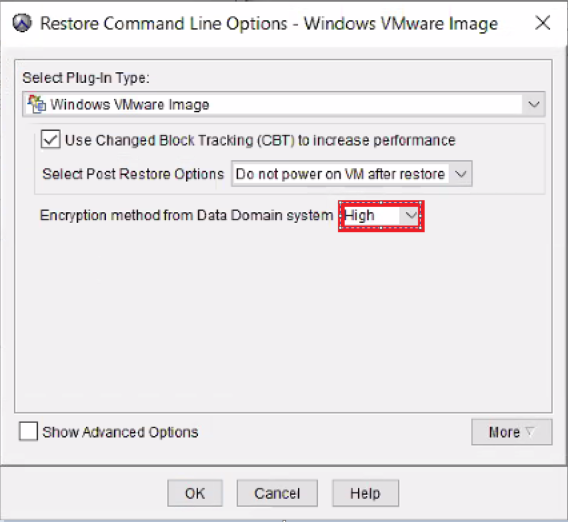
- 이미지 복원이 정상적으로 작동합니다.
Productos afectados
AvamarProductos
Avamar, Avamar Client for VMwarePropiedades del artículo
Número del artículo: 000069283
Tipo de artículo: Solution
Última modificación: 06 nov 2025
Versión: 3
Encuentre respuestas a sus preguntas de otros usuarios de Dell
Servicios de soporte
Compruebe si el dispositivo está cubierto por los servicios de soporte.