PowerVault: Unload Tape using ITDT DCR or CLI
Resumen: PowerVault: Unload Tape using ITDT DCR or CLI
Este artículo se aplica a:
Este artículo no se aplica a:
Este artículo no está vinculado a ningún producto específico.
En este artículo no se identifican todas las versiones de los productos.
Instrucciones
This procedure should be used when we have a stuck tape scenario. It could solve issues that SCSI commands are blocked, if we don't have a mechanical problem with the head or another piece of Tape Backup Unit.
0. All requirements are the same for both versions of ITDT:
Table of Contents
See "Fast install guide" session on the bottom of this article to get instructions to run ITDT CLI;
Run needed version, according to your Operation System.
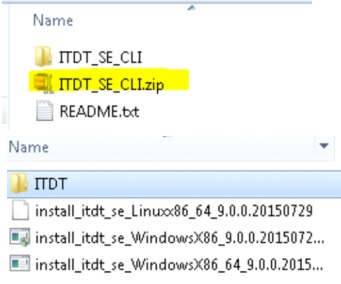
Table of Contents
Table of Contents
- Requirements
- Download Links
- ITDT DCR (GUI)
- ITDT Older versions
- ITDT CLI
- Fast install guide - ITDT CLI
0. All requirements are the same for both versions of ITDT:
- ITDT-DCR or Standard Edition CLI (If you don't have it, please download and install the application);
- Stop all Backup application services;
1. Download links
ITDT-DCR (GUI): https://downloads.dell.com/FOLDER02412201M/3/TL2000_TL4000_ZPE.exe
ITDT-SE (CLI): https://downloads.dell.com/FOLDER03379935M/4/ITDTutility_ZPE.exe
Table of Contents
2. ITDT DCR
- Run ITDT-DCR (GUI) as Administrator;
- Select Diagnostic/Maintenance option;
- Go to "Control Center" and run "Scan";
- After detecting the drive(s), select "Tapeutil";
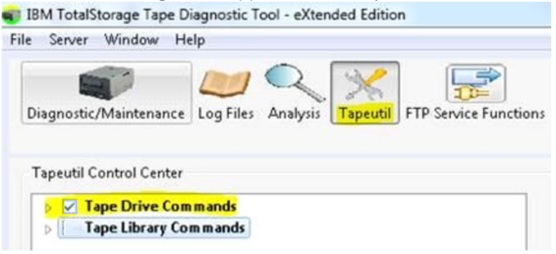
- Expand "Tape Drive Commands", locate and select the option "Unload";

- Go to "Execute" to confirm the operation.

Table of Contents
3. ITDT older versions
For older versions of the ITDT, follow the steps below:- Open ITDT-DCR (GUI);
- Select Diagnostic/Maintenance option;
- Go to "Control Center" and run "Scan";
- Select the drive with the tape stucked;
- Click on Test > Stuck Tape / Eject Test.

4. ITDT-SE CLI
See "Fast install guide" session on the bottom of this article to get instructions to run ITDT CLI;
- Open the ITDT-SE CLI;

- [S] Run scan for tape drives;
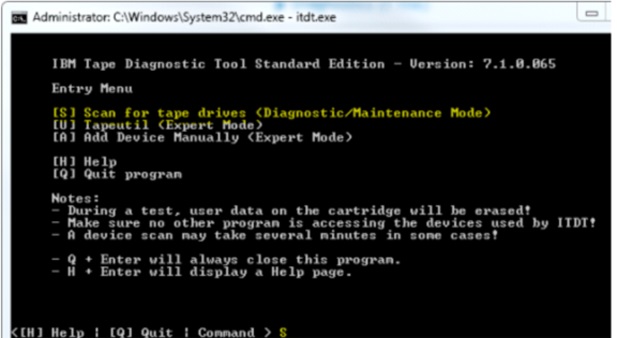
- [M] Open "Main Menu";
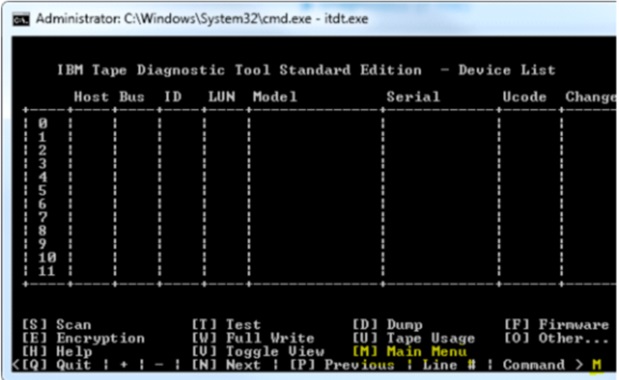
- [U] Open "Tapeutil" (Expert Mode);

- [30] Run "Unload Tape".

- For more information about these applications, search for ITDT User's guide on vendor’s web site.
Table of Contents
5. Fast Install guide - ITDT CLI:
Extract the package "ITDTutility_ZPE" and the installer "install_itdt_se" in "ITDT_SE_CLI".Run needed version, according to your Operation System.
Table of Contents
Productos afectados
PowerVaultPropiedades del artículo
Número de artículo: 000117533
Tipo de artículo: How To
Última modificación: 20 oct 2025
Versión: 5
Encuentra las respuestas que necesitas con la ayuda de otros usuarios de Dell
Servicios de asistencia
Comprueba si tu dispositivo está cubierto por los servicios de asistencia.