Dell Command Update Command-Line Driver Scan Error
Résumé: Learn about the Dell Command | Update driver scan error, "No update information is available. System is not supported by the available catalog(s)."
Cet article concerne
Cet article ne concerne pas
Cet article n’est associé à aucun produit spécifique.
Toutes les versions du produit ne sont pas identifiées dans cet article.
Symptômes
Dell Command | Update contains the command-line interface (CLI) tool dcu-cli.exe. This allows administrators the configuration abilities of Dell Command | Update and driver management from the Windows Command Prompt or PowerShell.
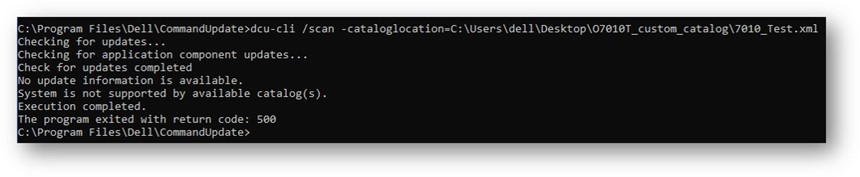
Scanning for driver updates fails with an error stating, "No update information is available. System is not supported by the available catalog(s)." This error occurs when a TechDirect Custom Driver Catalog XML is in use.
An example command that may fail with this error is:dcu-cli /scan -cataloglocation=C:\temp\CUSTOM_CATALOG.xml
Affected Products:
- Dell Command | Update
Cause
This error message is misleading, because the testing done by Dell shows that the model used is supported. Confirm that the model is supported by referencing the Dell Command | Update Application driver details page on Dell Support and referencing the Compatible Systems.
The required -allowXML switch is still in a disabled (default) state, causing the error.
-allowXML: Allows the user to enable or disable the use of the XML catalog file
Résolution
The correct commands required to scan with a TechDirect Custom Driver Catalog XML in use are:
dcu-cli /configure -allowXML=enabledcu-cli /scan -cataloglocation=C:\temp\CUSTOM_CATALOG.xml
If the issue persists, verify that the correct Dell platforms have been selected during the creation process of the TechDirect Custom Driver Catalog XML.
Informations supplémentaires
For more information about command line, refer to the Dell Command | Update command-line interface section of the Dell Command | Update Reference Guide from Support for Dell Command Update Manuals & Documentation.
Produits concernés
OptiPlex, Latitude, XPS, Fixed Workstations, Mobile Workstations, Dell Command | UpdatePropriétés de l’article
Numéro d’article: 000223721
Type d’article: Solution
Dernière modification: 25 août 2025
Version: 3
Trouvez des réponses à vos questions auprès d’autres utilisateurs Dell
Services de support
Vérifiez si votre appareil est couvert par les services de support.