Data Protection Advisor - Error 500 when previewing a custom report
Riepilogo: An error 500 occurs when previewing a custom report. The report runs fine when scheduled.
Questo articolo si applica a
Questo articolo non si applica a
Questo articolo non è legato a un prodotto specifico.
Non tutte le versioni del prodotto sono identificate in questo articolo.
Sintomi
When previewing a custom report, the following error 500 is observed:
RendererFactory could not create the RendererParametersXML
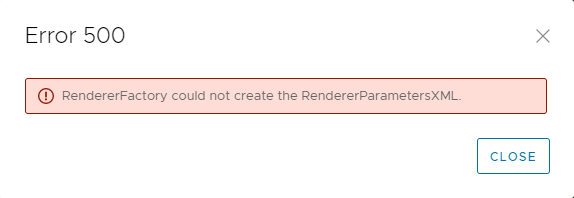
The report runs correctly when scheduled.
The issue only happens when Previewing the report under Custom Report Templates.
The following messages are seen in the DPA server.log on the Application server:
2022-11-07 15:00:07,170 ERROR [com.emc.dpa.command.reporter.execution.ReportRendererMDB] (Thread-56839) Error getting response from report engine for run id 7d326f70-0ac2-4d48-9b3d-300c306b86ad: com.emc.dpa.
datamodel.render.RendererServiceException: RendererFactory could not create the RendererParametersXML
...
Caused by: com.ctc.wstx.exc.WstxUnexpectedCharException: Unexpected character ' ' (code 32) (missing name?)
at [row,col {unknown-source}]: [3,69]
RendererFactory could not create the RendererParametersXML
The report runs correctly when scheduled.
The issue only happens when Previewing the report under Custom Report Templates.
The following messages are seen in the DPA server.log on the Application server:
2022-11-07 15:00:07,170 ERROR [com.emc.dpa.command.reporter.execution.ReportRendererMDB] (Thread-56839) Error getting response from report engine for run id 7d326f70-0ac2-4d48-9b3d-300c306b86ad: com.emc.dpa.
datamodel.render.RendererServiceException: RendererFactory could not create the RendererParametersXML
...
Caused by: com.ctc.wstx.exc.WstxUnexpectedCharException: Unexpected character ' ' (code 32) (missing name?)
at [row,col {unknown-source}]: [3,69]
Causa
This issue is caused by having the "&" special character in the title of the report.
Note, this is not the name of the custom report template, it is the title of the report which is configured in the Report Format options.
Note, this is not the name of the custom report template, it is the title of the report which is configured in the Report Format options.
Risoluzione
The & symbol needs to be removed from the report title.
- Select the report in Custom Report Templates and click EDIT.
- Click on the Preview tab and click the REPORT FORMAT > TABLE FORMAT.
- In the Table Format screen, remove the & symbol from the text in the Title field.
- Save the report and confirm the preview runs without errors.
Prodotti interessati
Data Protection AdvisorProprietà dell'articolo
Numero articolo: 000205086
Tipo di articolo: Solution
Ultima modifica: 26 mag 2026
Versione: 5
Trova risposta alle tue domande dagli altri utenti Dell
Support Services
Verifica che il dispositivo sia coperto dai Servizi di supporto.