NetWorker: Windows File System Backup for Azure Client is Missing Files
Riepilogo: Windows file system on Azure skips files although there is no NetWorker directive to do so.
Questo articolo si applica a
Questo articolo non si applica a
Questo articolo non è legato a un prodotto specifico.
Non tutte le versioni del prodotto sono identificate in questo articolo.
Sintomi
Windows file system on Azure skips files although there is no NetWorker directive to do so.
Debug save output shows
Debug save output shows
87713:save: Found prototype specification for '\\?\GLOBALROOT\Device\HarddiskVolumeShadowCopy1288\': skip : hiberfil.sys
87713:save: Found prototype specification for '\\?\GLOBALROOT\Device\HarddiskVolumeShadowCopy1288\Areas Compartidas\':+ skip : *.*
Causa
The backup file system is on Azure storage volume. The system uses Volume Shadow copy Service (VSS) Writer "Sync Share Service Writer." It skips files by design.
To verify that this is the cause,
- Open a command prompt as Administrator and run:
C:\>  DISKSHADOW /l writers.txt
DISKSHADOW> LIST WRITERS DETAILED
DISKSHADOW> exit
- Look at the output file for writers.txt. If you see the below message, then that confirms the issue.
* WRITER "Sync Share Service Writer"
.////
and that writer contains Components with affected drive
            - Components:
            - File List: Path = J:\DataFiles, Filespec = *.*
            - Paths affected by this component:
                - J:\DataFiles
            - Volumes affected by this component:
                               - \\?\Volume{c34a534a-63a2-4aee-b47a-e2092dc7a901}\ [J:\]
Risoluzione
Turn off VSS for backing up Azure storage volumes with the command:
VSS:*=off
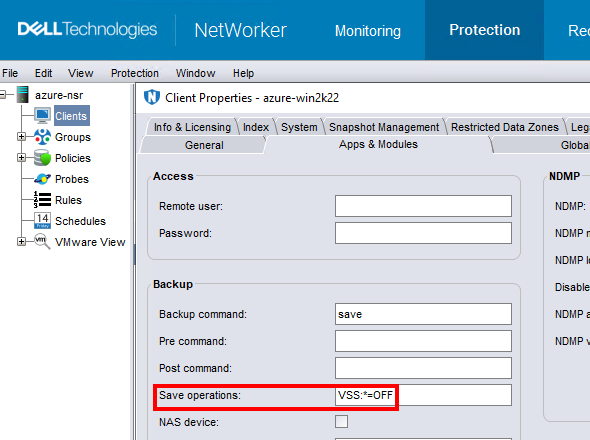
NOTE: Only do this for clients that backup file system data. Performing a backup without VSS makes it impossible to backup the windows
DISASTER_RECOVERY:\ save set; meaning, Bare Metal Recovery (BMR) of the Windows VM would not be possible.
Prodotti interessati
NetWorkerProdotti
NetWorker FamilyProprietà dell'articolo
Numero articolo: 000210906
Tipo di articolo: Solution
Ultima modifica: 04 mar 2026
Versione: 3
Trova risposta alle tue domande dagli altri utenti Dell
Support Services
Verifica che il dispositivo sia coperto dai Servizi di supporto.