Dell APEX Cloud Platform for Microsoft Azure: Die Node-Reparatur wird für Cluster mit einem einzelnen Node in der Azure 2402-Version nicht unterstützt.
Riepilogo: Die Azure 2402-Version unterstützt keinen Reparaturvorgang für Cluster mit einem Node. Wenn der Node ausfällt, muss der Cluster mit einem einzelnen Node erneut bereitgestellt werden.
Questo articolo si applica a
Questo articolo non si applica a
Questo articolo non è legato a un prodotto specifico.
Non tutte le versioni del prodotto sono identificate in questo articolo.
Sintomi
Bei einem Single-Node-Cluster muss der Nutzer bei einem Ausfall des Nodes das Dell SolVe-Verfahren> befolgen: Verfahren zum Austausch vor Ort –> Austauschen eines Cluster-Node – Reparieren eines Node in einem Single-Node-Cluster Schritte> zum NIM des Node (Kapazitätslaufwerke nicht löschen) und dann den Cluster erneut bereitstellen.
Wenn der Node jedoch auf der Azure 2402-Version ausgeführt wird, schlägt die erneute Bereitstellung des Clusters fehl.
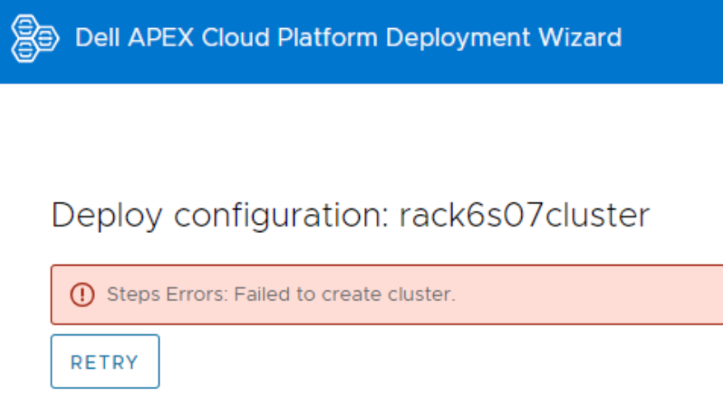
Melden Sie sich beim Node an und zeigen Sie die Protokolldatei an, CloudDeployment.xxx ECE unter C:\CloudDeployment\Logs gemeldet wurde: Test-AzStackHciExternalActiveDirectory.
ECE failed at: Test-AzStackHciExternalActiveDirectory,
2024-03-12 08:13:36 Verbose  [EnvironmentValidator:ValidateExternalAD] Get-InprogressUpdateNugetStore failed. Update package nuget store was not specified in runtime parameters.
2024-03-12 08:13:36 Verbose  [EnvironmentValidator:ValidateExternalAD] EnvCheckerModuleBase: C:\Program Files\WindowsPowerShell\Modules\AzStackHci.EnvironmentChecker
2024-03-12 08:13:36 Verbose  [EnvironmentValidator:ValidateExternalAD] Gathering External Active Directory validation assets.
2024-03-12 08:13:36 Verbose  [EnvironmentValidator:ValidateExternalAD] Starting External Active Directory validation. Detail output can be found in D:\CloudContent\MASLogs\AzStackHciEnvironmentChecker*
2024-03-12 08:14:10 Warning  [EnvironmentValidator:ValidateExternalAD] Critical (blocking) ExternalAD failures found in validation. 1 Rules failed:
2024-03-12 08:14:10 Verbose  [EnvironmentValidator:ValidateExternalAD] Validator failed. ExternalAD requirements not met. Review output and remediate:
Rule:

HealthCheckSource  : Deployment\ExternalActiveDirectory\16be73a5
Name               : AzStackHci_ExternalActiveDirectory_Test_OrganizationalUnit_ExecutingAsDeploymentUser
DisplayName        : Test AD Organizational Unit - ExecutingAsDeploymentUser
Tags               : {}
Title              : Test AD Organizational Unit - ExecutingAsDeploymentUser
Status             : FAILURE
Severity           : CRITICAL
Description        : Tests that the specified organizational unit exists and contains the proper OUs
Remediation        : https://learn.microsoft.com/en-us/azure-stack/hci/deploy/deployment-tool-prerequisites
TargetResourceID   : Test_AD_OU_HCIH06S3-101
TargetResourceName : Test_AD_OU_HCIH06S3-101
TargetResourceType : ActiveDirectory
Timestamp          : 3/12/2024 8:14:10 AM


 AdditionalData:

Key   : Detail
Value : The ActiveDirectory user account 'lab30114.local\MGMT' is ineligible to be used as a deployment user: the user
        is missing the GenericAll permission to the organizational unit 'OU=OUH06S3,DC=lab30114,DC=local'

Key   : Status
Value : FAILURE

Key   : TimeStamp
Value : 03/12/2024 08:14:10

Key   : Resource
Value : ExecutingAsDeploymentUser

Key   : Source
Value : HCIH06S3-101


2024-03-12 08:14:10 Verbose  [EnvironmentValidator:ValidateExternalAD] at ParseResult, C:\NugetStore\AzStackHci.EnvironmentChecker.Deploy.1.2100.2599.333\content\Classes\EnvironmentValidator\EnvironmentValidator.psm1: line 857
at Test-AzStackHciExternalActiveDirectory, C:\Program Files\WindowsPowerShell\Modules\AzStackHci.EnvironmentChecker\AzStackHciExternalActiveDirectory\AzStackHciExternalActiveDirectory.psm1: line 60
at <ScriptBlock>, <No file>: line 1
at RunSingleValidator, C:\NugetStore\AzStackHci.EnvironmentChecker.Deploy.1.2100.2599.333\content\Classes\EnvironmentValidator\EnvironmentValidator.psm1: line 429
at ValidateExternalAD, C:\NugetStore\AzStackHci.EnvironmentChecker.Deploy.1.2100.2599.333\content\Classes\EnvironmentValidator\EnvironmentValidator.psm1: line 262
at <ScriptBlock>, C:\CloudDeployment\ECEngine\InvokeInterfaceInternal.psm1: line 127
at Invoke-EceInterfaceInternal, C:\CloudDeployment\ECEngine\InvokeInterfaceInternal.psm1: line 123
2024-03-12 08:14:10 Verbose  [EnvironmentValidator:ValidateExternalAD] ECE PowerShellHost Script End
Causa
Die Reparatur eines Node auf einem Single-Node-Cluster wird in der Azure 2402-Version nicht unterstützt.
Risoluzione
Bei einem Cluster mit einem einzelnen Node sollten Sie Ihre Daten regelmäßig sichern.
Wenn der ECE-Fehler auftritt und die Reparatur eines einzelnen Nodes unterbrochen ist, wenden Sie sich an das Dell Supportteam, um den Cluster erneut bereitzustellen. Nachdem der Cluster erneut bereitgestellt wurde, stellen Sie die Daten auf dem Cluster wieder her.
Wenn der ECE-Fehler auftritt und die Reparatur eines einzelnen Nodes unterbrochen ist, wenden Sie sich an das Dell Supportteam, um den Cluster erneut bereitzustellen. Nachdem der Cluster erneut bereitgestellt wurde, stellen Sie die Daten auf dem Cluster wieder her.
Prodotti interessati
APEX Cloud Platform for Microsoft AzureProprietà dell'articolo
Numero articolo: 000223387
Tipo di articolo: Solution
Ultima modifica: 26 mar 2026
Versione: 2
Trova risposta alle tue domande dagli altri utenti Dell
Support Services
Verifica che il dispositivo sia coperto dai Servizi di supporto.