"Power surge on the USB port" Error in Windows 10
概要: Follow these steps to resolve a "Power surge on the USB port - Unknown USB Device needs more power than the port can supply" error in Windows 10.
この記事は次に適用されます:
この記事は次には適用されません:
この記事は、特定の製品に関連付けられていません。
すべての製品パージョンがこの記事に記載されているわけではありません。
現象
A Dell laptop with Windows 10 Pro 64 installed may report the following error: "Power surge on the USB port - Unknown USB Device needs more power than the port can supply." If you expand the message, the following message appears: "Power surge on the USB port - A USB device has malfunctioned and exceeded the power limits of its hub port. You should disconnect the device."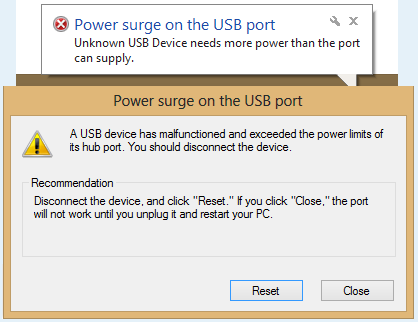
原因
The USB device causes a power surge message when plugged into the USB port.
解決方法
- Initial troubleshooting should follow the on-screen directions:
- Disconnect all USB peripheral items, then click the Reset button on the screen using the touchpad and touchpad buttons.
- Once reset, reboot the computer, reconnect the USB device, and then see if the error persists.
- If the issue persists, follow the steps below to run the Hardware Troubleshooter and test the USB port:
- Type
cmdin the Windows search bar and press Enter to open a command prompt. - Type
msdt.exe -id DeviceDiagnosticand press Enter to open the Windows Troubleshooter. - Click Hardware and Devices and then select Next.
- Click Run the troubleshooter and choose to run the tool as an administrator.
- Click Next and then follow the on-screen instructions to complete the troubleshooting process.
- Type
- If no issues are found, uninstall and reinstall all the USB controllers following the steps below:
- Disconnect the USB device from the computer.
- Press the Windows Logo + R keys on the keyboard, type devmgmt.msc in the Run command box and then press Enter. This opens Device Manager.
- Expand Universal Serial Bus Controllers.
- Right-click every device under the Universal Serial Bus Controllers section, and then click Uninstall to remove them one at a time.
- Restart the computer so that Windows reinstalls the USB controller drivers automatically.
- Now, plug in the USB device, and then check if that resolves the issue.
- If this issue continues to occur with a specific device, it is possible that the device is requiring more voltage or power than is available from the USB port being used. In this case, a USB hub with its own dedicated power source is suggested. Connect the powered USB hub to the computer's USB port and then connect the device to the powered USB hub.
- Run the Diagnostic Test on your USB Ports.
- Browse to the Dell USB Diagnostics page and follow the prompts to help identify and fix issues with your computer.
対象製品
G Series, Alienware, Dell Plus, Dell Pro, Dell Pro Max, Dell Pro Plus, Dell Pro Premium, Inspiron, Latitude, Dell Pro Rugged, Vostro, XPS, Mobile Workstations文書のプロパティ
文書番号: 000149584
文書の種類: Solution
最終更新: 22 7月 2025
バージョン: 10
質問に対する他のDellユーザーからの回答を見つける
サポート サービス
お使いのデバイスがサポート サービスの対象かどうかを確認してください。