Data Protection Advisor (DPA): Error message ‘Error 401: Unauthorized Action’ appears in Gui
概要: Error message ‘Error 401: Unauthorized Action’ appears in Gui
この記事は次に適用されます:
この記事は次には適用されません:
この記事は、特定の製品に関連付けられていません。
すべての製品パージョンがこの記事に記載されているわけではありません。
現象
User sees an error message on the DPA GUI and has to log back in again:
Error 401: Unauthorized Action
原因
This error happens when a user is logged into the DPA GUI for hours at a time and the open session is being closed due to inactivity or some other environment factor closes the session.
解決方法
The error can be ignored as it has no impact on DPA functionality.
User can log in to DPA again and continue as normal.
The following setting can be configured on the GUI to force a clean logoff after a specific period:
Administration > User & Security > Security Settings.
The Session Expiration parameter can be set to example for 6 hours (default is off):
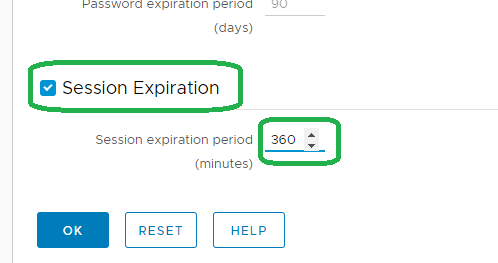
Note: The above feature was introduced on 18.2.
Please contact DELL Technical Support for further information.
User can log in to DPA again and continue as normal.
The following setting can be configured on the GUI to force a clean logoff after a specific period:
Administration > User & Security > Security Settings.
The Session Expiration parameter can be set to example for 6 hours (default is off):
Note: The above feature was introduced on 18.2.
Please contact DELL Technical Support for further information.
対象製品
Data Protection Advisor製品
Data Protection Advisor文書のプロパティ
文書番号: 000173588
文書の種類: Solution
最終更新: 05 5月 2026
バージョン: 4
質問に対する他のDellユーザーからの回答を見つける
サポート サービス
お使いのデバイスがサポート サービスの対象かどうかを確認してください。