PowerStore: LDAPS integration error "LDAP domain connection error! (0xE0906001000B)"
概要: In PowerStoreOS 1.03 (SP3), PowerStore introduced the ability to integrate LDAP for PowerStore Manager (UI) access. The Secure LDAP functionality cannot be implemented successfully.
この記事は次に適用されます:
この記事は次には適用されません:
この記事は、特定の製品に関連付けられていません。
すべての製品パージョンがこの記事に記載されているわけではありません。
現象
LDAP is used to allow domain users access to the PowerStore Manager user interface (UI).
The PowerStore Security Configuration Guide describes how Secure LDAP can be configured.
Implementing without Secure LDAP is working properly, and verifying the connection using the verify button is successful.
Attempting to configure secure LDAP fails, and the administrator is unable to use the secure option.
The PowerStore Security Configuration Guide describes how Secure LDAP can be configured.
Implementing without Secure LDAP is working properly, and verifying the connection using the verify button is successful.
Attempting to configure secure LDAP fails, and the administrator is unable to use the secure option.
原因
The problem is related to certificate integration.
In PowerStoreOS versions up to v2, the certificate uploads properly however there is no option to insert FQDN addresses.
Typically, the certificate is generated per FQDN name, hence without FQDN option, the certificate cannot properly establish secure communications with the LDAP server.
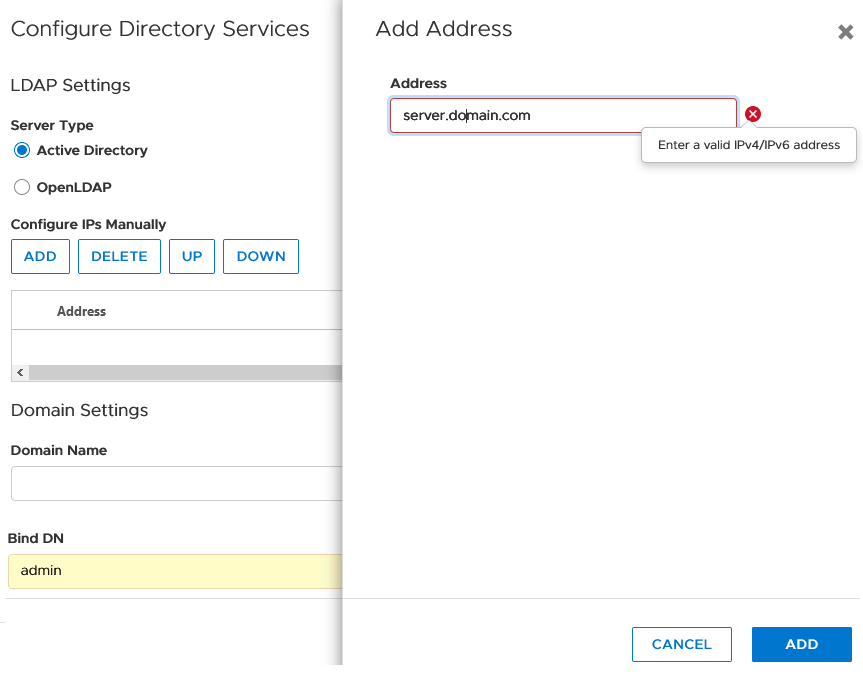
In PowerStoreOS versions up to v2, the certificate uploads properly however there is no option to insert FQDN addresses.
Typically, the certificate is generated per FQDN name, hence without FQDN option, the certificate cannot properly establish secure communications with the LDAP server.
解決方法
Fix
This issue is resolved in PowerStoreOS version 3.x.Workaround
Consider using as workaround:- IP base certificate if this can be created on the LDAP server.
- Work without LDAPs (none secure LDAP) as an interim solution.
- Remove LDAP and use local users instead until further notice.
対象製品
PowerStore文書のプロパティ
文書番号: 000181991
文書の種類: Solution
最終更新: 18 12月 2022
バージョン: 8
質問に対する他のDellユーザーからの回答を見つける
サポート サービス
お使いのデバイスがサポート サービスの対象かどうかを確認してください。