AppSync: In AppSync UI customer was unable to set the logging mode to debug as Apply button stayed disabled when debug option was selected.
概要: In AppSync UI customer was unable to set the logging level to debug as Apply button stayed disabled when debug option was selected.
この記事は次に適用されます:
この記事は次には適用されません:
この記事は、特定の製品に関連付けられていません。
すべての製品パージョンがこの記事に記載されているわけではありません。
現象
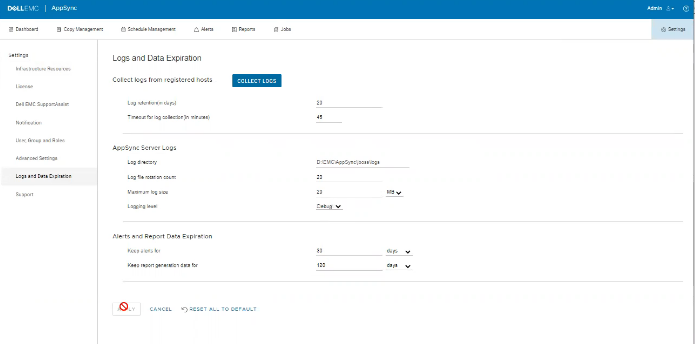
No errors in the logs but the issue can be observed on the UI as shown in the below.
原因
The Issue is because customer on the same screen, had set "Timeout for log collection(in minutes)" option value to 45 which is invalid.
解決方法
Set The value for "Timeout for log collection(in minutes)" option to a valid value of 90 and 120.
その他の情報
AppSync 4.5 will not allow an invalid value for "Timeout for log collection(in minutes)."
Valid values can be from 90 to 120.
Valid values can be from 90 to 120.
対象製品
AppSync, AppSync文書のプロパティ
文書番号: 000203604
文書の種類: Solution
最終更新: 09 9月 2025
バージョン: 8
質問に対する他のDellユーザーからの回答を見つける
サポート サービス
お使いのデバイスがサポート サービスの対象かどうかを確認してください。