Unisphere for PowerMax: REST API call error: "No supported metrics passed for current System version"
概要: Customer using REST API to gather data from a Unisphere for PowerMax 10.0.1 instance running on a PowerMax V4, finding that the expected metrics in V3 was the same as in V4
この記事は次に適用されます:
この記事は次には適用されません:
この記事は、特定の製品に関連付けられていません。
すべての製品パージョンがこの記事に記載されているわけではありません。
現象
Desired metrics called:
SMAS logs:
ERROR [em.bp.RESTAPI] (default task-486) RestapiExceptionMapper.toResponse(): Error: : com.emc.em.restapi.exception.RestapiException: No supported metrics passed for current System version
.
- "UsedUsableCapTB"
- "UsableCapacityTB"
- "SubscribedCapacityTB"
- "OverallCompressionRatio"
- "SnapModifiedCapTB"
- "SubscribedAllocatedCapTB"
SMAS logs:
ERROR [em.bp.RESTAPI] (default task-486) RestapiExceptionMapper.toResponse(): Error: : com.emc.em.restapi.exception.RestapiException: No supported metrics passed for current System version
.
原因
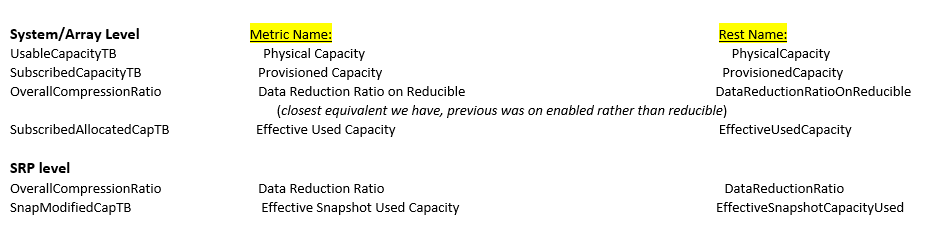
These particular metrics are no longer available in V4 PowerMax arrays.
解決方法
Using URL's will provide available metrics for the array called. The SID would be the V4 array.
(SID=complete serial number with 3 leading zeros, no HK000, BR000, or CK000. Ex 000123456789)
Left column what's sent/expected à Middle/Right columns are the new metrics
(display name in U4P and Right is equivalent RESTAPI name)
.
(SID=complete serial number with 3 leading zeros, no HK000, BR000, or CK000. Ex 000123456789)
https://{{server}}:{{port}}/univmax/restapi/performance/Array/help/{{SID}}/Categories
"categoryName": [
        "Array",
        "BEDirector",
        "Board",
        "DIMM",
        "DeviceGroup",
        "DiskGroup",
        "EMDirector",
        "Endpoint",
        "FEDirector",
        "FEPort",
        "FeEmulation",
        "FiconEmulation",
        "FiconEmulationThread",
        "FiconPortThread",
        "Host",
        "IPInterface",
        "Initiator",
        "MaskingView",
        "PortGroup",
        "RDFA",
        "RDFDirector",
        "RDFEmulation",
        "RDFPort",
        "RDFS",
        "SDNASFileSystem",
        "SDNASInterface",
        "SDNASNode",
        "SDNASServer",
        "SRP",
        "StorageContainer",
        "StorageGroup",
        "StorageResource",
        "ThinPool",
        "Volume",
        "cloudprovider",
        "zHyperLinkPort"
    ]

https://{{server}}:{{port}}/univmax/restapi/performance/Array/help/{{SID}}/Array/metrics/All
Ex for "Array":
"metricName": [
        "AvgFallThruTime",
        "AvgOptimizedReadMissSize",
        "BEIOs",
        "BEReadReqs",
        "BEReqs",
        "BEUtilization",
        "BEWriteReqs",
        "CapacityHS",
        "CapacityR1CacheSlotsInUse",
        "CapacityR2CacheSlotsInUse",
        "CompressionDedupSavingsCapacity",
        "CopySlotCountUsedCapacity",
        "CriticalAlertCount",
        "DA_Balance",
        "DataReductionRatioOnReducible",
        "DeviceWPEvents",
        "DisabledCapacity",
        "DiskUtilization",
        "EFD_Balance",
        "EffectiveResourcesCapacity",
        "EffectiveUsedCapacity",
        "FEHitReqs",
        "FEReadHitReqs",
        "FEReadMissReqs",
        "FEReadReqs",
        "FEReqs",
        "FEUtilization",
        "FEWriteHitReqs",
        "FEWriteMissReqs",
        "FEWriteReqs",
        "FE_Balance",
        "HWConfigHS",
        "HardwareHealthScore",
        "HostIOs",
        "HostMBReads",
        "HostMBWritten",
        "HostMBs",
        "HostReads",
        "HostWrites",
        "InfoAlertCount",
        "MaxEffectiveCapacity",
        "MaxProvisioning",
        "NumberR1ActiveSessions",
        "NumberR1MscActiveSessions",
        "NumberR1MscSessions",
        "NumberR2ActiveSessions",
        "NumberR2MscActiveSessions",
        "NumberR2MscSessions",
        "OptimizedMBReadMisses",
        "OptimizedReadMisses",
        "OverallHealthScore",
        "PatternDetectionSavings",
        "PercentCacheWP",
        "PercentEffectiveUsedCapacity",
        "PercentHit",
        "PercentReads",
        "PercentWrites",
        "PhysicalCapacity",
        "PrefetchedTracks",
        "ProvisionedCapacity",
        "ProvisionedPercent",
        "ProvisionedResourcesUsedPercent",
        "QueueDepthUtilization",
        "RDFAWPCapacity",
        "RDFUtilization",
        "RDF_Balance",
        "ReadResponseTime",
        "ReducibleCapacity",
        "ResponseTime",
        "SloHealthScore",
        "SnapshotResourcesCapacity",
        "SnapshotResourcesUsed",
        "SnapshotResourcesUsedPercent",
        "SoftwareHealthScore",
        "SystemMaxWPLimitCapacity",
        "SystemWPEvents",
        "TotalNumberR1Sessions",
        "TotalNumberR2Sessions",
        "TotalNumberRdfSessions",
        "UnreducibleCapacity",
        "VersionWritePendingUsedCapacity",
        "WPUsedCapacity",
        "WarningAlertCount",
        "WriteResponseTime"
    ]
}
Left column what's sent/expected à Middle/Right columns are the new metrics
(display name in U4P and Right is equivalent RESTAPI name)
.
その他の情報
The same KPI's (metrics) are seen in Unisphere for PowerMax performance charts. In general, there are default KPI's available to draw performance charts with and some that might need to be enabled in "Settings/Performance/Metrics." Depending on the array model, some are not available here as well because the metrics does not exist. In the case of the V4 PowerMax 2500/8500's.
対象製品
PowerMax 2500, PowerMax 8500文書のプロパティ
文書番号: 000213922
文書の種類: Solution
最終更新: 09 8月 2023
バージョン: 4
質問に対する他のDellユーザーからの回答を見つける
サポート サービス
お使いのデバイスがサポート サービスの対象かどうかを確認してください。