NetWorker: REST API 요청이 실패하고 오류 메시지가 표시됩니다. HTTP 상태 404 - "요청된 리소스를 사용할 수 없음"을 찾을 수 없음
概要: 다음 오류 메시지와 함께 NetWorker REST API 쿼리가 실패합니다. HTTP 상태 404 - "요청된 리소스를 사용할 수 없습니다. 원본 서버가 타겟 리소스에 대한 현재 표현을 찾지 못했거나 존재하는 것을 공개할 의사가 없습니다."
この記事は次に適用されます:
この記事は次には適用されません:
この記事は、特定の製品に関連付けられていません。
すべての製品パージョンがこの記事に記載されているわけではありません。
現象
NetWorker REST API 요청이 실패하고 다음과 같은 오류 메시지가 표시됩니다. HTTP 상태 404 - "요청된 리소스를 사용할 수 없음"을 찾을 수 없음
[root@NETWORKER_SERVER]:~# curl -ik GET -u **userid**:'***Password***' -H "Content-Type: application/json" 'https://NETWORKER_SERVER:9090/nwrestapi/v3/global/clients'
curl: (6) Could not resolve host: GET; Name or service not known
HTTP/1.1 404
Content-Type: text/html;charset=utf-8
Content-Language: en
Content-Length: 790
Date: Tue, 04 Jul 2023 12:11:41 GMT
Server: NSR SERVICES for Authentication
HTTP Status 404 – Not Foundbody {font-family:Tahoma,Arial,sans-serif;} h1, h2, h3, b {color:white;background-color:#525D76;} h1 {font-size:22px;} h2 {font-size:16px;} h3 {font-size:14px;} p {font-size:12px;} a {color:black;} .line {height:1px;background-color:#525D76;border:none;}
HTTP Status 404 – Not Found
Type Status Report
Message The requested resource [/nwrestapi/v3/global/clients] is not available
Description The origin server did not find a current representation for the target resource or is not willing to disclose that one exists.
Apache Tomcat/9.0.52 NetWorker 서버 설치에 nwrestapi 디렉토리가 없습니다.
Linux: /nsr/authc/webapps/nwrestapi/

Windows: C:\Program Files\EMC NetWorker\nsr\authc-server\tomcat\webapps\nwrestapi
restapi.log가 없거나 업데이트되지 않습니다.
Linux: /nsr/logs/restapi/restapi.log

Windows: C:\Program Files\EMC NetWorker\nsr\logs\restapi\restapi.log
原因
nwrestapi 경로가 없습니다. REST API 쿼리는 엔드포인트를 찾거나 다른 NetWorker 데이터베이스에서 데이터를 어떻게 제공해야 하는지 상관관계를 파악할 수 없습니다.
解決方法
nwrestapi는 Java Runtime Environment를 사용하는 NetWorker의 인증 서비스와 함께 구성됩니다. 인증을 구성할 때 잠재적인 Java 관련 문제를 방지하려면 NRE(NetWorker Runtime Environment)를 사용하는 것이 좋습니다. 최신 NRE 패키지는 Dell Support NetWorker 드라이버 및 다운로드 페이지에서 다운로드할 수 있습니다 .
리눅스:
Windows:
참고: Java 인스턴스가 여러 건 설치되어 있을 수 있습니다. 예를 들어 NRE와 Oracle JRE가 모두 서버에 설치될 수 있습니다. 위의 단계에서는 NetWorker가 사용하는 Java 설치를 확인합니다.
리눅스:
- NetWorker 서버에 로그인하고 루트로 전환합니다.
sudo su -
- NRE가 설치되어 있는지, 어떤 Java 인스턴스 NetWorker를 사용하도록 구성되어 있는지 확인합니다.
rpm -qa | grep nre
cat /nsr/authc/conf/installrc

[root@networker-mc]:~# rpm -qa | grep nre
nre-8.0.15-1.x86_64
[root@networker-mc]:~#
[root@networker-mc]:~# cat /nsr/authc/conf/installrc
JAVA_HOME=/opt/nre/java/latest
참고: Java 인스턴스가 여러 건 설치되어 있을 수 있습니다. 예를 들어 NRE와 Oracle JRE가 모두 서버에 설치될 수 있습니다. 위의 단계는 NetWorker가 사용하는 Java 설치를 확인합니다.
- 다음 스크립트를 실행하여 NetWorker authc 서버를 재구성합니다.
/opt/nsr/authc-server/scripts/authc_configure.sh

[root@networker-mc]:~# /opt/nsr/authc-server/scripts/authc_configure.sh

Specify the directory where the Java Standard Edition Runtime Environment (JRE) software is installed [/opt/nre/java/latest]:

The installation process will install an Apache Tomcat instance. For optimum security, EMC NetWorker Authentication Service will use a non-root user (nsrtomcat) to start the Apache Tomcat instance.
If your system has special user security requirements, ensure that proper operational permissions are granted to this non-root user (nsrtomcat).
Please refer to NetWorker Installation Guide.

WARNING: Port 9090 is already in use.

Do you wish to specify a different port number [y]? n

The Apache Tomcat will use "networker-mc.emclab.local" as the host name.
The Apache Tomcat will use "9090" as the port number.

The NetWorker Authentication Service requires a keystore file to configure encryption and to provide SSL support.

EMC recommends that you specify a keystore password that has a minimum of six characters.

Do you want to use the existing keystore /nsr/authc/conf/authc.keystore [y]?

Specify password for the existing keystore:
The install will use the existing certificate "emcauthctomcat" for Apache Tomcat.
The install will use the existing certificate "emcauthcsaml" for Authentication Service.

Creating the installation log in /opt/nsr/authc-server/logs/install.log.

Performing initialization. Please wait...

The installation completed successfully.
참고: 인증을 다시 로드하려면 NetWorker 서비스를 재시작해야 합니다. 이 작업은 다음 systemctl 명령으로 수행할 수 있습니다.
systemctl stop networker
and
systemctl start networker.
- 다음 폴더가 생성되었는지 확인합니다.
/nsr/authc/webapps/nwrestapi

[root@networker-mc]:~# ls -l /nsr/authc/webapps/nwrestapi/
total 0
drwx------. 2 nsrtomcat nsrtomcat  44 Jul  6 12:22 META-INF
drwx------. 3 nsrtomcat nsrtomcat  21 Jul  6 12:22 v1
drwx------. 3 nsrtomcat nsrtomcat  21 Jul  6 12:22 v2
drwx------. 3 nsrtomcat nsrtomcat  21 Jul  6 12:22 v3
drwx------. 6 nsrtomcat nsrtomcat 107 Jul  6 12:22 WEB-INF
- nwrestapi 디렉토리가 생성된 경우 REST API 쿼리를 실행합니다.
Windows:
- NRE가 설치되어 있는지, 어떤 Java 인스턴스 NetWorker를 사용하도록 구성되어 있는지 확인합니다.
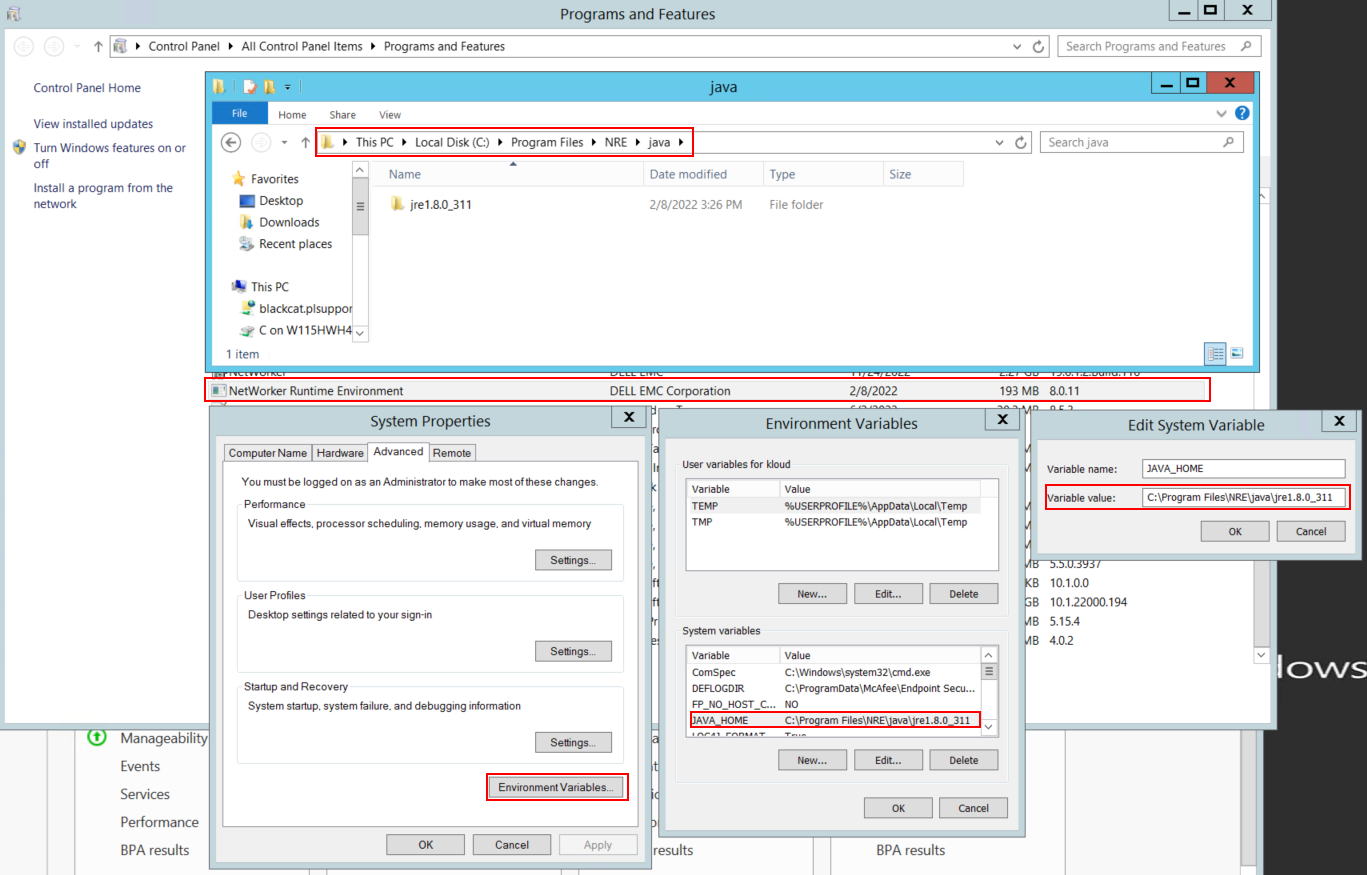
그림 1: NetWorker가 사용하는 Java 인스턴스를 확인합니다.
참고: Java 인스턴스가 여러 건 설치되어 있을 수 있습니다. 예를 들어 NRE와 Oracle JRE가 모두 서버에 설치될 수 있습니다. 위의 단계에서는 NetWorker가 사용하는 Java 설치를 확인합니다.
- NetWorker 패키지를 제거합니다. 이렇게 하면 NetWorker 데이터베이스 또는 구성 리소스가 제거되지 않습니다.
- 기존 설치 경로를 통해 NetWorker를 재설치합니다. NetWorker를 재설치하면 NetWorker의 인증 서비스가 재구성됩니다.
- 다음 경로가 있는지 확인합니다.
C:\Program Files\EMC NetWorker\nsr\authc-server\tomcat\webapps\nwrestapi

그림 2: NetWorker 인증 경로가 존재하는지 확인합니다.
- nwrestapi 디렉토리가 생성된 경우 REST API 쿼리를 실행합니다.
対象製品
NetWorker製品
NetWorker Family, NetWorker Series文書のプロパティ
文書番号: 000215602
文書の種類: Solution
最終更新: 27 3月 2025
バージョン: 7
質問に対する他のDellユーザーからの回答を見つける
サポート サービス
お使いのデバイスがサポート サービスの対象かどうかを確認してください。