Error in Device Manager After Installing the Intel Chipset Device Software After a Windows 10 Install
概要: Information about a Device Manager error (yellow exclamation mark) after installing the Intel Chipset Device Software.
この記事は次に適用されます:
この記事は次には適用されません:
この記事は、特定の製品に関連付けられていません。
すべての製品パージョンがこの記事に記載されているわけではありません。
現象
Device Manager will have an error in the Device Manager on "PCI Data Acquisition and Signal Processing Controller" after installing the Intel Chipset Device Software on a system with a new install of Windows 10.
Affected Systems:
- Latitude 5340
- Latitude 5440
- Latitude 7340
- Latitude 7440
- Latitude 7640
- Latitude 9440 2-in-1
- Precision 3580
- Precision 3581
- Precision 5480
- Precision 5680
- Precision 7680
- Precision 7780
原因
No cause information is available.
解決方法
Intel Chipset Device Software Driver
The following two methods can be used to resolve this issue.
- Connect the system to the Internet and do a "Windows Update" to install the latest driver.
- Uninstall the Intel chipset driver and install an older version.
- Press the "Windows" key, search, and choose "Control Panel" (Figure 1).
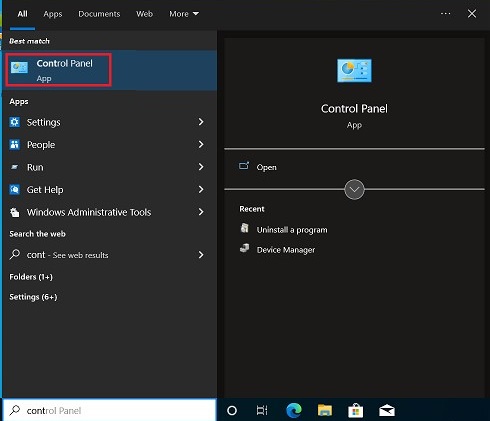
Figure 1
- Choose "Uninstall a program" (Figure 2).
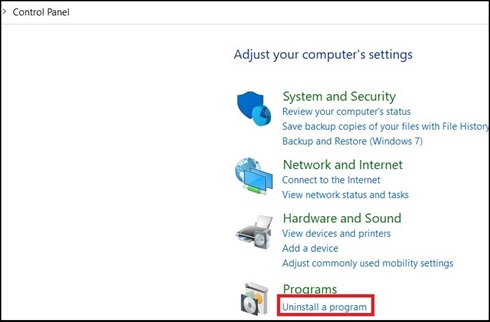
Figure 2
- Double-click on "Intel Chipset Device Software and choose "Next" in the new window to uninstall the Chipset driver (Figure 3).
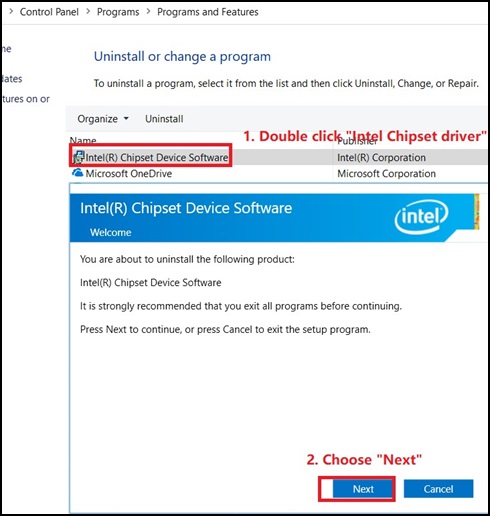
Figure 3
- In the Intel Chipset Device Software Window, click "Finish" (Figure 4).
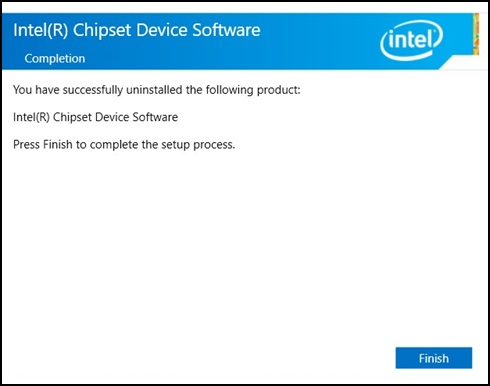
Figure 4
- No "Intel chipset driver" should be shown in the Control Panel (Figure 5).

Figure 5
- Download the old chipset driver from the following link: Intel Chipset
- Double-click on the downloaded package and then click "Install", begin the installation (Figure 6).
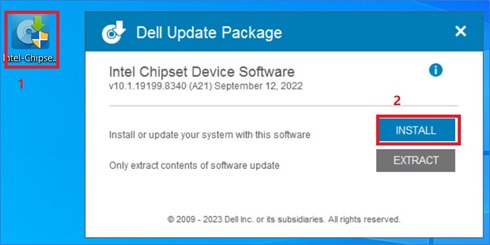
Figure 6
- Follow the install wizard, until the pop up complete message appears, then choose "Restart Now" (Figure 7).
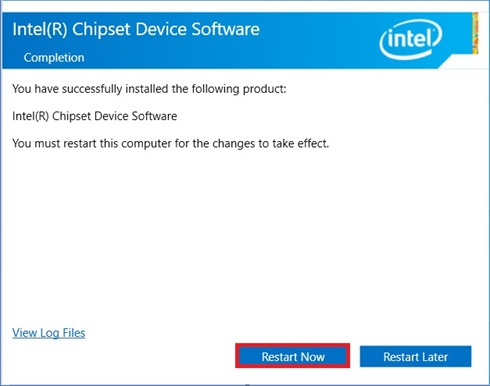
Figure 7
- After the system reboot, open "Control Panel" to check if the older chipset driver is installed (Figure 8).
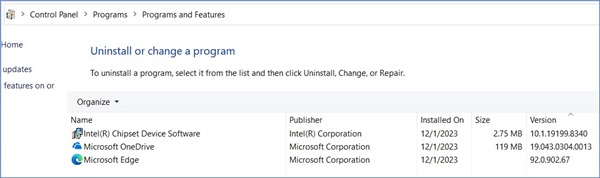
Figure 8
- There should be no error in the Device Manager (Figure 9).
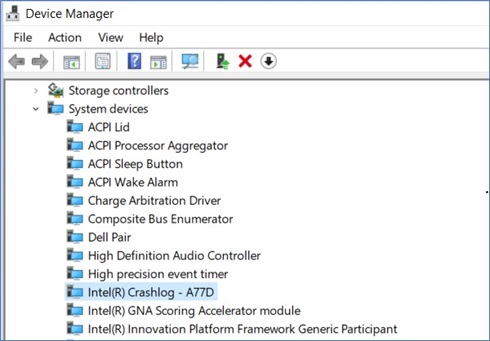
Figure 9
- Press the "Windows" key, search, and choose "Control Panel" (Figure 1).
A new driver, version 10.1.19600.8418 should be available on the Dell Driver site on January 16, 2024 (Pending).
対象製品
Latitude 5340, Latitude 7340, Latitude 7440, Latitude 9440 2-in-1, Latitude 5540, Latitude 7640, Precision 5480, Precision 3580, Precision 3581, Precision 5680, Precision 7680, Precision 7780文書のプロパティ
文書番号: 000220565
文書の種類: Solution
最終更新: 16 4月 2025
バージョン: 2
質問に対する他のDellユーザーからの回答を見つける
サポート サービス
お使いのデバイスがサポート サービスの対象かどうかを確認してください。