Unable to Complete Initial Activation for Office 2021, 2024, or 365 Preinstalled on a Dell Computer
概要: Learn how to successfully complete initial activation for your Office 2021, 2024, or 365.
この記事は次に適用されます:
この記事は次には適用されません:
この記事は、特定の製品に関連付けられていません。
すべての製品パージョンがこの記事に記載されているわけではありません。
現象
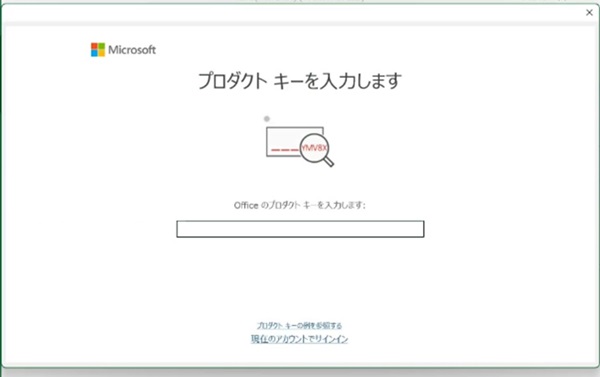
Office users may report that they are unable to complete the initial activation. They may be prompted for a Product Key, but Dell does not offer any Products Keys if the Office purchased is a Digital Licensed version. A Digital Licensed version of the Office software does not require any Products Keys during initial activation.
Affected Software:
- Office 2021
- Office 2024
- Office 365
原因
They may be promoted for a key as the Office installer does not detect the license associated to the computer.
解決方法
Workaround 1: Use Microsoft Fix It.
- Download the Microsoft FixIt tool .
- Extract the downloaded cssemerg97275.zip file.
- Double click the cssemerg97275.diagcab.
- Click Next when you see "Troubleshoot and help prevent computer problems".
- Click Next when you see "Find a Fix or workaround for new Issue 97275".
- The issue is detected and fixed automatically.
- Click Close the troubleshooter when you see the result. If the issue persists, go to the next workaround.
Workaround 2: Uninstall and reinstall Microsoft Office, then complete the activation for your Office.
- Follow the steps to uninstall Office:
- Follow the steps to reinstall Office:
- For Inspiron, XPS, Alienware users: Download and install or reinstall Microsoft 365 or Office 2021 on a PC or Mac
- For Vostro, Latitude, OptiPlex, Precision users: Reinstall Office from the Microsoft Store app
- For Inspiron, XPS, Alienware users: Download and install or reinstall Microsoft 365 or Office 2021 on a PC or Mac
- Follow the steps to activate Office:

対象製品
Alienware, Inspiron, OptiPlex, Vostro, XPS, G Series, G Series, Alienware, Inspiron, Latitude, Vostro, XPS, Fixed Workstations, Mobile Workstations文書のプロパティ
文書番号: 000224996
文書の種類: Solution
最終更新: 10 9月 2025
バージョン: 12
質問に対する他のDellユーザーからの回答を見つける
サポート サービス
お使いのデバイスがサポート サービスの対象かどうかを確認してください。