Dell Security Management Server 無法匯出報告
요약: 本文探討 Dell Security Management Server 無法在遠端主控台匯出受管理報告與一般錯誤的原因和解決方案。
이 문서는 다음에 적용됩니다.
이 문서는 다음에 적용되지 않습니다.
이 문서는 특정 제품과 관련이 없습니다.
모든 제품 버전이 이 문서에 나와 있는 것은 아닙니다.
증상
受影響的產品:
- Dell Security Management Server
受影響的版本:
- v10.x 和更舊版本
受影響的作業系統:
- Windows
在 Dell Security Management Server 上,您可以前往 報告 > 管理報告,以產生和匯出不同的受管理報告:

若要匯出報告,只要選取 匯出檔案 並選擇 Excel 或 CSV 格式即可:

注意: 由於報告的大小和端點數目,Dell Security Management Console 在等待匯出報告時,可能會在 60 秒後擲回以下錯誤,而匯出會失敗:
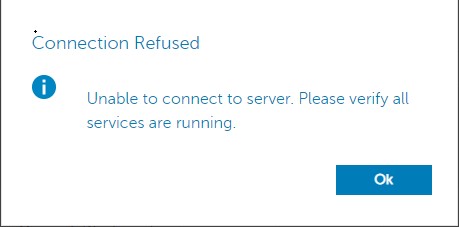
檢查安全性伺服器服務登入 c:\Program Files\*** 發生故障時,會回報類似以下的錯誤:
2020-12-07 12:07:56,350 ERROR com.dell.ddps.webui.controllers.ReportController [qtp1551039242-71115] - Timeout in webservice controller java.lang.IllegalStateException: WRITER
2020-12-07 12:07:56,351 ERROR com.dell.ddps.webui.controllers.ReportController [qtp1551039242-71115] - ServiceException thrown in webservice controller com.dell.ddps.webui.controllers.BaseWebUiController$LocalizedServiceException: The service did not respond in a timely manner.
2020-12-07 12:07:56,352 WARN org.springframework.web.servlet.mvc.method.annotation.ExceptionHandlerExceptionResolver [qtp1551039242-71115] - Failed to invoke @ExceptionHandler method: public java.lang.Object com.dell.ddps.webui.controllers.BaseWebUiController.handleException(javax.servlet.http.HttpServletRequest,javax.servlet.http.HttpServletResponse,java.lang.Exception,java.util.Locale) java.lang.IllegalStateException: WRITER
2020-12-07 12:07:56,353 WARN org.eclipse.jetty.server.HttpChannel [qtp1551039242-71115] - /webui/exportToExcel javax.servlet.ServletException: org.springframework.web.util.NestedServletException: Request processing failed; nested exception is java.lang.IllegalStateException: WRITER
원인
拒絕服務 (DoS) 篩選器會在 60 秒後終止伺服器連接。
해결
若要增加 DoS 篩選器閾值,請執行以下步驟:
- 使用記事本,開啟
webdefault.xml,位於C:\Program Files\Dell\Enterprise Edition\Security Server\conf預設情況下,並更新MaxRequestMs和maxIdleTrackerMs從 60000 到 300000 的超時:
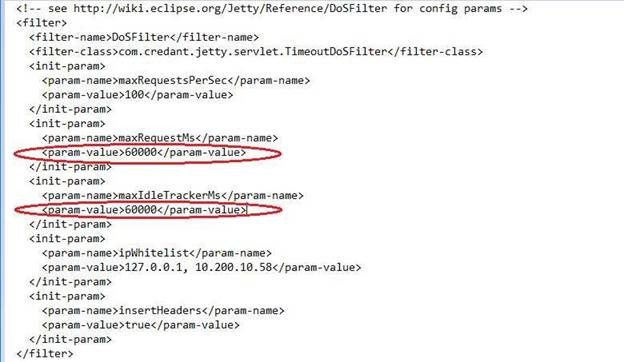
- 將這些值從 60000 變更為 300000 後,請儲存檔案,然後重新啟動安全性伺服器服務。若要重新啟動安全性伺服器服務,請按照以下步驟操作:
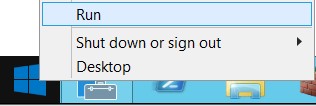
- 按一下滑鼠右鍵 啟動並選取 「執行」:
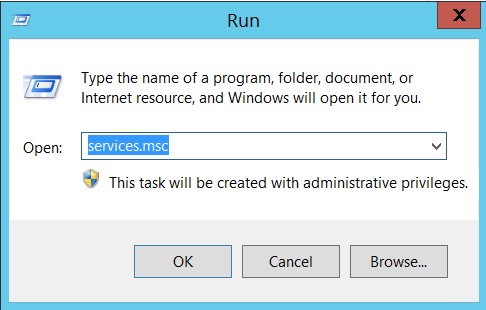
- 在「執行」對話方塊視窗中,輸入
services.msc,然後按下 Enter 或按一下 確定:
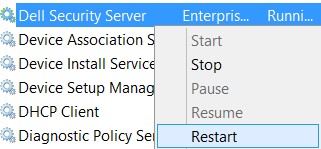
- 以滑鼠右鍵按一下 Dell Security Server 服務,然後選取重新啟動:
해당 제품
Dell Encryption문서 속성
문서 번호: 000184829
문서 유형: Solution
마지막 수정 시간: 17 7월 2026
버전: 11
다른 Dell 사용자에게 질문에 대한 답변 찾기
지원 서비스
디바이스에 지원 서비스가 적용되는지 확인하십시오.