Dell Security Management Server 无法导出报告
요약: 本文讨论 Dell Security Management Server 无法导出托管报告并在远程控制台中显示一般性错误的原因和解决方法。
이 문서는 다음에 적용됩니다.
이 문서는 다음에 적용되지 않습니다.
이 문서는 특정 제품과 관련이 없습니다.
모든 제품 버전이 이 문서에 나와 있는 것은 아닙니다.
증상
受影响的产品:
- Dell Security Management Server
受影响的版本:
- v10.x 及更低版本
受影响的操作系统:
- Windows
在 Dell Security Management Server 上,可以通过转到 ReportingManage > Reports来生成和导出不同的托管报告:

要导出报告,只需选择 导出文件并 选择 Excel 或 CSV 格式即可:

注意: 由于报告的大小和端点的数量,在等待报告导出时,可能会在 60 秒后,Dell Security Management Console 抛出以下错误,并且导出将失败:
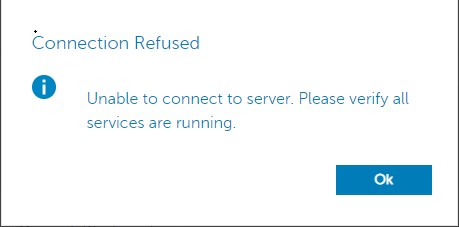
检查安全服务器服务日志 c:\Program Files\*** 在发生故障时,将报告类似于以下错误的错误:
2020-12-07 12:07:56,350 ERROR com.dell.ddps.webui.controllers.ReportController [qtp1551039242-71115] - Timeout in webservice controller java.lang.IllegalStateException: WRITER
2020-12-07 12:07:56,351 ERROR com.dell.ddps.webui.controllers.ReportController [qtp1551039242-71115] - ServiceException thrown in webservice controller com.dell.ddps.webui.controllers.BaseWebUiController$LocalizedServiceException: The service did not respond in a timely manner.
2020-12-07 12:07:56,352 WARN org.springframework.web.servlet.mvc.method.annotation.ExceptionHandlerExceptionResolver [qtp1551039242-71115] - Failed to invoke @ExceptionHandler method: public java.lang.Object com.dell.ddps.webui.controllers.BaseWebUiController.handleException(javax.servlet.http.HttpServletRequest,javax.servlet.http.HttpServletResponse,java.lang.Exception,java.util.Locale) java.lang.IllegalStateException: WRITER
2020-12-07 12:07:56,353 WARN org.eclipse.jetty.server.HttpChannel [qtp1551039242-71115] - /webui/exportToExcel javax.servlet.ServletException: org.springframework.web.util.NestedServletException: Request processing failed; nested exception is java.lang.IllegalStateException: WRITER
원인
拒绝服务 (DoS) 筛选器会在 60 秒后终止服务器连接。
해결
要提高 DoS 筛选器阈值,请执行以下步骤:
- 使用记事本,打开
webdefault.xml,位于C:\Program Files\Dell\Enterprise Edition\Security Server\conf默认情况下,并更新MaxRequestMs和maxIdleTrackerMs超时从 60000 到 300000:
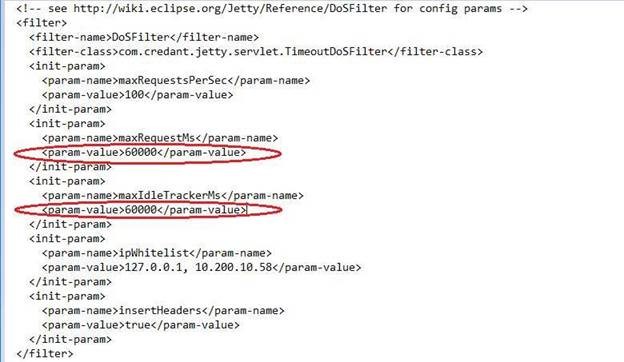
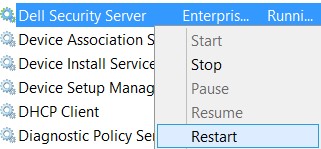
- 将值从 60000 更改为 300000 后,保存文件并重新启动安全服务器服务。要重新启动安全服务器服务,请执行以下步骤:
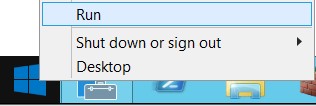
- 右键单击 开始并选择 运行:
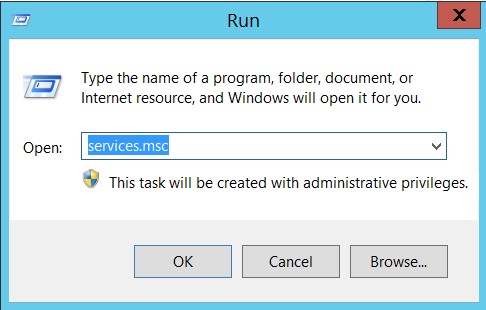
- 在“运行”对话框窗口中,键入
services.msc,然后按 Enter 键或单击 确定:
- 右键单击 Dell Security Server Service,然后选择重新启动:
해당 제품
Dell Encryption문서 속성
문서 번호: 000184829
문서 유형: Solution
마지막 수정 시간: 17 7월 2026
버전: 11
다른 Dell 사용자에게 질문에 대한 답변 찾기
지원 서비스
디바이스에 지원 서비스가 적용되는지 확인하십시오.