Dell Encryption scales improperly with UI resolution
Summary: Dell Encryption (formerly Dell Data Protection | Encryption) scales improperly on 4k displays when scaling is set to 250% in Windows 10.
Acest articol se aplică pentru
Acest articol nu se aplică pentru
Acest articol nu este legat de un produs specific.
Acest articol nu acoperă toate versiunile de produs existente.
Symptoms
Note:
- As of May 2022, Dell Endpoint Security Suite Enterprise has reached End of Maintenance. For more information, reference Product Life Cycle (End of Support / End of Life) Policy for Dell Data Security
- As of January 2019, Dell Endpoint Security Suite Pro has reached End of Service. For more information, reference Product Life Cycle (End of Support / End of Life) Policy for Dell Data Security
- As of February 2018, Dell Data Protection | Security Tools has reached End of Service. For more information, reference Product Life Cycle (End of Support / End of Life) Policy for Dell Data Security
- Reference Endpoint Security for additional information about current products.
Affected Products:
- Dell Encryption Enterprise
- Dell Encryption Personal
- Dell Endpoint Security Suite Enterprise
- Dell Data Protection | Enterprise Edition
- Dell Data Protection | Personal Edition
- Dell Endpoint Security Suite Pro
- Dell Data Protection | Security Tools
Affected Versions:
- v8.10 and 8.17
Affected Operating Systems:
- Windows 10 (RTM, 1511, 1607, 1703)
Cause
Not Applicable
Resolution
Note: This issue has been resolved in v8.18.
On certain devices that are shipped with UHD (4k) screens, and the UI scaling within Windows 10 is set to 250%, the UI may display improperly and be difficult to navigate within the Dell Data Security Console application.
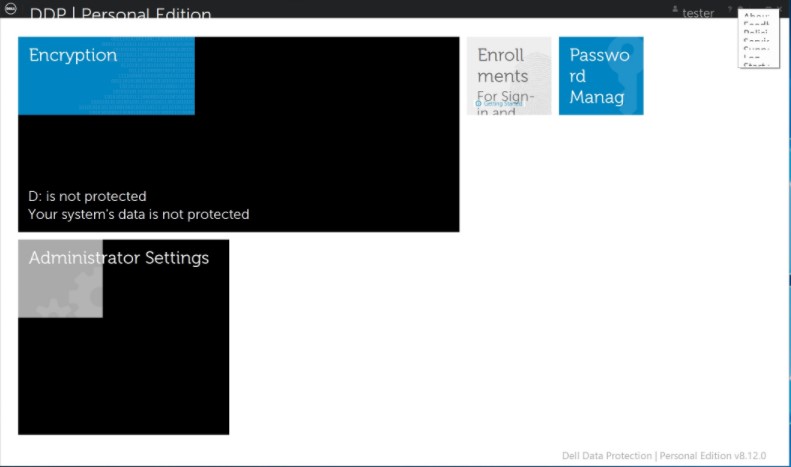
This can be temporarily resolved by running the Dell Data Security Console application in Compatibility Mode for Windows 8.
To enable compatibility mode:
- Right-click the icon and select Properties.
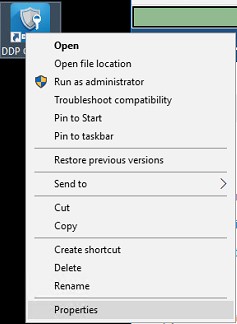
- Select the Compatibility Tab.
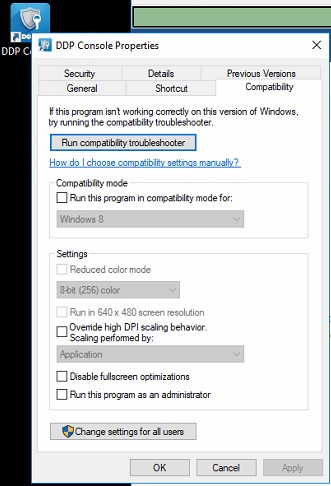
- Check that the box for Compatibility mode is labeled Run this program in compatibility mode for: And leave the setting on Windows 8.
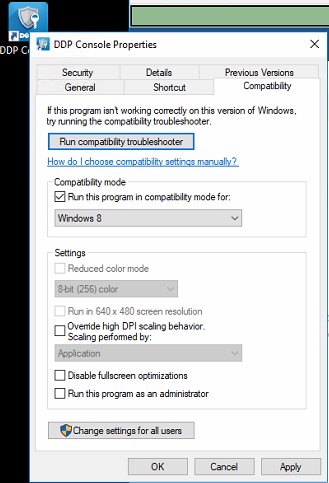
- Click Apply and then OK to enforce the changes.
To contact support, reference Dell Data Security International Support Phone Numbers.
Go to TechDirect to generate a technical support request online.
For additional insights and resources, join the Dell Security Community Forum.
Produse afectate
Dell Encryption, Dell Endpoint Security Suite Pro, Dell Endpoint Security Suite EnterpriseProprietăți articol
Article Number: 000124977
Article Type: Solution
Ultima modificare: 19 Apr 2026
Version: 13
Găsiți răspunsuri la întrebările dvs. de la alți utilizatori Dell
Servicii de asistență
Verificați dacă dispozitivul dvs. este acoperit de serviciile de asistență.