DPA: Chargeback Details report does not return Data Retained field
Summary: The Chargeback Details report returns all zeros in the data retained column.
Acest articol se aplică pentru
Acest articol nu se aplică pentru
Acest articol nu este legat de un produs specific.
Acest articol nu acoperă toate versiunile de produs existente.
Symptoms
The Chargeback Details report returns all zeros in the
data retained column despite successful data collection of all assigned requests.Cause
The product is functioning as designed.
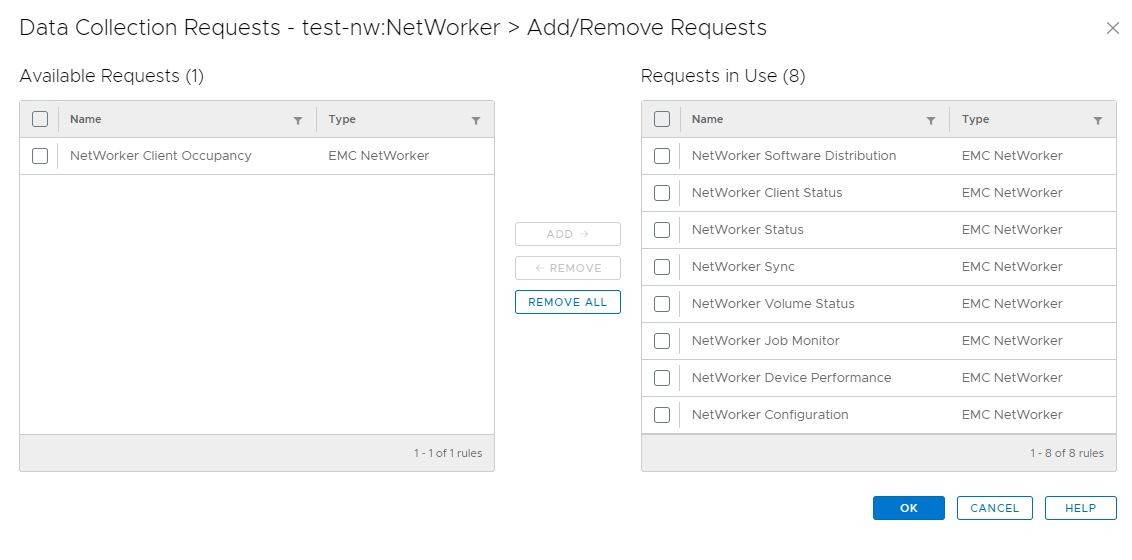
Examining the assigned data collection requests for the NetWorker object, it was found that not all requests were assigned. The Client Occupancy request was not assigned.
The data retained column is populated from the Client Occupancy datasource, which requires the Client Occupancy request be assigned.
Below is an example of this.
Resolution
To resolve this issue, follow these steps.
- In the DPA UI go to Inventory then Object Library. Under Applications select the NetWorker object.
- Click the Properties button and then the Data Collection tab.
- In this window, click the Add/Remove Request button.
- Select Client Occupancy request in the left pane.
- Click the Add button to add it to the right pane.
- Click Ok to finish the assignment of the request.
Once assigned, the DPA Agent runs the request and collects occupancy data.
Once there has been occupancy data collected, the data retained field populates in the report.
Contact Dell Technical Support for further details or information.
Proprietăți articol
Article Number: 000225355
Article Type: Solution
Ultima modificare: 29 Jan 2026
Version: 1
Găsiți răspunsuri la întrebările dvs. de la alți utilizatori Dell
Servicii de asistență
Verificați dacă dispozitivul dvs. este acoperit de serviciile de asistență.