Windows 10 Displays Multiple Playback Devices When Connected to Dell Wireless Headset Using Bluetooth
Summary: Learn why Windows 10 displays multiple playback devices with different names.
Acest articol se aplică pentru
Acest articol nu se aplică pentru
Acest articol nu este legat de un produs specific.
Acest articol nu acoperă toate versiunile de produs existente.
Symptoms
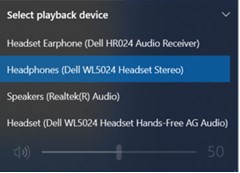
The computer runing Windows 10 may display multiple different playback devices with different names. This is noticed when connected to Dell Wireless Headset using Bluetooth.
Affected Headsets:
- Dell Pro Premium Wireless ANC Headset WL7024
- Dell Pro Plus Wireless ANC Headset WL5024
- Dell Pro Wireless Headset WL3024
Cause
This is to differentiate multiple paths of connections for the headsets.
Resolution
This is working as designed.
Headset Earphone (Dell HR024 Audio Receiver) |
If the dongle is connected, this option appears assuming that both the dongle and Bluetooth connection are used simultaneously. |
Headphones (Dell Pro Plus Wireless ANC Headset WL5024) |
This is the correct selection when connecting the headset using Bluetooth. Choose this option. See the Service Manual of the headset (Connecting the headset > Bluetooth connection) |
Headset (Dell WL5024 Headset Hands-Free AG Audio) |
This is a Bluetooth mono channel device that is primarily used for voice call. Not to be selected as playback device in the playback device list. |
Produse afectate
Dell Pro Wireless Headset WL3024, Dell Pro Plus Wireless ANC Headset WL5024, Dell Pro Premium Wireless ANC Headset WL7024Proprietăți articol
Article Number: 000227603
Article Type: Solution
Ultima modificare: 25 Nov 2025
Version: 6
Găsiți răspunsuri la întrebările dvs. de la alți utilizatori Dell
Servicii de asistență
Verificați dacă dispozitivul dvs. este acoperit de serviciile de asistență.