Error on Boot with an Optane Accelerated Equipped Computers Forced Shutdown
Summary: After a forced shutdown of an Optane accelerated device, an error may be received on boot.
Acest articol se aplică pentru
Acest articol nu se aplică pentru
Acest articol nu este legat de un produs specific.
Acest articol nu acoperă toate versiunile de produs existente.
Symptoms
Optane Boot Error
If an Optane acceleration-equipped computer experiences a forced shutdown, an error message may be seen upon restarting the computer:
"The operating system did not shut down cleanly. Reconstructing Cache Metadata."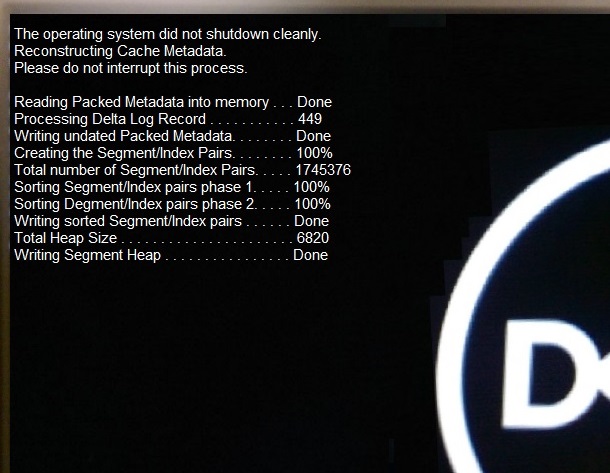
Cause
Working within the design specification
The drive Metadata between the Serial ATA (SATA) and the Optane drive no longer matches, when an Optane accelerated computer experiences a forced shutdown.
Resolution
Working within the design specification
When a forced shutdown occurs, on the next reboot the Metadata must be reconstructed. This happens automatically and should not take an excessive amount of time.
The error message is an example of the rebuild process.
Once the Metadata rebuilds, the computer boots.
Note: There is a hard drive or corruption of the operating system issue if the computer fails to boot after the metadata rebuilds or it fails. Run the enhanced Pre-Boot System Assessment (ePSA) diagnostics and if required, troubleshoot the operating system. If the ePSA diagnostics fail, contact Dell Technical Support for further assistance using the following link: Dell Technical Support Contact
Produse afectate
Alienware Aurora R6, Inspiron 3670, OptiPlex 3050 All-In-One, OptiPlex 3050 Tower, OptiPlex 3050 Micro, OptiPlex 3050 Small Form Factor, OptiPlex 5050 Tower, OptiPlex 5050 Micro, OptiPlex 5050 Small Form Factor, OptiPlex 5250 All-In-One
, OptiPlex 7050 Tower, OptiPlex 7050 Micro, OptiPlex 7050 Small Form Factor, OptiPlex 7450 All-In-One, Vostro 3670, XPS 8920
...
Proprietăți articol
Article Number: 000133144
Article Type: Solution
Ultima modificare: 01 mai 2026
Version: 13
Găsiți răspunsuri la întrebările dvs. de la alți utilizatori Dell
Servicii de asistență
Verificați dacă dispozitivul dvs. este acoperit de serviciile de asistență.