VxRail: vCenter Unable to get Deployment Status
Zhrnutie: The VxRail deployment page freezes and the VxRail Management Interface (VAMI) shows “Unable to get deployment status” because vCenter cannot reach the DNS server.
Tento článok sa vzťahuje na
Tento článok sa nevzťahuje na
Tento článok nie je viazaný na žiadny konkrétny produkt.
V tomto článku nie sú uvedené všetky verzie produktov.
Symptómy
Deployment Page Stuck
The VxRail deployment page shows a job that does not progress.
Initial configuration vCenter
VAMI Error Message
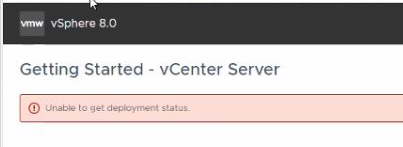
The VAMI page displays:
Unable to get deployment status
Príčina
Network Connectivity Failure
vCenter is unable to resolve or reach the DNS server required for deployment validation.
Diagnostic Evidence
Firstbootlogindicates failure to configure network.
The inability to contact DNS prevents the VAMI pre‑check from retrieving deployment status.

Riešenie
Resolve DNS Connectivity
- Verify that the vCenter Server Appliance can ping the DNS server.
- If ping fails, check network ACLs or firewalls that may block ICMP traffic between vCenter and DNS.
- Correct any DNS server address or routing issues and repeat the deployment pre‑check.
Dotknuté produkty
VxRail, VxRail Appliance Series, VxRail SoftwareVlastnosti článku
Číslo článku: 000340653
Typ článku: Solution
Dátum poslednej úpravy: 04 aug 2026
Verzia: 3
Nájdite odpovede na svoje otázky od ostatných používateľov spoločnosti Dell
Služby podpory
Skontrolujte, či sa na vaše zariadenie vzťahujú služby podpory.