Applications Deployed Using ClickOnce Fail to Launch on Computers Running Dell Encryption Enterprise or Dell Encryption Personal
摘要: Applications that are deployed using ClickOnce may fail to launch after a reboot on computers running Dell Encryption Enterprise or Dell Encryption Personal.
本文适用于
本文不适用于
本文并非针对某种特定的产品。
本文并非包含所有产品版本。
症状
Affected Products:
- Dell Encryption Enterprise
- Dell Encryption Personal
Affected Versions:
- v10.2 to 11.0
Affected Operating Systems:
- Windows
It has been observed that applications deployed using ClickOnce fail to launch on computers with Dell Encryption after a reboot with the error that the application has failed to start because its side-by-side configuration is incorrect. The error below may be displayed when users attempt to launch applications:
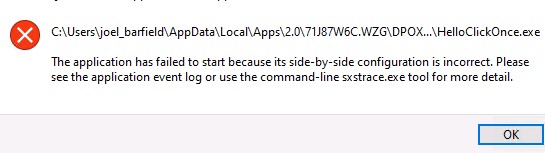
Figure 1: (English Only) Error attempting to launch applications
原因
This is due to the files used by ClickOnce application .config or .manifest having end of file corruption. The encryption driver cannot hard link these metadata files properly.
解决方案
This issue is resolved in v11.1 of Dell Encryption Enterprise and Dell Encryption Personal Edition.
To contact support, reference Dell Data Security International Support Phone Numbers.
Go to TechDirect to generate a technical support request online.
For additional insights and resources, join the Dell Security Community Forum.
受影响的产品
Dell Encryption文章属性
文章编号: 000191189
文章类型: Solution
上次修改时间: 06 9月 2023
版本: 3
从其他戴尔用户那里查找问题的答案
支持服务
检查您的设备是否在支持服务涵盖的范围内。