NetWorker: NWUI Install Fails with "Database configuration failed"
摘要: During the installation of the NetWorker Web User Interface (NWUI) an error appears stating "Database configuration failed." The installation stops and rolls back.
本文适用于
本文不适用于
本文并非针对某种特定的产品。
本文并非包含所有产品版本。
症状
- The NetWorker Web User Interface (NWUI) package is installed on a Windows platform.
- NWUI was not installed previously, this is a new installation.
- The NWUI package fails to install; an error appears stating
Database configuration failed. - Installing the NetWorker client, storage node, and or server package completes successfully if the NWUI option is not picked.
原因
The Microsoft Visual Studio Runtime package is not installed on the server. The Postgres database that NWUI uses requires Visual Studio Runtime. During the installation configuration options, the following warning appears:
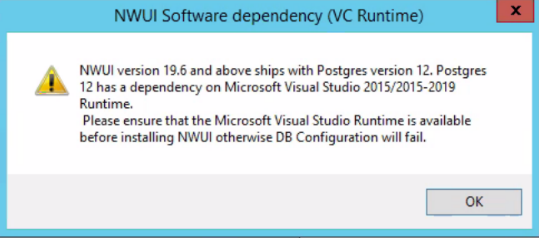
This warning does not stop the installation from proceeding; however, the install fails if the dependency is not met.
解决方案
Check the version-specific NetWorker Installation Guide
The "Install NetWorker Management Web UI using NetWorker server software" section includes required dependencies for NWUI. These dependencies include Visual Studio Runtime. The version-specific Installation Guide details which runtime versions are required.
NOTE: `Control Panel\Programs\Programs and Features` shows if the required Visual Studio Runtime package is installed.
These packages are available through Microsoft Visual C++ Redistributable latest supported downloads

受影响的产品
NetWorker产品
NetWorker Family文章属性
文章编号: 000202333
文章类型: Solution
上次修改时间: 21 4月 2025
版本: 10
从其他戴尔用户那里查找问题的答案
支持服务
检查您的设备是否在支持服务涵盖的范围内。