PowerStore: Upgrade succeeded. Failed to perform post upgrade commands: Upgrade to DNA failed. (0xE04030010046)
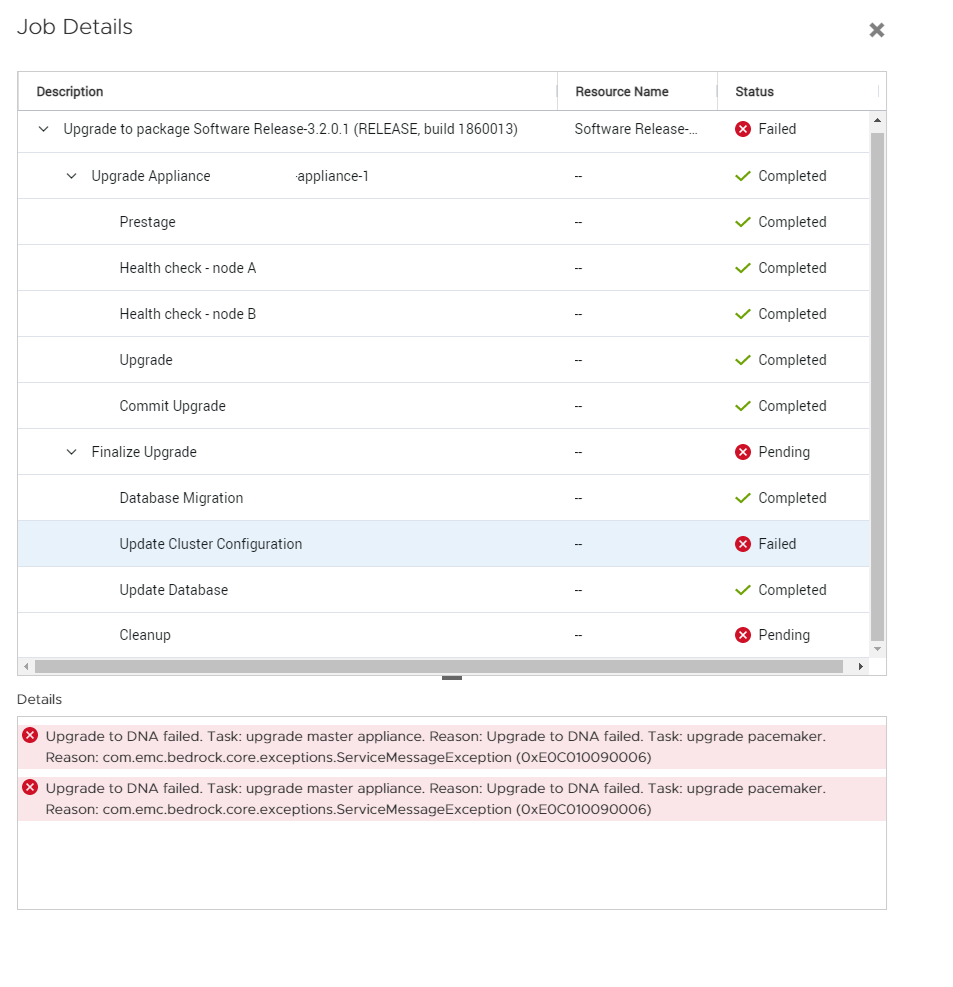
Summary: PowerStore Non-Disruptive Upgrade (NDU) to 3.2.x completed but Update Cluster Configuration failed due to failed to perform post upgrade commands. GUI shows: Upgrade succeeded. Failed to perform post upgrade commands: Upgrade to Dynamic Node Affinity (DNA) failed. Task: upgrade master appliance. Reason: Upgrade to DNA failed. Task: upgrade pacemaker. Reason: com.emc.bedrock.core.exceptions.ServiceMessageException (0xE04030010046) ...
This article applies to
This article does not apply to
This article is not tied to any specific product.
Not all product versions are identified in this article.
Symptoms
GUI shows:
Pre Stage Completed
Health Check Completed
Upgrade Completed
Commit Upgrade completed
Finalize Upgrade Pending
Update Cluster Configuration Failed
Cause
The post-upgrade tasks use rsync communication to update/sync configuration between the nodes. An rsync timeout occurred which resulted in the update/sync operation between nodes failing.
If the error occurred on a PowerStore X, the post-upgrade tasks use the ICM/ICD network connection between the nodes to complete update/sync operations. On a PowerStore X, the ICM network traverses the ToR switching at the client site. It does not traverse internally to the chassis (this is where it differs from PowerStore T appliances)
Resolution
Workaround:
For a PowerStore T, reboot the primary node and retry NDU.
For a PowerStore X, ensure the ICM/ICD network is properly configured between the nodes for native VLAN and IPv6 traffic and is functioning properly. After the ICM/ICD network configuration has been validated, contact Dell Technical Support or your authorized service provider. Reference this article for assistance with additional steps that must be performed for the upgrade to be rerun successfully.
Fix:
This issue is fixed in PowerStoreOS 3.6.0.0.
Affected Products
PowerStoreArticle Properties
Article Number: 000209249
Article Type: Solution
Last Modified: 11 Jul 2025
Version: 11
Find answers to your questions from other Dell users
Support Services
Check if your device is covered by Support Services.