Data Domain: RPM Upload Failure on UI Exception Error Occurred
Summary: The UI becomes unresponsive and RPM uploads fail because the iDRAC does not supply Secure Boot entries in host_bios.json, causing the sms_system_get_secure_boot API to error.
This article applies to
This article does not apply to
This article is not tied to any specific product.
Not all product versions are identified in this article.
Symptoms
Observed Symptoms
- Data Domain Web UI is extremely slow or unresponsive.
- RPM package upload using the UI fails after showing 95% progress. Error "
There was an exception retrieving data. Please view your log files" - Going to the Maintenance > System page sends the below error:
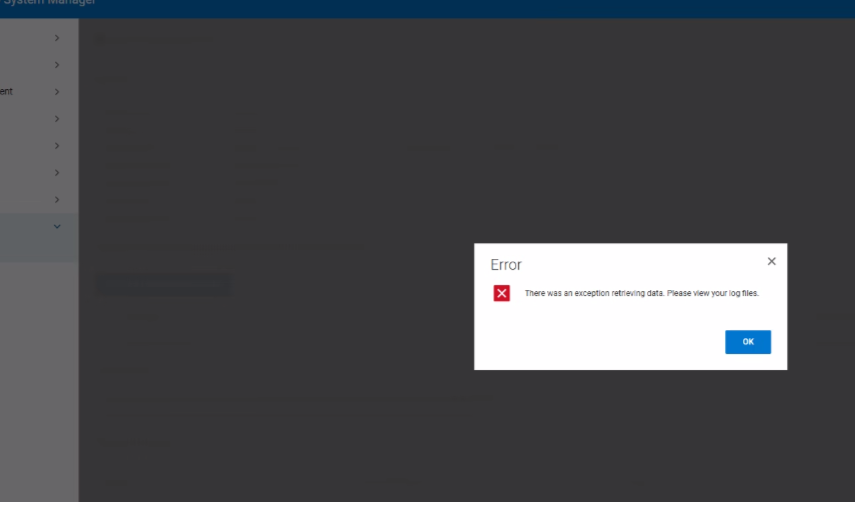
- Log entry:
09 Jan 2026 11:49:59,972 ERROR [xxx-xxx-127.0.0.1-8009-exec-563] An exception occurred while handling a client request
com.datadomain.webf.shared.sms.SMException:
- Backend logs show
ERROR: pta_json_get_specific_obj: error parsing JSON object SecureBoot
ERROR: pta_json_file_get_object: failed to get JSON object value
ERROR: plat_pta_secure_boot_get_status: Secure Boot: failed to get object "SecureBoot"
ERROR: Failed to get Secure Boot status, rc = 8
Cause
Root Cause Analysis
The Data Domain Web UI becomes unresponsive and RPM uploads fail because the host_bios.json file retrieved from the iDRAC does not contain the required Secure Boot fields. The missing fields cause the sms_system_get_secure_boot API call to throw exceptions, preventing the UI from completing the upload workflow.
Contributing Factors
- The DDOS component relies on the
HOSA REST APIto obtain Secure Boot status; without the JSON entries, the API returns an I/O error. - Resulting error propagates to the web server, leading to the observed “
Exception error occurred” message
Resolution
Resolution Steps
- Reset the iDRAC to restore proper BIOS JSON provisioning. Refer to article Data Domain: BMC/iDRAC Reset Procedure
- Verify UI responsiveness and retry the RPM upload using the UI
- If the issue persists, collect System Update Package (SUB) logs for deeper analysis and contact Dell Support.
Affected Products
Data DomainArticle Properties
Article Number: 000496707
Article Type: Solution
Last Modified: 21 أغسطس 2026
Version: 2
Find answers to your questions from other Dell users
Support Services
Check if your device is covered by Support Services.