Openshift Event Code: 1030NODE0001
Zusammenfassung: Sustained high CPU utilization on a single control plane node, more CPU pressure is likely to cause a failover; increase available CPU.
Dieser Artikel gilt für
Dieser Artikel gilt nicht für
Dieser Artikel ist nicht an ein bestimmtes Produkt gebunden.
In diesem Artikel werden nicht alle Produktversionen aufgeführt.
Symptome
Extreme CPU pressure can cause slow serialization and poor performance from the kube-apiserver and etcd. When this happens, there is a risk of clients seeing non-responsive API requests which are issued again causing even more CPU pressure.
It can also cause failing liveness probes due to slow etcd responsiveness on the backend. If one kube-apiserver fails under this condition, chances are you will experience a cascade as the remaining kube-apiservers are also under-provisioned.
It can also cause failing liveness probes due to slow etcd responsiveness on the backend. If one kube-apiserver fails under this condition, chances are you will experience a cascade as the remaining kube-apiservers are also under-provisioned.
Ursache
This alert is triggered when there is a sustained high CPU utilization on a single control plane node.
The urgency of this alert is determined by how long the node is sustaining high CPU usage:
The urgency of this alert is determined by how long CPU utilization across all three control plane nodes is higher than two control plane nodes can sustain.
The urgency of this alert is determined by how long the node is sustaining high CPU usage:
- Critical
- when CPU usage on an individual control plane node is greater than 90% for more than 1h.
- Warning
- when CPU usage on an individual control plane node is greater than 90% for more than 5m.
The urgency of this alert is determined by how long CPU utilization across all three control plane nodes is higher than two control plane nodes can sustain.
- Warning
- when CPU utilization across all three control plane nodes is higher than two control plane nodes can sustain for more than 10m.
Lösung
Diagnosis:
Execute the following PromQL queries on the OCP web console for the help of diagnosis (Observe → Metrics → Run queries).Top 5 of containers with the most CPU utilization on a particular node:
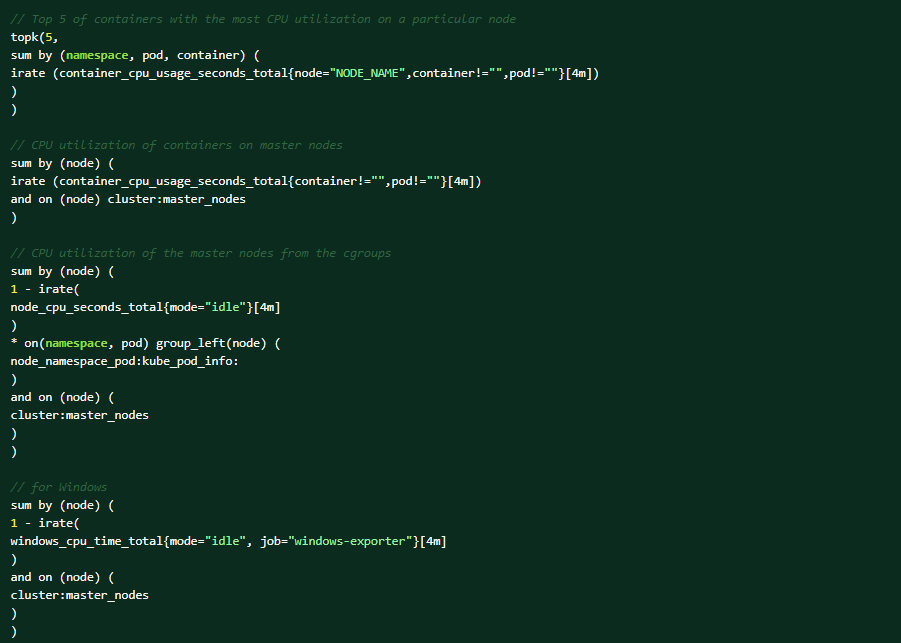
These are the conditions that could trigger the alert:
- there is a new workload that is generating more calls to the apiserver and causing high CPU usage. In this case, increase the CPU and memory on your control plane nodes.
- the alert is triggered based on the node metrics, so it could be that a component on the node is causing the high CPU usage.
- apiserver/etcd is processing more requests due to client retries that is being caused by an underlying condition.
- uneven distribution of requests to the apiserver instance(s) due to http2 (it multiplexes requests over a single TCP connection). The load balancers are not at application layer, and so does not understand http2.
Mitigation:
- if a workload is generating load to the apiserver that is causing high CPU usage, then increase the CPU and memory on your control plane nodes.
- If the sustained high CPU usage is due to a cluster degradation:
- find out the root cause of the degradation, and then determine the next steps accordingly.
Support:
If all the above steps cannot resolve the issue, contact the Dell EMC technical support for further investigation.
Weitere Informationen
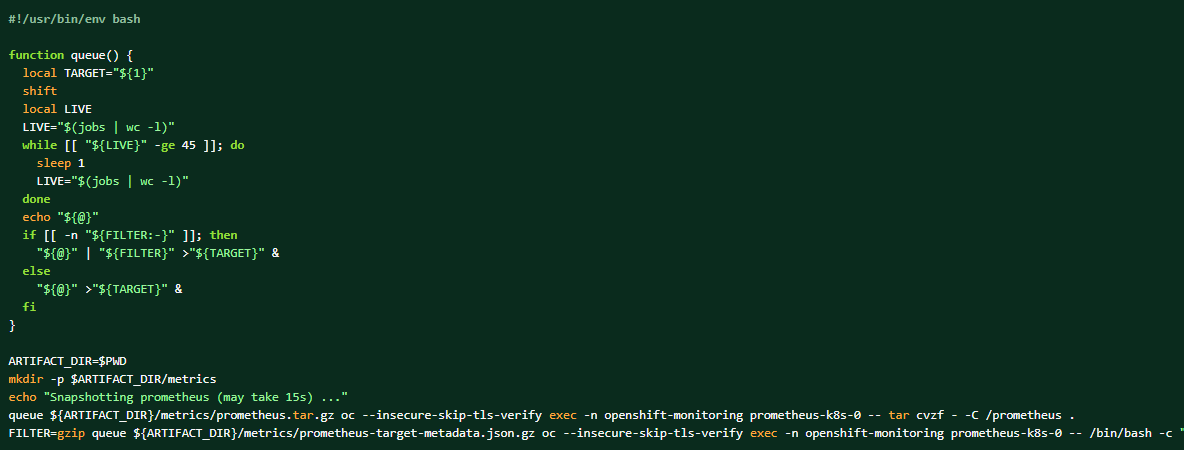
If the log bundle is collected, the Prometheus data can also be dumped as the complementing materials.
How to take a dump of the cluster prometheus data:
Betroffene Produkte
APEX Cloud Platform for Red Hat OpenShiftArtikeleigenschaften
Artikelnummer: 000217405
Artikeltyp: Solution
Zuletzt geändert: 13 Feb. 2026
Version: 3
Antworten auf Ihre Fragen erhalten Sie von anderen Dell NutzerInnen
Support Services
Prüfen Sie, ob Ihr Gerät durch Support Services abgedeckt ist.